Where users drop off on your website (and how to find it)
Your conversion rate is the average. The drop-off tells you the specific step where visitors leave. Find that step, fix it, and the rate goes up.
Your conversion rate is 2.1%. You want it to be higher. So you start making changes.
You rewrite the headline. You add testimonials. You change the CTA button color. You tweak the pricing page. You do all of this at once, check again in a week, and the rate is 2.3%.
Was that worth a week of work? Probably not. And you have no idea which change helped, if any.
The problem is not that you lack ideas for improvement. The problem is that you do not know where visitors are actually leaving. You are fixing the house without knowing which room has the leak.
What drop-off analysis actually means
Your website is a sequence of steps. Visitors move from one page to the next, and at each step, some of them leave.
A typical journey looks like this:
- Land on the homepage
- View a features or pricing page
- Reach the signup page
- Complete the signup form
- Start using the product (activation)
At each transition, you lose some visitors. That is normal. The question is: where do you lose the most?
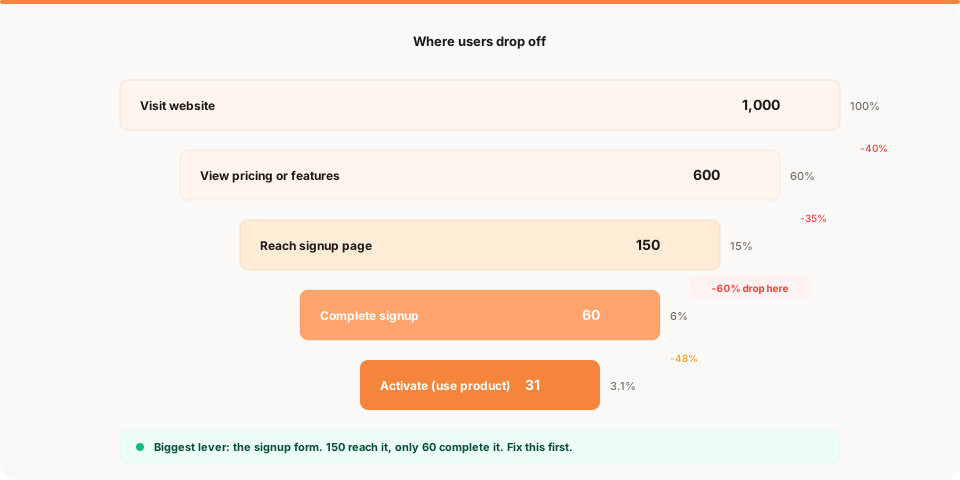
If 1,000 people visit your homepage and 600 view your pricing page, that is a 40% drop. If 600 view pricing but only 150 reach the signup page, that is a 75% drop. If 150 reach the form but only 60 complete it, that is a 60% drop.
The overall conversion rate from visitor to signup is 6%. But the story behind that number has three very different problems. The biggest gap is between pricing and signup (75% drop). That is where you should focus, not on the homepage headline or the button color. Once you have found the biggest gap, how to decide what to fix first covers the next step: turning that information into a clear prioritization decision when multiple problems are visible at once.
Why most founders cannot see the drop-off
Traditional analytics dashboards show you aggregate metrics: total visitors, overall bounce rate, average session duration. They show the summary but hide the story.
When you look at a chart that says "2.1% conversion rate," you know the outcome but not the cause. The dashboard does not tell you which specific step is broken. It just tells you the overall number is low.
This is why dashboards fail solo founders. They answer "what happened" but not "where" or "why."
To find drop-off points, you need to look at each step of the journey individually. Not the average across all of them.
The 5 most common drop-off points
These are the steps where small products lose visitors most often. Every product is different, but these patterns show up repeatedly.
1. The homepage to second page
This is the first and often the largest drop. Visitors land on your homepage and a significant percentage leave without clicking anything.
What causes it:
- The headline does not explain what the product does in 5 seconds
- The page loads slowly, especially on mobile
- There is no clear next step (missing CTA or buried navigation)
- The design looks unfinished or untrustworthy
How to check: compare total homepage visitors to the number of visitors who view any second page (pricing, features, about). If more than 60% leave the homepage without clicking, the homepage is your bottleneck.
2. The pricing page
Visitors who reach the pricing page are interested. They want to know the cost. If they leave this page, it is usually because of confusion, not disinterest.
What causes it:
- Too many pricing tiers with unclear differences
- Hidden pricing that requires a demo request
- Feature comparison tables that are dense and hard to scan
- No clear CTA on the page
- The price feels too high relative to what the visitor understands about the product
How to check: compare pricing page visitors to signup page visitors. If fewer than 25% of pricing viewers continue to signup, the pricing page is creating friction. For a dedicated guide to diagnosing and fixing every common pricing page problem, why your pricing page isn't converting covers the full list.
3. The signup form
This is one of the most measurable drop-offs. You can see exactly how many people reach the signup page and how many complete it.
What causes it:
- Too many required fields (name, company, phone, role, use case)
- Required credit card before seeing the product
- Email verification that sends people to their inbox and breaks the flow
- Confusing form layout on mobile
- No indication of what happens after signup
How to check: compare signup page visitors to completed signups. If completion is below 40%, the form itself is the problem. For context, the best-performing signup forms convert at 50% to 70%. For a deeper dive into the six specific reasons users abandon signup, read why users don't complete signup.
4. The onboarding sequence
The signup is complete. Now the user lands in the product. Many of them never complete the first meaningful action.
What causes it:
- The first screen is an empty state with no guidance
- Onboarding has too many required steps before value
- The user does not understand what to do first
- The product looks different from what the marketing page promised
How to check: compare total signups to users who complete the first key action (whatever "activation" means for your product). If activation is below 30%, your onboarding is losing people.
5. The return visit
Users activated once but never came back. This is the hardest drop-off to see because it happens over days or weeks, not within a single session.
What causes it:
- The product did not deliver enough value in the first session
- There is no trigger to bring users back (no email, no notification, no reason to return)
- The user found an alternative
- The use case was a one-time need
How to check: look at how many activated users return within 7 days. If fewer than 20% come back, the product is not retaining them. This is a product problem, not a website problem.
How to find your drop-off without complex tools
You do not need an expensive analytics suite or session recording tool. You need the number of visitors at each step.
The simple method
Open your analytics. Look at pageviews for each URL in the journey:
- Homepage: how many unique visitors?
- Pricing or features page: how many?
- Signup page: how many?
- Thank-you or dashboard page (post-signup): how many?
Write down the four numbers. Calculate the percentage that moved from each step to the next. Find the biggest gap.
That is your drop-off analysis. It takes 10 minutes.
What the numbers tell you
If the biggest gap is between homepage and pricing, your homepage is not compelling enough or the navigation is unclear.
If the biggest gap is between pricing and signup, the pricing page is creating confusion or friction.
If the biggest gap is between signup page and completed signup, the form is the bottleneck.
If the biggest gap is between signup and activation, your onboarding needs work.
Each gap points to a different fix. The framework is always the same: what happened, where, and what to do about it.
How to prioritize which drop-off to fix
You found multiple drop-offs. Which one do you fix first?
Rule: fix the step with the largest absolute gap
Not the largest percentage gap. The largest absolute gap in people lost.
If 1,000 people visit your homepage and 600 continue (400 lost), and 150 reach the signup form and 60 complete it (90 lost), the homepage gap is larger in absolute terms. Fixing the homepage to keep even 50 more people would have a bigger impact than perfecting the signup form.
Exception: fix the step closest to conversion first if the gaps are similar
If the homepage drops 400 people and the signup form drops 90, the homepage is the priority. But if the homepage drops 200 and the form drops 180, fix the form first because those 180 people were closer to becoming users. They already showed interest by reaching the form.
The one-change rule
Make one change per week. Check whether the number at that step improved. If it did, move to the next bottleneck. If it did not, try a different fix for the same step.
Do not change three things at once. You will not know which one worked.
A real example
A solo founder builds a project management tool. The numbers over two weeks:
- Homepage visitors: 1,200
- Features page visitors: 480 (40% of homepage)
- Signup page visitors: 120 (25% of features)
- Completed signups: 72 (60% of form visitors)
- Activated users: 28 (39% of signups)
The biggest absolute gap is between homepage and features page: 720 people lost. But the biggest proportional gap is between features and signup: 75% leave the features page without proceeding.
The founder investigates the features page. It is a long scrolling page with 12 features, no CTA in the first viewport, and the signup button is at the bottom. The fix: add a CTA above the fold on the features page. After one week, signup page visitors jump from 120 to 210. Same traffic, same form, better flow.
That single change improved the overall conversion rate from 6% to 10.5%. The founder did not rewrite the homepage, redesign the product, or run an A/B test. They found the gap and closed it.
The difference between a drop-off and a bounce
A bounce is when someone visits one page and leaves. A drop-off is when someone moves through multiple pages and then stops at a specific step.
Both matter, but they tell you different things.
High bounce rate on the homepage means first impressions are poor. High drop-off between pricing and signup means the pricing page creates friction. High drop-off between signup and activation means the onboarding is broken.
Bounce rate by page is one of the five metrics that matter most. But funnel drop-off analysis adds the sequential context that bounce rate alone cannot provide.
Start here
If you have never done a drop-off analysis, do it today. It takes 10 minutes:
- Open your analytics
- Write down pageviews for your four most important pages
- Calculate the percentage that moves to the next step
- Find the biggest gap
- Make one change to that page
- Check again in one week
This is the fastest way to improve your conversion rate without guessing. Not by redesigning everything. By finding the one step where people leave and making it easier to stay.
Keep reading
- Why your conversion rate is low: the five real causes behind low conversion
- The 5 metrics that actually matter: including bounce rate by page and activation
- How to act on your website data: the framework for turning numbers into decisions
- Muro for founders: see how Muro surfaces drop-off points automatically