Why users don't complete signup (and how to fix it)
Most signup flows lose more than half their visitors before activation. The fix is almost always removing steps, not adding features.
Someone clicked your "Start free trial" button. They wanted your product. They made a deliberate decision to try it.
And then they disappeared.
This happens to most products. Not sometimes. Most of the time. The gap between "clicked signup" and "became an active user" is where more potential customers are lost than at any other stage.
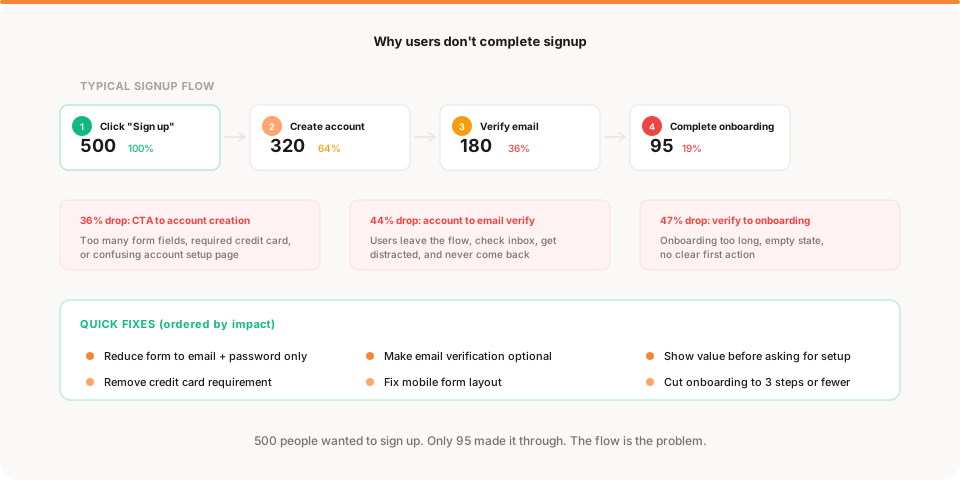
A typical pattern: 500 people click the signup button. 320 create an account. 180 verify their email. 95 complete onboarding. That is an 81% loss between intent and activation.
Those 405 people did not decide your product was bad. They got stuck, confused, distracted, or frustrated by the process of getting in.
Signup is not a single step
Most founders think of signup as one event: the user signs up. But signup is actually a sequence of micro-steps, and each one is a potential exit.
The typical sequence:
- Click the CTA. The visitor is interested enough to try.
- Fill out the form. Name, email, password. Maybe more.
- Verify email. Open inbox, find the email, click the link.
- Complete onboarding. Set up their account, configure preferences.
- First meaningful action. Create a project, import data, send a message.
At each step, you lose people. The question is not whether you lose them. It is where you lose the most and why.
This is a specific version of the broader drop-off analysis applied to the most critical part of your funnel: the moment between interest and activation.
The 6 reasons users abandon signup
1. The form asks for too much
The number one reason for signup abandonment is a form that feels like a survey.
Name, email, password, company name, company size, role, how did you hear about us, agree to terms, subscribe to newsletter, verify you are not a robot.
Every field you add costs you signups. Not a few. Studies show that reducing form fields from 6 to 3 can improve completion by 50% or more.
The fix: ask for email and password. That is it. Everything else can be collected later, during onboarding, or never. If you do not absolutely need a field to create the account, remove it.
2. You require a credit card for a free trial
This is the single most expensive conversion killer for small products.
Requiring a credit card at signup reduces free trial conversions by 50% to 80%. The psychological barrier is enormous. Even if the user trusts you, entering a credit card feels like a commitment. And most people are not ready to commit before they see the product.
The fix: remove the credit card requirement. Let users try the product for free. Add the payment step later, after they have experienced value. Yes, you will get more unqualified signups. You will also get far more qualified ones who would never have entered a card upfront.
3. Email verification breaks the flow
You send a verification email. The user leaves your app to check their inbox. They get distracted by other emails. They close the tab. They forget about you.
Email verification is responsible for some of the largest signup drop-offs in small products. The intent was good (verify the email is real) but the cost is high (losing 30% to 50% of users who never return from their inbox).
The fix: let users in immediately. Verify later. Send a gentle reminder after their first session. Or verify in the background without forcing a click. The goal is to keep the user in your product, not to validate their email address at the expense of losing them entirely.
4. Onboarding has too many steps
The user created an account. Now they see a setup wizard with 7 steps. Choose a plan. Name your workspace. Invite team members. Set preferences. Connect integrations. Import data. Complete your profile.
By step 4, half of them are gone.
Every onboarding step costs you users. The math is brutal: if each step retains 80% of users, a 5-step onboarding keeps only 33% of the people who started it. A 7-step onboarding keeps 21%.
The fix: cut your onboarding to 3 steps or fewer. Ask yourself: what is the minimum setup needed for the user to experience the product's core value? Do that and nothing else. Move everything optional to settings or a later prompt.
5. The first screen is an empty state
The user signs up, completes whatever setup you require, and lands on a dashboard with no data. No content. No guidance. Just empty cards and placeholder text.
This is the moment where most users decide the product is not for them. Not because it is bad, but because they cannot see what it does.
The fix: never show an empty state. Prefill with sample data, show a guided tour, or prompt a single clear action. "Add your first project" is better than a blank screen. A product that looks alive on first visit is far more likely to retain the user than one that looks like an empty room.
6. Mobile signup is broken
If 40% to 60% of your traffic comes from mobile devices (which it probably does), your signup flow needs to work perfectly on a small screen.
Common mobile problems: form fields that are too small, password requirements that are hard to meet on a phone keyboard, CAPTCHA challenges that are difficult on touch screens, and layouts that overflow or scroll awkwardly.
The fix: open your signup flow on your phone. Try to complete it. Time yourself. If it takes more than 60 seconds or requires any frustration, fix it. This is one of the five things you should check regularly.
How to find where users are dropping off
You do not need a complex analytics tool for this. You need the count at each step.
The simple method
Track how many users reach each stage:
- How many visitors click the signup CTA?
- How many submit the signup form?
- How many verify their email (if required)?
- How many complete onboarding?
- How many perform the first meaningful action?
Compare the numbers sequentially. Find the biggest gap. That is your bottleneck.
If 500 click the CTA but only 320 submit the form, the form is the problem. If 320 submit but only 180 verify, email verification is the problem. If 180 verify but only 95 complete onboarding, the onboarding is the problem.
Each gap has a different fix. The diagnosis tells you which one to work on.
What to track technically
Most analytics tools can track these as pageview counts or custom events:
- Signup page views (step 1)
- Account creation events (step 2)
- Email verification events (step 3)
- Onboarding completion events (step 4)
- First key action events (step 5)
If your tool makes this hard to see, it is the wrong tool for this job. You need step-by-step visibility, not aggregate charts.
What a healthy signup funnel looks like
Before you decide a step is broken, it helps to know what a normal one looks like, so here are rough ranges to compare against. Treat them as a smell test, not targets, since they vary a lot by product and price.
Of the visitors who reach your signup page, a clean email-and-password form should convert 50% to 70% into created accounts. If you gate on a credit card, expect that to fall by half or more. Email verification, when required, typically costs you another 30% to 50% between account creation and first login, which is exactly why so many teams drop it. Onboarding should retain most of the people who make it in: if each step keeps around 80%, a three-step flow keeps roughly half and a seven-step flow keeps about a fifth. And first meaningful action, your activation moment, is healthy anywhere north of 40% of signups for most products.
Add those up and you can see why the intent-to-activation loss is so often 70% or 80%. Each step multiplies against the last. The good news is the same math in reverse: remove one costly step and the gain compounds through everything downstream.
What to fix first
You found multiple drop-offs. Here is the order that typically produces the fastest results:
Priority 1: Reduce form fields
This is the cheapest fix with the most predictable impact. Removing two fields from a signup form often improves completion by 20% to 40%. It takes an hour to implement and the results are visible within a week.
Priority 2: Remove email verification (or make it optional)
If you require email verification before the user can access the product, make it optional. Let users in immediately. This is a one-line code change in most systems and can recover 30% to 50% of the users you currently lose between form submission and product access.
Priority 3: Remove credit card requirement
If you require a credit card for a free trial, consider removing it. This is the highest-impact change for products that currently gate access behind payment information.
Priority 4: Shorten onboarding
Cut your onboarding to the minimum viable setup. If you have 7 steps, find the 3 that are truly necessary and defer the rest. Show value before asking for configuration.
Priority 5: Fix mobile
Test the entire signup flow on a phone. Fix anything that feels slow, cramped, or confusing. This is a silent conversion killer that many founders overlook because they develop and test on desktop.
The instinct that makes it worse
When completion is low, the tempting move is to add: a progress bar so people know how far they have to go, reassurance copy under the form, a testimonial beside it, a "your data is safe" badge. None of these are bad, and at the margin some of them help. But they are almost always the wrong first move, because they treat a length problem as a confidence problem.
If your form has eight fields, a progress bar just tells people how much tedium remains. If you force a credit card, no testimonial removes the commitment it demands. Reassurance smooths a step; removing the step deletes the drop-off entirely. So the order matters: cut everything you can first, then, once the flow is as short as it will go, add reassurance to the few steps that genuinely must stay. Subtraction beats decoration nearly every time.
The difference between signup and activation
Signup means the user created an account. Activation means the user experienced your product's core value.
These are not the same thing, and conflating them is one of the most common analytics mistakes.
A product with 100 signups and 20 activations has a different problem than a product with 20 signups and 18 activations. The first has an onboarding problem. The second has a traffic or conversion problem.
Activation rate is one of the five metrics that matter most. If your signup numbers look decent but activation is low, the problem is between signup and first use. For a deeper guide to defining and measuring activation properly, read what is user activation.
The one-week test
If you want to improve your signup completion rate this week, do this:
- Open your signup flow on your phone. Complete it. Time it. Note every friction point.
- Count the fields on your form. Remove every field that is not strictly required to create an account.
- Check whether email verification is mandatory. If it is, make it optional.
- Count your onboarding steps. Cut them to 3 or fewer.
- Check your numbers in one week.
Most founders who follow this sequence see a measurable improvement in signup completion within 7 days. Not because they built something new, but because they removed the obstacles between intent and action.
The people who click your signup button already want your product. Your job is to stop getting in their way.
Once signup completion improves, the next question is whether your in-product onboarding experience guides new users to their first meaningful result. How to improve your onboarding experience covers that step in full.
Keep reading
- Where users drop off on your website: the broader framework for finding bottlenecks
- Why your conversion rate is low: the five real causes behind low conversion
- The 5 metrics that actually matter: including activation rate
- Muro for founders: see how Muro surfaces onboarding drop-offs automatically