Why your pricing page isn't converting (and how to fix it)
Pricing page failures are almost never about the price. They happen because visitors cannot decide which option is right for them, or because they don't have enough context to evaluate whether the price is fair. Clarity fixes this faster than discounting does.
Your pricing page is one of the most intentional pages a visitor can reach.
Getting there requires clicking through from your homepage or a product page, making a deliberate choice to check the cost. Visitors who land on pricing are not casually browsing. They are evaluating.
And yet for most early-stage products, the pricing page is where the majority of interested visitors disappear.
The natural assumption is that the price is too high. That is rarely the problem. The actual problem, in almost every case, is that the visitor could not make a decision. Not because the numbers were too large, but because the page did not give them enough clarity to choose.
The difference between "too expensive" and "too confusing"
When a visitor leaves your pricing page without converting, you cannot know why unless you investigate. But the data gives you useful clues.
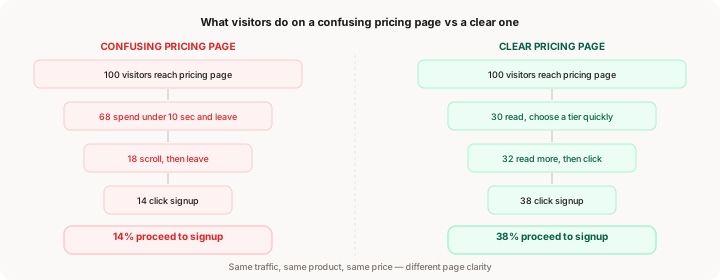
Visitors who leave because the price is too high typically spend time on the page. They read the tiers. They consider. Then they close the tab. Time-on-page is 30 seconds or more.
Visitors who leave because the page is confusing typically spend very little time. They scan, feel uncertain about what they are even looking at, and leave. Time-on-page is under 10 seconds.
For most early products, the exit pattern is the second one. Visitors arrive with intent, encounter a pricing page that requires more thinking than they are willing to do, and move on.
This distinction matters because the fix for "too expensive" is to change your pricing. The fix for "too confusing" is to redesign the page. Those are very different projects with very different payoffs. Before you start offering discounts or changing price points, confirm which problem you actually have.
How to confirm your pricing page is the bottleneck
Before diving into fixes, verify the scope of the problem with two numbers.
Pricing page to signup conversion rate. How many visitors who view your pricing page go on to reach the signup page? A healthy rate is 25% to 40%. Below 15% is a strong signal the page is failing. To get this number, compare pageviews on your pricing page with pageviews on your signup page, for visitors who passed through pricing.
Time-on-page. If your analytics shows average time-on-page for the pricing page, check it. Under 15 seconds suggests visitors are leaving without reading. Between 20 and 60 seconds suggests they are reading but not converting. Over 60 seconds with no conversion suggests genuine evaluation that did not result in a clear next step.
If pricing-to-signup is below 25% and time-on-page is short, clarity is your problem. If time-on-page is decent but conversion is still low, something else is blocking the decision.
For the broader funnel context, where users drop off on your website covers how to find which step in your funnel has the largest gap, including the pricing page as one of the five most common drop-off points.
The six specific reasons pricing pages fail
These are the patterns that appear most consistently in early-stage products. Most founders have at least two or three of them active.
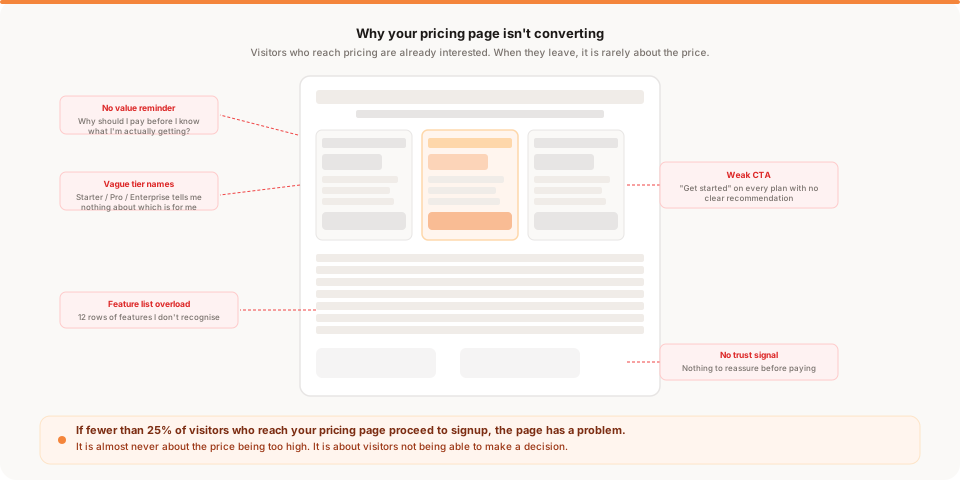
1. There is no value reminder before the price
Visitors arrive at your pricing page from different places. Some come from your homepage after reading your full pitch. Others land directly from a Google search for pricing, or from a blog post, or from a product review site.
The visitors who have not read your full homepage do not know enough about your product to evaluate whether the price is fair. They see three tiers and three numbers, but without a clear picture of what they are getting, the numbers float without context.
A short value statement at the top of the pricing page fixes this. It does not need to be long. One or two sentences that re-anchor what the product does and who it is for. Something like: "Muro sends you a daily summary of what changed on your site, why it changed, and what to do next. No dashboards. No setup calls."
Visitors who skipped your homepage now have context. Visitors who read your homepage are reminded. Both groups are better positioned to evaluate the tiers below.
2. Too many tiers with unclear differences
The decision fatigue research is consistent: more options reduce the probability of choosing any option. For pricing pages, this shows up as visitors scrolling through four or five tiers, feeling unable to decide which one is right for them, and leaving rather than committing to the "wrong" one.
Three tiers is the widely-accepted ceiling for most self-serve products. Two tiers is often better for products early in their lifecycle. If you have four or more, removing a tier is probably your fastest pricing page improvement.
The second part of this problem is tier naming. "Starter," "Pro," and "Enterprise" tell the visitor nothing. They have to read every feature to figure out which tier matches their situation. Replace tier names with audience descriptions. "For solo founders," "For small teams," and "For growing companies" answer the question "which one is for me?" before the visitor reads a single feature.
3. Feature list overload
This is the most common pricing page mistake and the one founders are most resistant to fixing.
The instinct is to list every feature to demonstrate value and justify the price. The result is a table with 20 or 30 rows that visitors cannot scan quickly, where the features they actually care about are buried among ones they have never heard of.
Feature lists create work for the visitor. They have to assess each row. They have to decide whether each feature is relevant to them. For a pricing page where the goal is a fast, confident decision, this is exactly the wrong experience.
The fix is aggressive curation. Identify the 3 to 5 features that actually differentiate your tiers and matter most to your target buyer. List those. Remove everything else, or move it to a detailed feature page that interested buyers can access separately. A shorter feature list that includes only the important ones converts better than a comprehensive one.
4. Vague or identical CTAs on every tier
"Get started" is not a useful CTA on a pricing page when it appears identically on three different tiers. It does not help the visitor make a decision. It does not reinforce what they are choosing. It treats all tiers as equivalent when the visitor is trying to understand which one is right.
More specific CTAs convert better. "Start with Starter free for 30 days." "Try the Pro plan." "Talk to us about Enterprise." Each CTA names the tier, reduces decision uncertainty, and feels more like confirmation of a choice than a generic button.
Adding a "most popular" or "recommended" label to one tier also increases conversion by reducing the ambiguity of choice. Visitors who are unsure which tier to pick will often default to the highlighted recommendation rather than leave.
5. Missing or buried trust signals
Trust is especially fragile on a pricing page because the visitor is about to pay. Any uncertainty about whether the product is legitimate, whether support is available, or whether they can get a refund if it does not work compounds the hesitation.
Social proof that worked well on your homepage needs to appear on your pricing page too. Not a full wall of testimonials, but something specific and relevant to the payment decision. A quote from a customer about getting value, a logo bar of recognizable companies, a money-back guarantee with clear terms.
The guarantee placement matters. It needs to be within one scroll of the CTA. If it lives only in the footer, it does not help the visitor who is hovering over the signup button.
6. Poor mobile experience on pricing
Pricing tables that work in a three-column layout on desktop collapse into a confusing vertical scroll on mobile. The visitor scrolls through all of Tier 1's features, then Tier 2's features, then Tier 3's features, and by the end has lost the ability to compare.
Mobile pricing page failures are one of the most common conversion problems for products with significant mobile traffic. If 40% or more of your traffic is mobile and your pricing table is desktop-first, you are losing a meaningful fraction of your most interested visitors.
The fix is a mobile-specific pricing layout that shows the most important information for each tier in a compact format, with a CTA below each one, rather than a comparison table that requires lateral context to understand.
How to diagnose which problem you have
Run through this short diagnostic before making any changes.
Check pricing-to-signup rate. If it is below 15%, the page has a significant problem. If it is between 15% and 25%, there is meaningful room for improvement.
Check time-on-page. Short time (under 15 seconds) points to a clarity problem at the top of the page. Moderate time (30 to 60 seconds) with no conversion points to a decision-blocking problem (too many tiers, weak CTAs, or missing trust signals).
Check mobile vs desktop conversion on the pricing page specifically. If mobile pricing conversion is less than half of desktop, the layout is the issue. Diagnosing the mobile conversion gap is a separate exercise with its own fix sequence.
Check traffic source. If visitors from organic search (who have the highest intent) leave the pricing page at the same high rate as social visitors, the problem is the page. If only low-intent traffic leaves, the problem is traffic quality, not the page.
What to fix first
If you have confirmed the pricing page is a bottleneck, here is the order that produces the fastest measurable improvement.
Start with tier count. If you have four or more tiers, remove one before changing anything else. This is a 30-minute change with a potentially large impact. Check results after one week.
Then add a value reminder. Two sentences at the top of the page that re-establish what the product does and who it is for. This is a 10-minute copy change.
Then cut the feature list. Keep the 3 to 5 features that differentiate your tiers. Remove everything else, or move it behind a "see all features" link. This is the change founders are most reluctant to make and one of the most consistently effective.
Then improve CTAs. Replace "Get started" with tier-specific copy. Add a "most popular" label to the tier you want to highlight.
Then add a trust signal. One relevant testimonial or a money-back guarantee, placed within one scroll of the primary CTA.
Then fix mobile. If you have significant mobile traffic and the pricing layout is a comparison table, convert it to a single-column format with individual tier cards. This comes last because it is the most technical change.
Three real scenarios
Scenario A: Short time-on-page, high bounce. A founder with three pricing tiers and a 28-row feature table has 11% pricing-to-signup conversion. Average time on the pricing page is 8 seconds. Most visitors are not reading the feature table at all. The fix: cut the feature table to 5 rows, add a one-sentence value reminder, rename the tiers to describe the audience. Within two weeks, pricing-to-signup improves to 24%.
Scenario B: Decent time-on-page, still no conversion. A founder with two pricing tiers and a clean layout has 13% pricing-to-signup conversion despite visitors spending an average of 45 seconds on the page. The CTAs say "Get started" on both tiers. There is no money-back guarantee visible. The fix: add specific CTA copy, add "30-day money-back guarantee" near each CTA. Within two weeks, pricing-to-signup improves to 29%.
Scenario C: Desktop converts but mobile does not. A founder sees 32% pricing-to-signup on desktop and 6% on mobile. Mobile is 48% of traffic. The pricing page uses a three-column comparison table. The fix: create a mobile-optimized single-column layout. Within two weeks, mobile pricing-to-signup reaches 19% and overall conversion improves significantly.
Keep reading
- Where users drop off on your website: how to find your biggest conversion bottleneck across the full funnel
- Why mobile users convert less: the full guide to mobile-specific conversion problems, including pricing page layout
- Why your conversion rate is low: the five real causes of low overall conversion
- Traffic is high but signups are low: step-by-step diagnostic for when traffic looks healthy but signups do not
- Muro for founders: analytics that shows pricing page drop-off rates automatically