Why your conversion rate is low (and how to actually fix it)
A low conversion rate is usually caused by one of five things: wrong audience, unclear value, signup friction, broken mobile, or confusing pricing. Diagnose first, then fix the most impactful one.
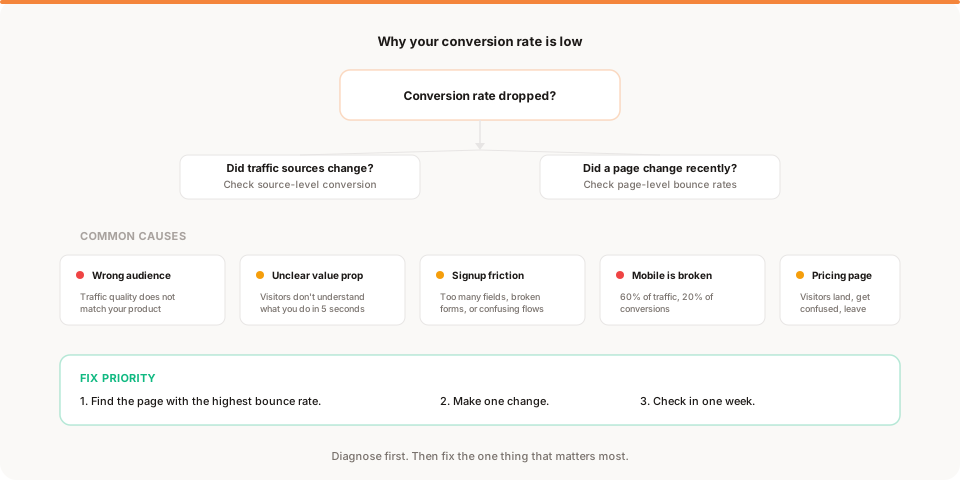
Your conversion rate is 1.2%. You expected higher. You have been getting traffic, but barely anyone signs up.
So you start googling "how to improve conversion rate" and every article tells you the same things: improve your CTA, add social proof, reduce form fields, test your headline.
You try a few of those. Nothing changes. Because the advice is generic and the problem is specific.
A low conversion rate is not one problem. It is at least five different problems, and each one has a different fix. The trick is figuring out which one you actually have.
The first thing to understand
A conversion rate is a ratio. Visitors go in, signups come out, and the percentage between them is your rate.
When that rate is low, the instinct is to blame the landing page. But the landing page is only one of the variables. The other variable is who is visiting.
If you send 1,000 people from a Reddit post to your SaaS product and 3 of them sign up, your conversion rate is 0.3%. That does not mean your page is bad. It means the audience does not match.
If you send 100 people from a Google search for "simple analytics for startups" and 8 of them sign up, your conversion rate is 8%. Same page. Different visitors. Completely different result.
Before you change anything on your website, you need to understand whether the problem is the traffic or the page. The fix for each is completely different.
Is it a traffic problem or a page problem?
Here is how to tell.
Break down your conversion rate by source. Most analytics tools let you do this. If yours does not, that is a sign the tool is not built for your needs.
Look at three things:
-
Organic search conversion rate. These are people who searched for something related to your product. They have intent. If they are not converting, your page is the issue.
-
Direct traffic conversion rate. These are people who typed your URL or clicked a bookmark. They already know you. If they are not converting, something changed on your site.
-
Social and referral conversion rate. These are people who clicked a link from Twitter, Hacker News, or a blog post. They are curious but may not be your audience. Low conversion here is often normal.
If organic and direct convert well but social does not, you have a traffic quality issue. Do not touch the page. Either accept that social traffic is top-of-funnel awareness, or create dedicated landing pages for those audiences.
If organic and direct are also converting poorly, the problem is on your site. Keep reading.
The 5 real reasons your conversion rate is low
These are not generic tips. These are the specific patterns that show up again and again in early-stage products.
1. You are attracting the wrong audience
This is the most common cause and the hardest to accept. You wrote a blog post that went viral. You got mentioned in a newsletter. Traffic spiked. But the people who arrived were not looking for your product.
Signs this is the problem:
- High overall traffic, low signup rate
- Social and referral traffic converts below 0.5%
- Organic search traffic converts much higher than other sources
- Bounce rate is high across all pages, not just one
For a detailed breakdown of this pattern, read traffic is up but conversions are down.
What to do: do not optimize your landing page for the wrong audience. Instead, focus on growing the channels that bring the right audience. Double down on SEO, communities where your users already spend time, and content that matches actual buyer intent.
2. Your value proposition is unclear
Visitors land on your homepage and do not understand what you do within 5 seconds.
This is more common than most founders think. You have been so close to the product for so long that the messaging makes perfect sense to you. But a first-time visitor sees your headline, scans the page, and leaves because they could not figure out what the product does or why they should care.
Signs this is the problem:
- Homepage bounce rate above 50%
- Visitors spend less than 10 seconds on the page
- The page converts well when you explain the product in person but poorly when you send the link
What to do: rewrite your headline to describe the outcome, not the product. "Analytics that emails you what matters" is clearer than "Intelligent data platform for modern teams." Test one headline change and check the result in a week.
3. Your signup flow has too much friction
The visitor is interested. They click "Sign up." And then they encounter:
- 6 form fields instead of 2
- A required credit card before they can see the product
- An email verification step that sends them to their inbox
- A confusing onboarding sequence with 8 steps before they see value
Every additional step reduces completions. For early products, the signup form should ask for the minimum: email and password. Everything else can come later.
Signs this is the problem:
- Many visitors reach the signup page but few complete it
- The drop-off happens between clicking the CTA and actually signing up
- Mobile signup completion is much worse than desktop
What to do: count the fields on your signup form. If there are more than 3, remove the ones that are not strictly necessary. If you require a credit card, consider removing that requirement for a free trial. If email verification blocks access, make it optional for the first session.
4. Your mobile experience is broken
This is the silent killer of conversion rates.
Depending on your product and audience, 40% to 60% of your traffic may come from mobile devices. If your site does not work well on a phone, you are losing half your potential signups without realizing it.
Signs this is the problem:
- Mobile bounce rate is 20 or more percentage points higher than desktop
- Mobile conversion rate is a fraction of desktop
- The signup form is awkward, cut off, or hard to fill on small screens
- You have never tested your site on an actual phone (be honest)
What to do: open your site on your phone right now. Try to sign up. If anything feels slow, cramped, or confusing, fix it. This one check can double your effective conversion rate if your mobile experience is bad. For a full breakdown of the specific mobile issues that kill conversion and how to fix each one, why mobile users convert less goes deep on this.
5. Your pricing page confuses people
If you have a pricing page and visitors are landing on it, check its bounce rate. A pricing page with a bounce rate above 50% is a strong signal that something is confusing.
Common pricing page problems:
- Too many tiers (the visitor cannot tell which one is for them)
- Hidden or unclear pricing (the visitor has to request a demo to learn the cost)
- Feature comparisons that are dense and hard to scan
- No clear CTA on the page
Signs this is the problem:
- Pricing page has a high bounce rate
- Visitors go from homepage to pricing and then leave
- The pricing page is one of your most-visited pages but produces almost no signups
What to do: simplify. One or two tiers. A clear CTA on each tier. Short feature lists. No "contact us for pricing." If you are a small product selling to small teams, the pricing page should take 10 seconds to understand. For a detailed debugging guide covering every pricing page problem and how to fix each one, read why your pricing page isn't converting.
For a detailed walkthrough of how to find the exact step where visitors leave, read where users drop off on your website.
How to diagnose: a step-by-step process
If your conversion rate is low and you are not sure which problem you have, follow this sequence:
Step 1: Break down conversion by source. Is the problem in all traffic or only certain channels? This tells you whether the issue is traffic quality or your website.
Step 2: Check bounce rate by page. Which page loses the most visitors? That is your first fix target. This is one of the most useful metrics you can check.
Step 3: Walk the funnel. How many visitors reach the signup page? How many complete the form? Where is the biggest gap?
Step 4: Test on mobile. Open your site on a phone. Can you sign up in 30 seconds without frustration?
Step 5: Read the page as a stranger. Open your landing page. Pretend you have never heard of your product. Can you explain what it does and why it matters in one sentence after reading for 5 seconds?
If you get stuck at any step, the three-question framework helps: what happened, why, and what should I do?
What to fix first
You found the problem. Now what?
Do not fix everything. Fix one thing.
The most impactful order is usually:
- If it is a traffic problem, stop trying to convert the wrong audience. Shift effort to the channels that actually bring buyers.
- If it is a mobile problem, fix it immediately. This is the easiest fix with the largest potential impact.
- If it is the signup form, reduce fields and remove barriers. This is a one-hour change with measurable results.
- If it is the value prop, rewrite the headline. Test one version at a time. Do not redesign the whole page.
- If it is pricing, simplify the page. Fewer tiers, clearer CTAs, shorter copy.
Make the change. Wait one week. Check whether the conversion rate moved. If it did, you found the right lever. If it did not, go back to step 1 and check the next cause.
The most common mistake
The most common mistake is not diagnosing before fixing. Founders see a low conversion rate and immediately start rewriting headlines, redesigning pages, and adding testimonials. They change five things at once, see no improvement, and conclude that "nothing works."
The problem is not that nothing works. The problem is that they never identified the actual cause. A new headline does not fix a broken mobile layout. Social proof does not fix the wrong audience. Form optimization does not fix an unclear value prop.
Diagnose first. Then fix the one thing that matters most.
Keep reading
- Traffic is high but signups are low: a step-by-step diagnostic guide for the chronic case where traffic is decent but signups never materialise
- Traffic is up but conversions are down: how to handle the most confusing conversion pattern
- The 5 metrics that actually matter: what to track and what to ignore
- How to act on your website data: a framework for turning numbers into decisions
- Muro for founders: see how insight-first analytics surfaces conversion issues automatically