Wix analytics: what's built in and how to add more (2026 guide)
Wix has the most complete built-in analytics of the major site builders: traffic, sources, sessions, top pages, and conversions or funnels on higher plans. The catches are that it's cookie-based (so it needs a consent banner) and the full analytics require a Premium plan. To add a cookieless, privacy-friendly tool, paste a tracking script into Wix's custom code in Settings, which needs a Premium plan and connected domain. That gives you banner-free tracking and, with a tool like Muro, a morning email summary.
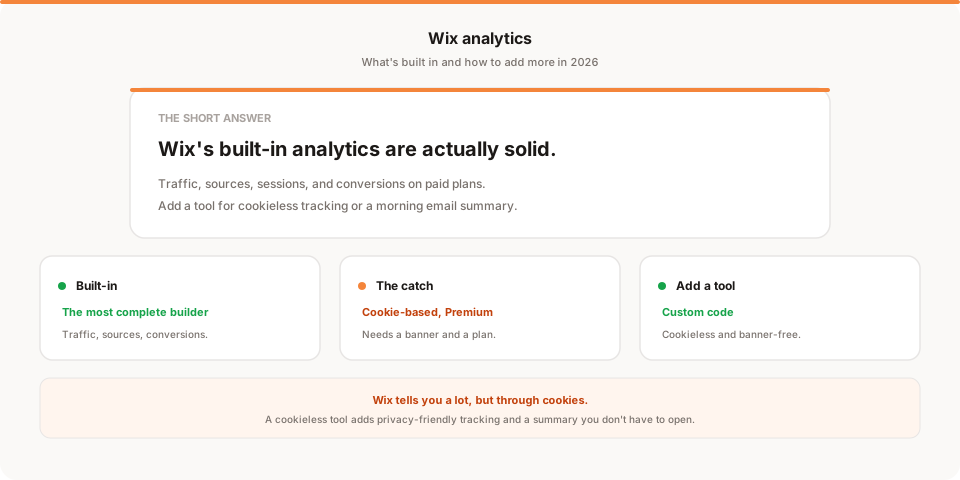
Short answer: Wix has the most complete built-in analytics of any major site builder. On a Premium plan you get traffic, sources, sessions, top pages, and conversions, all in one dashboard. The two catches are that it's cookie-based (so it feeds the need for a consent banner) and the good stuff requires a paid plan. So the real question on Wix is whether you want a cookieless, come-to-you alternative, and this guide covers what's built in and how to add one.
Wix gets a lot of grief from developers, but on analytics it quietly outdoes most of its peers. Where Squarespace and Webflow give you the basics, Wix gives you a fairly rich dashboard. The tradeoffs are about privacy and delivery, not whether the data exists. Let's map what you have before adding anything.
Quick disclosure: I'm the founder of Muro, a privacy-friendly analytics tool, so I have a stake here. I've written this to be useful even if you stick with Wix's built-in analytics, and saved my own product for one honest mention near the end.
Does Wix have built-in analytics?
Yes, and they're the most complete of the major builders. On Premium plans, the Wix Analytics dashboard covers a lot: traffic and sessions over time, where visitors came from, your top pages, visitor location and device, and on higher plans conversions and funnels, plus sales data if you run a Wix store.
For most small businesses, that's genuinely enough to run on. You can see whether traffic is growing, which channels bring it, and what people look at. So the honest starting point on Wix is different from most builders: don't assume you need a third-party tool, because you might already have what you're looking for.
The two catches with Wix's built-in analytics
There are two real limitations, and they're the reason people still add a separate tool.
First, it's cookie-based. Wix's analytics rely on cookies, which means that for EU visitors they contribute to needing a cookie consent banner, and you lose the data of everyone who declines. On a small business site, a consent banner is friction you may not want.
Second, the good analytics require a Premium plan. Free Wix sites get very limited analytics, so the full dashboard is gated behind a paid plan with a connected domain.
And like every builder, Wix's analytics live in a dashboard you have to log into, so there's no short plain-English summary that comes to you, and no single view if you also run sites on other platforms.
How to add analytics to a Wix site
If those catches matter to you, adding a dedicated tool is straightforward.
The mechanism is Wix's custom code, found in your dashboard settings (under the Advanced or Tracking and Analytics area), and it requires a Premium plan with a connected domain. Adding a tool takes about two minutes:
- Copy the tracking snippet from your analytics tool of choice.
- In your Wix dashboard, open Settings and find the custom code area.
- Paste the snippet into the Head, and set it to load on all pages.
- Apply and publish. The tool starts collecting on the next visit.
This works for Google Analytics, which Wix also offers as a native integration, as well as privacy-friendly tools like Plausible, Fathom, or Muro.
Google Analytics or a privacy-friendly tool?
Here's the Wix-specific angle. Your built-in analytics already use cookies, so adding Google Analytics just adds more cookie-based tracking and more reason to show a banner. If your goal in adding a tool is a cleaner, more private setup, a cookieless tool is the one that actually moves the needle: it collects no personal data, needs no banner, and gives you an alternative to Wix's cookie-based numbers. I compared the privacy-friendly options in the best privacy-friendly analytics tools for 2026, and if you're weighing whether Google's tool is worth the overhead, the best Google Analytics alternatives covers it.
What a dedicated tool adds on top of Wix
Because Wix already covers so much, be clear about what a separate tool genuinely adds.
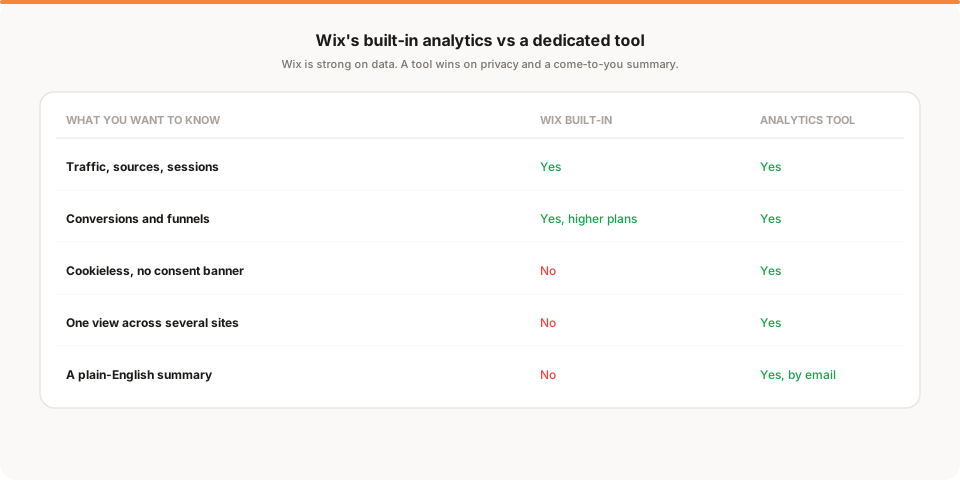
- Cookieless, banner-free tracking. A view of your traffic that doesn't depend on cookies or a consent banner, which is the main reason to bother.
- A cross-site view. One consistent lens if your Wix site is one of several properties on different platforms.
- A summary that comes to you. The morning brief Wix's dashboard can't send, so you stay informed without logging in.
If none of those three matter to you, Wix's built-in analytics are a perfectly good place to stay.
Why your Wix numbers won't match other tools
Run a tool alongside Wix and the numbers won't match exactly, which is normal. Wix's cookie-based analytics and a cookieless tool count differently by design: the cookieless tool includes visitors who would have rejected a banner, so it often reports higher numbers. Bot filtering and session definitions differ too. A 10 to 30 percent gap between any two tools is expected, so pick one as your source of truth and watch the trend rather than reconciling exact figures.
How Muro fits with Wix
Softly and honestly: Muro is one of the privacy-friendly tools you can add to a Wix site through custom code, and it's built for people who'd rather not open a dashboard to know how their site is doing.
Once the script is in your Wix custom code, Muro uses no cookies and, in most contexts, needs no consent banner, which is the cleaner counterpart to Wix's cookie-based tracking. Instead of another dashboard to check, it emails your team a short, plain-English brief each morning: yesterday's visitors, pageviews, bounce rate and average session against the day before, plus your top 3 sources and top 3 pages. There's a full dashboard too when you want to dig in, where form leads show up once your form redirects to a thank-you page you mark as a goal. If you share links to promote your Wix site, Muro Links count the clicks, and the dashboard shows which links led to signups. We keep the product specifics on our analytics for Wix page.
To be clear about what it is and isn't: Muro summarizes your own aggregate data. It won't tell you what to do next, and it won't replace Wix's built-in store and funnel reporting. It gives you a privacy-friendly, come-to-you read of your traffic that Wix's cookie-based dashboard doesn't.
How often should you check your Wix analytics?
Wix's dashboard is rich enough to get lost in, which is its own small trap: more charts invite more checking that rarely changes a decision.
For most Wix sites, a weekly glance is plenty. Once a week, look at three things: did traffic move, where is it coming from, and did anyone convert. That ten-minute habit catches the campaign that landed or the quiet stretch that means it's time to promote, without turning analytics into a daily task. The real risk isn't checking too little, it's either drowning in Wix's detail or drifting into never checking at all, both of which a short weekly review, or a summary that comes to you, quietly solves.
Native, a tool, or both?
On Wix, "both" is common, but the reasoning is different from other builders because Wix's built-in analytics are so capable. You don't add a tool to Wix because Wix is missing data, you add one for a specific quality: privacy. Wix's analytics are cookie-based, so if your reason for adding a tool is a cleaner, banner-free setup, a cookieless tool is the point, and it sits alongside or in place of the cookie-based numbers.
The other two reasons are the familiar ones. If your Wix site is one of several properties, a dedicated tool gives you a single view across all of them, which Wix can't. And if you'd rather get a summary than open a dashboard, a tool delivers that. But if none of privacy, cross-site reporting, or a come-to-you summary matters to you, be honest with yourself: Wix's native analytics are genuinely good, and adding a second tool just to have one is effort you don't need. Add a tool for a reason, not out of habit. On Wix more than anywhere, the built-in analytics are good enough that the reason has to be real, so name it before you install anything, and you'll end up with a setup you actually use rather than two dashboards you check neither of.
A word on the Wix cookie banner
Because Wix's built-in analytics use cookies, EU-facing Wix sites generally need a cookie consent banner, and Wix provides one. Here's the nuance people miss: adding a cookieless analytics tool does not automatically remove that need. As long as Wix's own cookie-based analytics, or any other cookie-setting feature, are active, the banner obligation remains.
So if part of your goal is to get rid of the consent banner entirely, adding a cookieless tool is only half the job. You'd also need to turn off the cookie-based tracking that requires consent in the first place, and audit any other scripts, pixels, or embeds that set cookies. For many Wix users that's more trouble than it's worth, and the realistic win is simply having a privacy-friendly source of truth for traffic while keeping the banner. Go in clear-eyed: a cookieless tool makes your analytics more private, but it doesn't delete the banner on its own.
Wix free plan versus Premium for analytics
It's worth being explicit about the plan situation, because it trips people up. On a free Wix site you get only very limited analytics, and you cannot add custom code, so third-party tools are off the table until you upgrade. The full Wix Analytics dashboard and the custom-code area both require a Premium plan with a connected domain.
The practical takeaway is that on Wix, real analytics of any kind, native or third-party, effectively start at the Premium tier. If you're still on the free plan and serious about understanding your traffic, upgrading is the unlock, and once you're there you get both the strong built-in dashboard and the option to add a cookieless tool on top. If you're not ready to upgrade, accept that you're flying on very limited data and plan to fix it when you can, rather than assuming a workaround exists.
Setting up conversion tracking on Wix
Wix has native conversion and funnel tools on higher plans, and they're worth using, but if you're tracking conversions in a separate analytics tool the method is the familiar one. Send visitors to a dedicated thank-you page after a key action, a form submission, a purchase, a booking, and count a view of that page as a conversion. Because the page view carries the traffic source, you can trace each conversion back to the channel that drove it.
The reason to bother, even with Wix's own funnels available, is attribution across tools and channels. Wix sees conversions inside Wix; a dedicated tool ties them to the same source-and-campaign view it uses for all your traffic, including any off-Wix links you share. On a small business site, knowing that one channel converts far better than another is usually worth more than the raw conversion count itself, because it tells you where to spend next.
The honest bottom line
Wix is the rare builder where the built-in analytics are genuinely strong, so start there and explore what you already have. For many small businesses, the native dashboard is enough.
You'd add a dedicated tool for specific reasons: cookieless tracking that skips the consent banner, a consistent view across several sites, or a plain-English summary that comes to you instead of waiting in a dashboard. Add one by pasting a script into Wix's custom code on a Premium plan, and make it a cookieless tool so you're adding privacy rather than more cookies. If the come-to-you summary is what appeals, start a free 30-day Muro trial: no credit card, no cookies, and a two-minute morning email alongside everything Wix already shows you. If a richer privacy-first dashboard is what you want, Plausible and Fathom pair well with Wix too.