How to add analytics to a Notion site (2026 guide)
Notion has only minimal built-in analytics. Its Page Analytics feature shows view counts, and on paid plans it can show which teammates viewed a workspace page, but for a public Notion site it does not show traffic sources, countries, devices, or conversions. To get real analytics on a published Notion site, use a Notion site builder that supports custom code (such as Super, Potion, or Bullet) and add a lightweight analytics script to the head. Privacy-friendly, cookieless tools work well because they need no consent banner and install in one line.
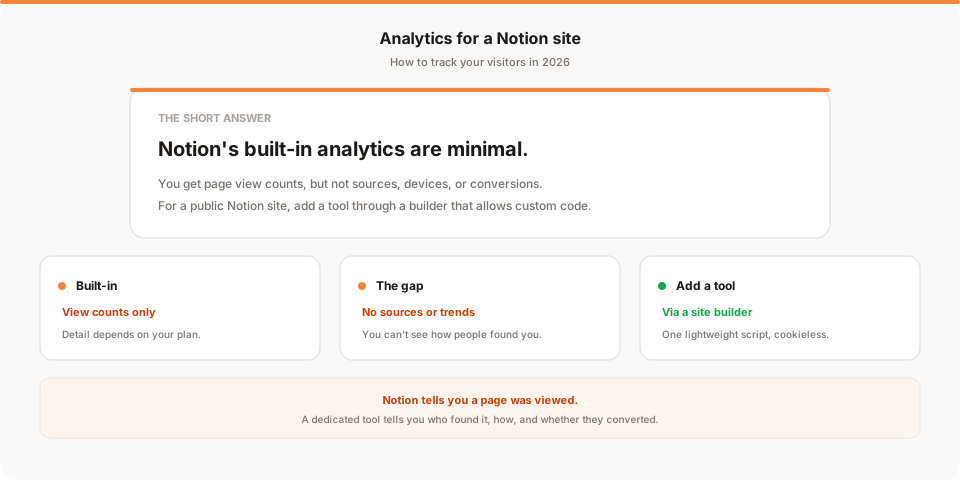
Short answer: Notion's built-in analytics only show you page view counts, so if you've published a public Notion site and want to know where your visitors come from or whether they convert, you'll need to add a proper analytics tool. The usual route is a Notion site builder that supports custom code, into which you paste one lightweight script. This guide covers what Notion tracks natively, where it stops, and exactly how to add more.
Notion has quietly become a real website builder. People publish landing pages, documentation, portfolios, and even full marketing sites straight from a Notion workspace. The one thing that consistently frustrates them is analytics: you can see that a page got views, but almost nothing about who those visitors were or how they found you. Let's fix that.
Quick disclosure: I'm the founder of Muro, a privacy-friendly analytics tool, so I have a stake in this topic. I've written this as a genuine how-to that works with any analytics tool, and saved my own product for one honest mention near the end.
Does Notion have built-in analytics?
Yes, but "minimal" is the honest word for it.
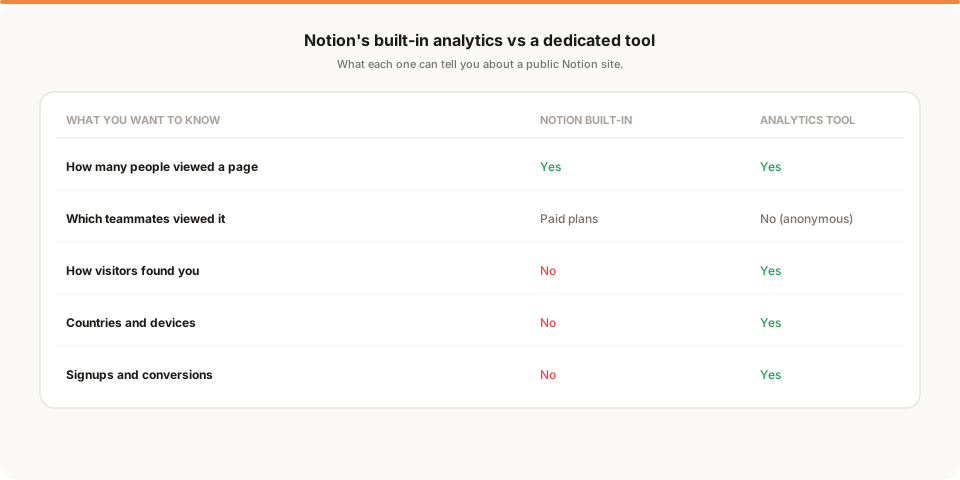
Notion includes a feature called Page Analytics. On a workspace page, it shows how many times the page has been viewed, and on paid plans it can show which members of your workspace opened it and when. That's genuinely useful inside a team, where you might want to know if the doc you shared actually got read.
The limits show up the moment you publish a page to the public web. For a public Notion site, your visitors are anonymous strangers, not named teammates, so the "who viewed this" view doesn't apply. What you're left with is a view count, and a view count alone can't answer the questions that actually matter for a public site: where did these people come from, what did they look at, and did any of them do the thing you wanted?
The gap with public Notion sites
Here's the specific problem, stated plainly. Notion tells you that a page was viewed. It doesn't tell you how it was found or what happened next.
You can't see whether a visitor arrived from Google, from a tweet, from a newsletter, or by typing your URL directly. You can't see which country or device they used. You can't see the path they took through your site, or whether they clicked the signup link at the bottom of your page. For a personal wiki, none of that matters. For a Notion site you're using to grow something, all of it matters, and Notion's built-in analytics simply weren't designed to provide it.
There's also a practical wrinkle: Notion's native publishing doesn't give you a field to paste a tracking script into. So even if you have a favorite analytics tool, you can't just drop it onto a plain published Notion page. That's the gap the rest of this guide closes.
How to add real analytics to a Notion site
The reliable way to add analytics to a public Notion site is to publish it through a Notion site builder that supports custom code. Tools like Super, Potion, and Bullet take your Notion pages and turn them into a proper website, and crucially, they give you a place to inject custom code into the page head, which is exactly where an analytics script belongs.
The process looks the same regardless of which builder or analytics tool you choose:
- Publish your Notion site through a builder that supports custom code injection. Connect your Notion pages and set up your domain inside the builder.
- Get your tracking snippet from the analytics tool you want to use. It's a short script, usually a single line.
- Paste it into the builder's custom code (head) setting. Most builders have a clearly labeled area for head or custom code in their site settings.
- Publish and verify. Load your live site, then check your analytics tool to confirm the visit registered. That's it, and it covers every page on the site, not just one.
A quick honest note: features change, so check your specific builder's current documentation for exactly where custom code goes and which plan tier includes it. The pattern above is stable, but the menu names move around.
Which Notion site builder should you use?
Since the builder is what makes analytics possible, it's worth a quick word on choosing one. I'll keep this fair rather than pushing a favorite, because the right pick depends on your needs and their feature sets change often.
The main tools people use to publish Notion sites are Super, Potion, and Bullet. All three do the core job: they turn your Notion pages into a fast public website on your own domain, and all three support adding custom code, which is the feature you care about for analytics. Beyond that, they differ on theming flexibility, speed optimizations, SEO controls, and price, so the honest advice is to check each one's current plans and pick based on which matches your design goals and budget.
Two things to verify before you commit, specifically for analytics. First, confirm that custom code injection into the head is available on the plan you're considering, since some builders reserve it for higher tiers. Second, check that the builder loads your analytics script on every page, not just the homepage, so you don't end up with blind spots on your interior pages. Both are usually fine, but they're worth a two-minute check so you don't discover a gap after you've built the whole site.
If you already publish through one of these, you don't need to switch. Whichever builder you're on, the analytics step is the same: find the custom code setting and paste your script into the head.
What real analytics tell you that Notion doesn't
Once a tool is installed, the picture changes completely. Instead of a bare view count, you get the things that actually help you make decisions.
- Traffic sources. Whether people came from search, social, a newsletter, or direct. This is the single most useful thing Notion can't tell you, because it's how you learn what's working.
- Top pages. Which parts of your Notion site pull the most attention, so you know what to expand and what to cut.
- Countries and devices. Where your audience is and whether your mobile experience holds up.
- Conversions. Whether visitors actually signed up, clicked through, or did whatever you built the site to achieve.
That last one is the difference between a site you hope is working and a site you know is working. If you want the wider view of which tools do this well, I went through the field in the best privacy-friendly analytics tools for 2026, and if you're comparing against Google's tool, the best Google Analytics alternatives covers that decision.
Why privacy-friendly tools fit Notion sites especially well
You can add any analytics tool through a builder, including Google Analytics. But cookieless, privacy-friendly tools are a particularly natural fit for Notion sites, for two reasons.
First, install effort. A privacy-friendly tool is usually a single lightweight line of script, which is ideal when you're pasting into a builder's code box rather than managing a full tag setup. Second, and bigger: no consent banner. Because these tools don't set cookies or collect personal data, you generally don't need the cookie consent banner that Google Analytics requires in the EU. On a clean, minimal Notion site, bolting on a consent banner feels especially clunky, so avoiding it keeps the site as tidy as Notion intended. If you're curious why Google Analytics carries that requirement, I explained it in is Google Analytics GDPR compliant?.
Tracking signups and conversions from a Notion site
Most Notion sites exist to get someone to do something: join a waitlist, buy a template, book a call, subscribe. Tracking that is worth one extra step.
The cleanest approach is the same one that works anywhere: send people to a dedicated thank-you page after they take the action, and count views of that page as conversions in your analytics tool. If your call to action is an outbound link (to a form, a checkout, or a booking tool), most analytics tools can also track that click as a goal. Either way, once conversions are set up, you stop guessing whether your Notion site is doing its job and start seeing it.
How Muro fits with a Notion site
Softly and honestly: Muro is one of the privacy-friendly tools you can add to a Notion site through a builder that supports custom code, and it's built for people who don't want to log into a dashboard to know how their site is doing.
Once the script is in your builder's head setting, Muro uses no cookies and, in most contexts, needs no consent banner. Instead of leaving the numbers for you to check, it emails your team a short, plain-English brief each morning: yesterday's visitors, pageviews, bounce rate and average session against the day before, plus your top 3 sources and top 3 pages. There's a full dashboard too, but most days the email is all you open. Clicks on Notion links aren't counted automatically, and Notion builders don't let you tag links, so point the links you care about (signup form, booking page, checkout) through Muro Links short links to count the clicks. If your form redirects to a thank-you page, mark it as a goal and signups show up in the dashboard by source. We keep the product specifics on our analytics for Notion page if you want them for your setup.
To be clear about what it is and isn't: Muro summarizes your own aggregate data. It won't tell you who a specific anonymous visitor was, and it won't tell you what to do next. It tells you, in plain language, what your traffic is doing, which is exactly what Notion's view counts leave out.
How often should you check your Notion site analytics?
Once you've got real analytics running, the trap is the same one that catches every small site: you set it up, look at it obsessively for a week, then forget it exists.
For most Notion sites, a weekly glance is plenty. Once a week, look at three things: did traffic move, where is it coming from, and did anyone convert. That's enough to catch the launch that landed, the newsletter mention that sent a spike, or the quiet week that means it's time to promote again. You don't need to watch it daily, and watching it daily usually just adds anxiety without adding insight.
The real risk isn't checking too little in a given week, it's the slow drift where "once a week" becomes "once a month" becomes never, right when something interesting is happening. A Notion site is often a side project or a launch page, exactly the kind of thing that's easy to stop watching. That's the whole appeal of tools that send you a summary instead of waiting for you to visit: the update arrives whether or not you remembered to look.
The bottom line
Notion is a surprisingly capable way to publish a site, but its analytics stop at view counts, and for a public site that's not enough to actually grow anything. The fix is straightforward: publish through a Notion site builder that supports custom code, paste in a single analytics script, and suddenly you can see where visitors come from, what they read, and whether they convert.
If you want to keep the site as clean as Notion makes it look, reach for a cookieless, privacy-friendly tool so you skip the consent banner entirely. And if you'd rather not check yet another dashboard, start a free 30-day Muro trial: no credit card, no cookies, one line of script in your builder, and a two-minute morning email instead of a tab you forget to open. If a dashboard suits you better, pick one of the other privacy-friendly tools. The important thing is to stop flying blind on a site you're actually trying to grow.