Ghost analytics: what's built in and how to add more (2026 guide)
Ghost has strong built-in analytics for a publisher: member signups and growth, email open and click rates, and native traffic and source data. Where it's thinner is granular device data and a plain-English summary you don't have to log in for. To add a dedicated tool, paste a tracking script into Settings, then Code injection, then the Site Header field, which is available on every Ghost plan and self-hosted installs. Cookieless, privacy-friendly tools fit best.
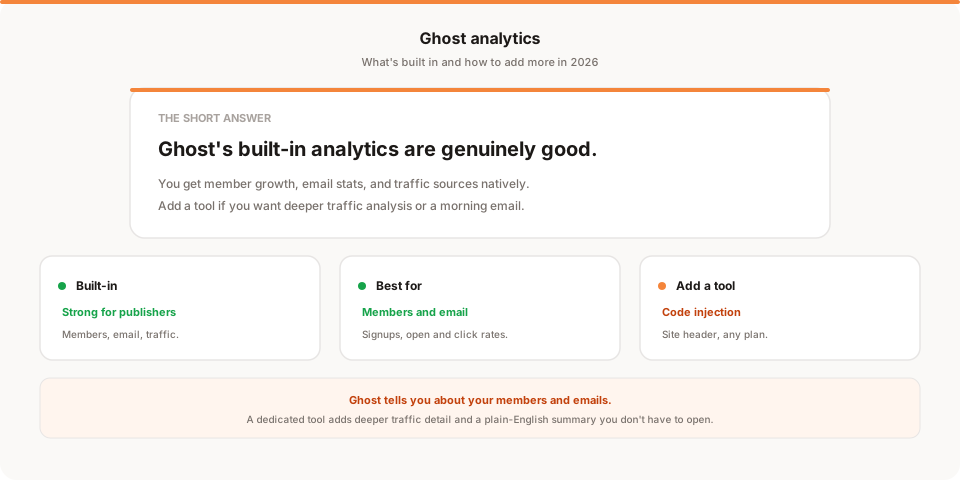
Short answer: Ghost has some of the best built-in analytics of any publishing platform. Member growth, paid conversions, email open and click rates, and native traffic and source data are all there without any setup. So the honest question isn't "how do I get analytics on Ghost," it's "does Ghost's built-in view answer my questions, and if not, how do I add a tool for the gaps." This guide covers both.
Ghost is built for publishers and creators, and its analytics reflect that: it cares a lot about members and email, which is exactly what a newsletter or membership business lives on. That's a refreshing change from platforms that give you almost nothing. Let's map what you already have before adding anything.
Quick disclosure: I'm the founder of Muro, a privacy-friendly analytics tool, so I have a stake here. I've written this to be genuinely useful even if you never add a tool, and saved my own product for one honest mention near the end.
Does Ghost have built-in analytics?
Yes, and they're good, especially for the things a publisher actually cares about.
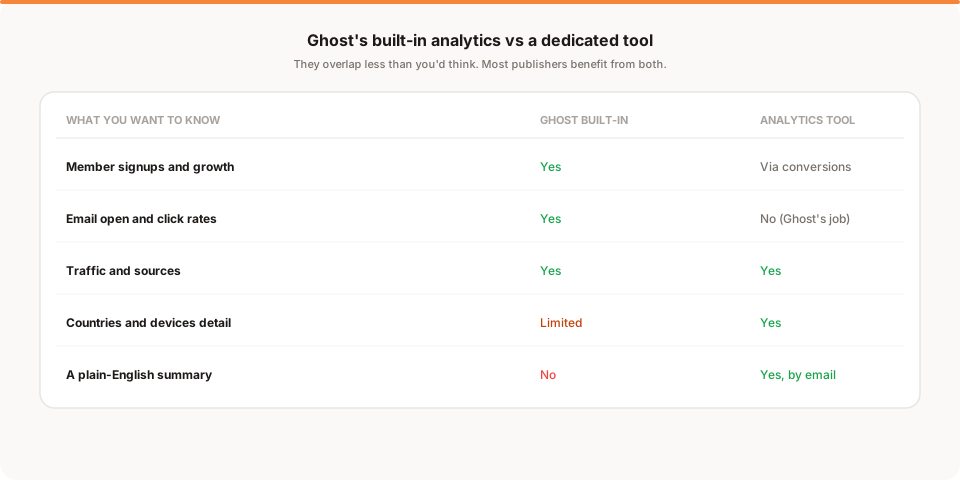
Out of the box, Ghost tracks your member signups and growth over time, your paid conversions and revenue, and email analytics like open and click rates for each newsletter. More recently Ghost has rolled out native web analytics with traffic and source data, so depending on your version and plan you may already see where your readers come from and which posts pull the most attention. For a membership or newsletter site, that's a genuinely strong foundation that many standalone tools don't even attempt, because they don't know anything about your members or your emails.
So before you reach for anything else, actually explore what's already in your Ghost admin. A lot of creators add a third-party tool and then realize Ghost was already answering half their questions.
Where Ghost's built-in analytics stop
That said, there are real edges. Ghost's analytics are optimized for members and email, which means a few things are thinner.
Detailed device and country breakdowns are limited compared to a dedicated analytics tool. If you run several sites on different platforms, Ghost only sees the Ghost one, so you don't get a consistent cross-site view. And crucially, Ghost's analytics live in a dashboard you have to log into: there's no short plain-English summary that comes to you, so the numbers only help on the days you remember to check. None of these are failures, they're just the boundary of what a publishing platform's built-in analytics are designed to do.
How to add analytics to Ghost
If you want to fill those gaps, adding a dedicated tool is quick, and it doesn't require a plan upgrade.
The mechanism is code injection, available on every Ghost(Pro) plan and on self-hosted Ghost. Adding a tool takes about two minutes:
- Copy the tracking snippet from your analytics tool of choice.
- In Ghost admin, go to Settings, then Code injection.
- Paste the snippet into the Site Header field.
- Save. The tool starts collecting on the next page load, across your whole site.
This works for Google Analytics as well as privacy-friendly tools like Plausible, Fathom, or Muro. Because Ghost injects the code site-wide, you install once and every post and page is covered.
Google Analytics or a privacy-friendly tool?
Ghost audiences tend to care about privacy, and a cookie banner sits awkwardly on a clean reading experience, so the choice matters here. Google Analytics is free and deep, but it uses cookies and generally needs a consent banner in the EU, which adds friction and loses you the data of everyone who declines. Cookieless, privacy-friendly tools collect no personal data and need no banner, which fits the Ghost aesthetic much better. If you want the full category, I compared the options in the best privacy-friendly analytics tools for 2026, and if you're weighing whether to leave Google's tool behind, the best Google Analytics alternatives covers the decision.
What a dedicated tool adds on top of Ghost
Since Ghost already handles members and email well, it helps to be specific about what a separate tool actually adds.
- Deeper traffic detail. Full source, campaign, country, and device breakdowns, so you can see not just that traffic rose but exactly where it came from.
- Conversions by source. Tying a signup back to the specific channel that produced it, which complements Ghost's own member-source data.
- A cross-site view. If your Ghost publication is one of several properties, a tool gives you one consistent lens across all of them.
- A summary that comes to you. The thing Ghost's dashboard can't do: land the key numbers in your inbox each morning so you don't have to log in.
That last point is the one most creators underrate, because the best analytics setup is the one you actually read.
Why your Ghost numbers won't match other tools
If you run a tool alongside Ghost's native analytics, the numbers won't match exactly, and that's fine.
Every analytics system counts differently. Ghost, Google Analytics, and a cookieless tool each define a visit and filter bots in their own way, and Google Analytics additionally loses data when EU visitors reject its cookie banner. So a 10 to 30 percent gap between any two of them is normal, not a sign that one is broken. Pick one as your source of truth for traffic, keep Ghost as your source of truth for members and email, and watch the trends rather than reconciling exact figures.
How Muro fits with Ghost
Softly and honestly: Muro is one of the privacy-friendly tools you can add to Ghost through code injection, and it's built for creators who'd rather not log into a dashboard to know how things are going.
Once the script is in your Ghost Site Header, Muro uses no cookies and, in most contexts, needs no consent banner. It complements Ghost rather than replacing it: Ghost keeps owning members and email, and Muro emails your team a short, plain-English brief each morning covering yesterday's visitors, pageviews, bounce rate and average session against the day before, plus your top 3 sources and top 3 pages. There's a full dashboard too, where a welcome page marked as a goal shows which posts and sources bring in members, but most days the email is all you open. If you share links to promote your posts, Muro Links count the clicks, and the dashboard shows which links led to signups. We keep the product specifics on our analytics for Ghost page.
To be clear about what it is and isn't: Muro summarizes your own aggregate data. It won't tell you what to do next, and it won't replace Ghost's member and email analytics. It gives you the plain-language traffic read that Ghost's dashboard leaves you to assemble yourself.
How often should you check your Ghost analytics?
Ghost makes it tempting to check constantly, because watching your member count tick up is genuinely motivating. But for decisions, a weekly rhythm is enough.
Once a week, look at four things: did membership grow, how did your last email perform, did traffic move, and where did it come from. That's a ten-minute review that catches what matters without turning every morning into a dashboard session. The real risk for creators isn't checking too little, it's the emotional swing of checking too often and reacting to the daily wobble of a small audience. A weekly cadence, or a short summary that comes to you, keeps you focused on publishing rather than refreshing.
Native analytics, a tool, or both?
For most Ghost publishers the honest answer is both, and it helps to be clear about the division of labor. Ghost owns the things only Ghost can know: who your members are, how many converted to paid, your recurring revenue, and how each newsletter performed. No external analytics tool sees any of that, because it lives inside your Ghost membership and email system. A dedicated analytics tool owns the things Ghost is lighter on: detailed traffic sources, device and country breakdowns, conversions tied to specific campaigns, and a summary that comes to you.
So the two aren't really competitors. The question isn't "Ghost or a tool," it's "do I need what a tool adds on top of Ghost." If you mostly care about member growth and email performance, Ghost alone is plenty and you should save yourself the extra setup. If you also run paid campaigns, publish across several sites, or simply want the numbers to reach you without logging in, add a tool and let each system do what it's best at. Trying to force one tool to do both jobs, or ignoring Ghost's excellent member data because you added a traffic tool, is where people get frustrated and end up trusting neither.
What about self-hosted Ghost?
If you run self-hosted Ghost rather than Ghost(Pro), the picture is slightly different but the method is the same. Code injection works identically: you add your tracking script under Settings, then Code injection, then Site Header, and it loads across your whole site. What varies is the native analytics. Some of Ghost's newer web-analytics features depend on configuration and the exact version you're running, so a self-hosted install may or may not show the full traffic dashboard out of the box. The member and email analytics are core to Ghost, so those are present regardless of how you host.
The practical upshot is that self-hosted Ghost users tend to lean on a dedicated tool a little more often, simply because it's the fastest way to get consistent traffic analytics without standing up extra services or wrangling a data pipeline. Pick a cookieless tool, paste the script into code injection, and you have the traffic layer sorted in two minutes while Ghost keeps handling members and email.
Turning Ghost analytics into decisions
Data only helps if it changes what you publish, so here's a simple weekly loop for a Ghost site. Pair one number from Ghost with one from your traffic tool. From Ghost, look at which posts converted the most new members, because that tells you what your audience values enough to sign up for. From your analytics tool, look at where those readers came from, because that tells you which channels are actually worth your time. Put the two together and you get a concrete instruction: write more of what converts, and promote it where your best readers already are.
That single pairing, done weekly, will do more for a Ghost publication than staring at any individual chart. It connects what you make to who it reaches, which is the whole point of analytics and exactly the connection a pile of disconnected dashboards fails to give you. Everything else, the daily member-count refresh included, is mostly noise by comparison. Do that pairing for a month and you'll have a clearer sense of your publication's engine than most creators ever build, without adding a single new tool to the list, because it comes from connecting what you already have rather than collecting more of it.
The honest bottom line
Ghost is one of the few platforms where the answer to "does it have analytics" is a confident yes. Its member and email analytics are excellent, and its native traffic data keeps improving. Explore what you already have before adding anything, because it may be enough.
When you do want more, the gaps are specific: deeper traffic and device detail, conversions tied to sources, a cross-site view, and a summary that comes to you instead of waiting in a dashboard. Fill them by pasting one script into Ghost's code injection, ideally a cookieless tool so your privacy-friendly setup stays banner-free. And if the summary-that-comes-to-you part appeals most, start a free 30-day Muro trial: no credit card, no cookies, and a two-minute morning email alongside everything Ghost already tells you about your members. If a dashboard suits you better, Plausible and Fathom are excellent next to Ghost too.