Framer analytics: what's built in and how to add more (2026 guide)
Framer has decent, privacy-friendly built-in analytics on paid Site plans: visitors, traffic sources, and top pages, with no cookie banner needed. Where it's thinner is detailed device data, conversions tied to sources, and a plain-English summary you don't have to log in for. To add a dedicated tool, paste a tracking script into Framer's custom code under Site Settings, then publish. Cookieless tools keep the whole setup banner-free.
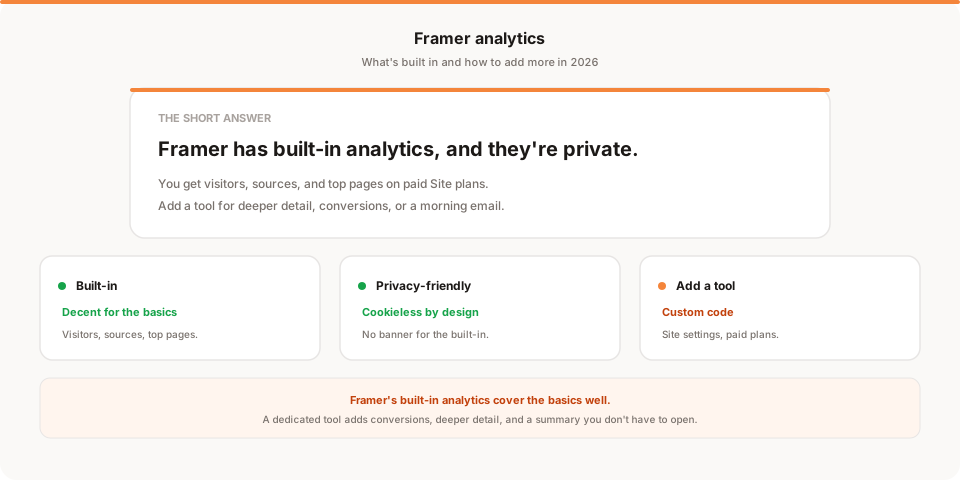
Short answer: Framer actually has built-in analytics, and unlike some builders they're privacy-friendly, showing your visitors, sources, and top pages on paid Site plans with no cookie banner needed. So the real question is whether Framer's native view is enough, and if not, how to add a dedicated tool for conversions, deeper detail, or a summary that comes to you. This guide covers both.
Framer has become a serious way to design and ship a marketing site, and its analytics have grown up alongside it. That means the starting point here is better than for most builders: you probably already have useful numbers. Let's look at what they cover before adding anything.
Quick disclosure: I'm the founder of Muro, a privacy-friendly analytics tool, so I have a stake here. I've written this to be useful even if you stick with Framer's built-in analytics, and saved my own product for one honest mention near the end.
Does Framer have built-in analytics?
Yes, and they're better than you might expect. On paid Site plans, Framer includes native analytics that show your visitors and page views, your traffic sources, and your top pages, presented cleanly and designed to be privacy-friendly. That last part matters: because the built-in analytics are cookieless, you don't need a consent banner just to see your own traffic.
For a portfolio, a landing page, or a marketing site, that covers the questions most people have day to day: are people showing up, where are they coming from, and what are they looking at. It's a genuinely good baseline, and it's worth exploring fully before you assume you need anything else.
Where Framer's built-in analytics stop
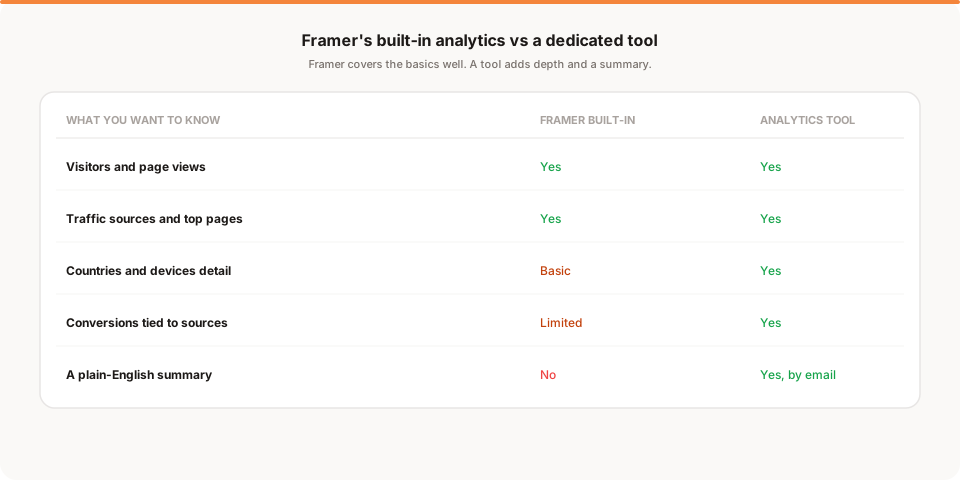
The edges show up when you want more than the basics. Framer's native analytics are lighter on detailed device and country breakdowns than a dedicated tool. They don't fully handle conversions tied to traffic sources, so you can see that visitors arrived but not always which channel produced the ones who actually converted. If you run several sites across different platforms, Framer only sees the Framer one. And like every builder's dashboard, the numbers live somewhere you have to log into, so there's no short plain-English summary that comes to you.
None of these are flaws, they're just the line where a builder's built-in analytics end and a dedicated tool begins.
How to add analytics to a Framer site
If you want to go deeper, adding a dedicated tool is quick.
The mechanism is Framer's custom code, available on paid Site plans. Adding a tool takes about two minutes:
- Copy the tracking snippet from your analytics tool of choice.
- In Framer, open Site Settings and find the custom code section.
- Paste the snippet into the site's head code.
- Publish your site. The tool starts collecting on the next visit, across every page.
This works for Google Analytics as well as privacy-friendly tools like Plausible, Fathom, or Muro. Because the code loads site-wide, one install covers your whole Framer site.
Google Analytics or a privacy-friendly tool?
Here's a Framer-specific consideration: since your built-in analytics are already cookieless, adding Google Analytics would actually make your setup less private and force you to add a consent banner you didn't need before. That's a strange trade on a site you designed to look clean. A cookieless, privacy-friendly tool keeps the whole thing banner-free while giving you the depth Framer's native analytics lack. I compared the options in the best privacy-friendly analytics tools for 2026, and if you're specifically weighing whether to bring Google's tool into the mix, the best Google Analytics alternatives lays out the trade-offs.
What a dedicated tool adds on top of Framer
Since Framer covers the basics, it's worth being precise about what a separate tool adds.
- Conversions by source. Tying a form submission or signup back to the specific channel that drove it, which turns traffic data into marketing decisions.
- Deeper segmentation. Fuller device, country, and campaign breakdowns for when the basic view isn't enough.
- A cross-site view. One consistent lens if your Framer site is one of several properties.
- A summary that comes to you. The morning brief Framer's dashboard can't send, so you stay informed without logging in.
Why your Framer numbers won't match other tools
Run a tool alongside Framer's native analytics and the numbers won't match exactly. That's expected.
Each system defines a visit and filters bots differently, and Google Analytics additionally loses data when EU visitors reject its banner. A 10 to 30 percent gap between any two of them is normal. Rather than trying to reconcile them, pick one as your source of truth and watch the trend inside it. The direction of change is what matters, not whether two dashboards agree on an exact number.
How Muro fits with Framer
Softly and honestly: Muro is one of the privacy-friendly tools you can add to a Framer site through custom code, and it's built for people who'd rather not open a dashboard to know how their site is doing.
Once the script is in your Framer head code, Muro uses no cookies and, in most contexts, needs no consent banner, so it matches Framer's own privacy-friendly approach. Every morning at 8 AM it emails your team a short, plain-English brief on yesterday: visitors, pageviews, bounce rate and average session compared with the day before, your top 3 sources and pages, and one line on anything that stood out. There's a full dashboard too when you want to dig in, including signups once you mark your thank-you page as a goal. If you share links to promote your Framer site, Muro Links count the clicks, and the dashboard shows which links led to signups. We keep the product specifics on our analytics for Framer page.
To be clear about what it is and isn't: Muro summarizes your own aggregate data. It won't tell you what to do next, and it isn't meant to replace Framer's clean built-in view. It adds the depth and the come-to-you summary that the built-in analytics don't provide.
How often should you check your Framer analytics?
Framer makes analytics pleasant to look at, which is a small trap of its own: pretty charts invite frequent checking that rarely changes a decision.
For most Framer sites, a weekly glance is plenty. Once a week, look at three things: did traffic move, where is it coming from, and did anyone convert. That ten-minute habit catches the launch that landed or the quiet stretch that means it's time to promote again. The bigger risk isn't checking too little, it's drifting into never checking once the novelty wears off, which is exactly when a short summary that arrives in your inbox earns its keep.
Native, a tool, or both?
Framer is one of the cleaner "both" cases, because its native analytics are already good and privacy-friendly, so a dedicated tool is genuinely additive rather than a replacement. Keep Framer's built-in view for the everyday glance, since it's fast, attractive, and cookieless. Add a tool when you hit one of its edges: you need conversions tied to sources, you want deeper segmentation, you run several sites and want one lens across them, or you'd rather get a summary by email than open the dashboard.
The mistake to avoid is adding a heavy, cookie-based tool "just in case" and ending up with a consent banner on a site that didn't need one. If you're going to add anything to Framer, add something that matches its cookieless nature. That way you gain depth without giving up the clean, banner-free experience that made Framer's own analytics pleasant in the first place. Both layers stay privacy-friendly, and neither one asks your visitors to accept a cookie banner, so you get the best of each without any compromise on the experience.
Keep your Framer site fast
One of Framer's selling points is speed, and analytics is a common place people quietly undo it. Google Analytics plus Google Tag Manager can add a hundred kilobytes or more of JavaScript, along with the cookie handling that comes with it, and on a site you chose Framer for partly because it loads fast, that's a real regression. It shows up in your Core Web Vitals and, ironically, in the very analytics you just installed.
Cookieless, privacy-friendly tools are built the opposite way. Most ship a script well under five kilobytes and do their work without cookies or heavy dependencies, so they barely register on load time. If page speed matters to you, and on Framer it usually does, that weight difference is a genuine reason to prefer a lightweight tool over the Google stack. You measure your traffic without paying for it in performance, which is the whole idea. It's a small thing that compounds, too, since a faster site tends to rank and convert a little better, which means the lightweight choice quietly helps in more than one place at once, not just on load time.
Setting up conversion tracking on Framer
Since conversions are the one thing Framer's built-in analytics handle least, it's worth spelling out how to close that gap. The reliable method is the thank-you page. Point your form's success action, or a call-to-action button, at a dedicated page like /thank-you or /booked, and then mark a view of that page as a conversion in your analytics tool. Because that page view still carries the visitor's traffic source, you learn not just that someone converted but which channel sent them.
This is worth the five minutes it takes, because it changes the question you can answer. Without it, you know how many people filled in your form. With it, you know that, say, your newsletter converts at three times the rate of your paid ads, which tells you exactly where to put your next hour and your next dollar. And if you run a Framer booking or commerce flow, the same trick applies to the confirmation screen, so every kind of conversion on your site lands in the same report next to the source that produced it.
A note on Framer's evolving analytics
One honest caveat: Framer keeps expanding its native analytics, so exactly what's included on your plan may be more than this guide describes by the time you read it. That's a good thing, and it means you should check your current Framer analytics before assuming you need to add anything. Look at what your plan shows for sources, devices, and any conversion or event tracking, and only reach for a dedicated tool to fill the gaps that remain.
The parts least likely to arrive natively are the ones that aren't really a builder's job: a consolidated view across multiple sites on different platforms, and a plain-English summary delivered to your inbox instead of a dashboard. Those are the durable reasons to add a tool, regardless of how far Framer's own analytics grow. Everything else, check first, because Framer may already have you covered. The safest habit is to re-check once a year or after any big Framer update, since the line between what's native and what needs a tool keeps moving in your favor.
The honest bottom line
Framer is one of the good cases: it has real, privacy-friendly built-in analytics, so start by exploring what you already have. For many sites, the native view is enough.
When you want more, the gaps are specific: conversions tied to sources, deeper segmentation, a cross-site view, and a summary that comes to you. Fill them by pasting one script into Framer's custom code, and because Framer is already cookieless, keep it that way with a privacy-friendly tool rather than adding a consent banner for Google Analytics. If the come-to-you summary is what appeals, start a free 30-day Muro trial: no credit card, no cookies, and a two-minute morning email alongside Framer's clean built-in charts. If a richer dashboard is what you want, Plausible and Fathom pair well with Framer too.