Bubble analytics: how to track your no-code app (2026 guide)
Bubble gives you logs, not analytics: no real view of visitors, traffic sources, or signups by source. To measure your Bubble app, paste a tracking script into the header field under Settings, then SEO/metatags, which requires a paid plan. Because Bubble apps are single-page apps, use a tool that supports single-page-app or history-based tracking so page changes register as separate views. Cookieless, privacy-friendly tools are the easiest fit.
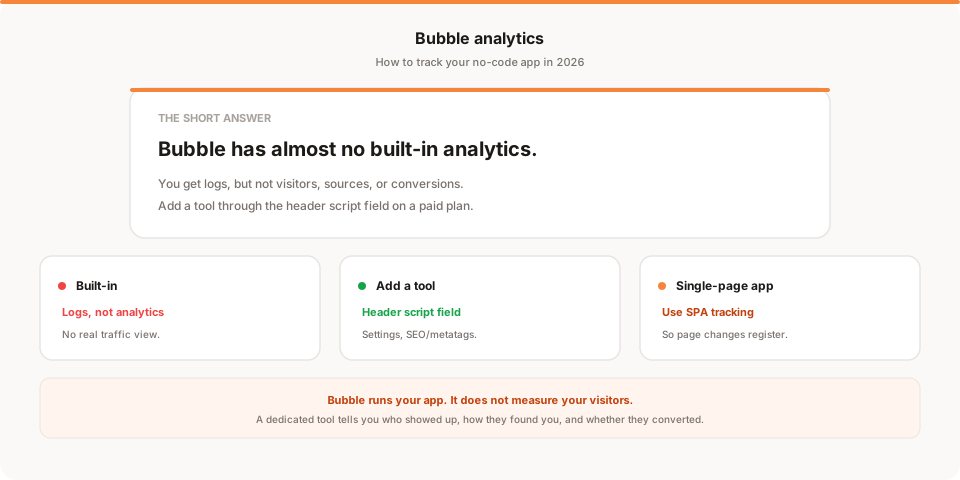
Short answer: Bubble gives you logs, not analytics. If you've built an app on Bubble and want to know who's using it, where they came from, and whether they sign up, you'll need to add a real analytics tool. You do that by pasting a tracking script into the header field under Settings, then SEO/metatags. There's one gotcha, because Bubble apps are single-page apps, so this guide walks through the setup and the fix for it.
Bubble lets you ship a real web app without writing code, which is genuinely impressive. The blind spot shows up the moment you launch: you can see your database and your workflow logs, but almost nothing about the humans actually using the thing. Let's fix that.
Quick disclosure: I'm the founder of Muro, a privacy-friendly analytics tool, so I have a stake here. I've written this as a genuine how-to that works with any analytics tool, and saved my own product for one honest mention near the end.
Does Bubble have built-in analytics?
Not in any meaningful sense. Bubble gives you logs, which is a different thing from analytics.
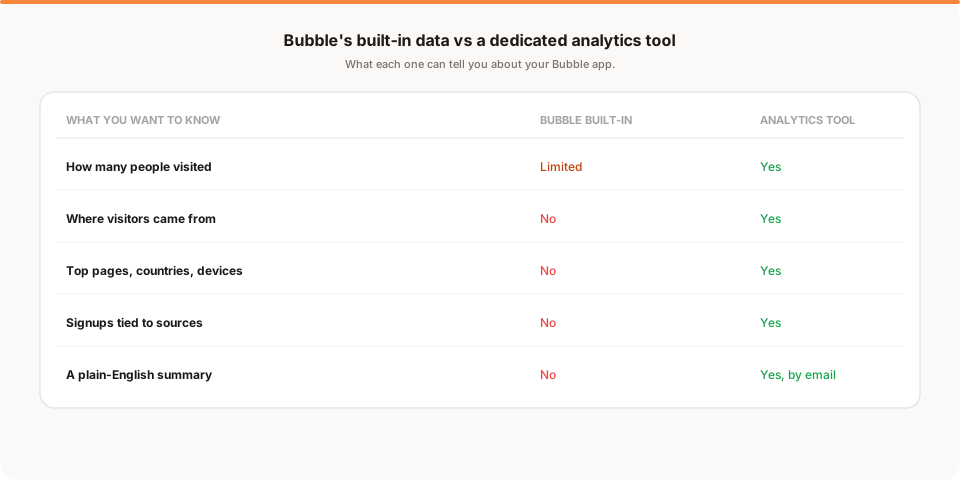
The server logs and workflow logs are useful for debugging: you can see when workflows ran, when errors happened, and what your app did behind the scenes. That's valuable when something breaks. What it isn't is a view of your visitors. Bubble won't tell you how many people came to your app this week, where they came from, which pages they spent time on, or which marketing channel produced your signups.
So if you've been opening your Bubble logs hoping to understand your traffic, that's why it feels unsatisfying. Logs describe what your app did. Analytics describe what your users did. You need the second one, and Bubble expects you to add it.
What you're missing without real analytics
Here's the specific gap. Without a dedicated tool, you're flying blind on every question that actually helps you grow the app.
You can't see whether your users arrived from a Product Hunt launch, a Google search, a newsletter, or a paid ad. You can't tell which landing page converts visitors into signups and which one leaks them. You can't segment by device to check that mobile users can actually complete your core flow. And you can't connect a signup back to the campaign that produced it, which is the single most useful thing analytics can do for you. For a private internal tool, none of this matters. For a Bubble app you're trying to grow, all of it does.
How to add analytics to a Bubble app
The way to get real analytics on a Bubble app is to add a tracking script through the app's header field. Here's the honest version.
The location is Settings, then the SEO / metatags tab, where Bubble gives you a field for script and meta tags in the page header. This is available on paid Bubble plans. Adding a tool takes about two minutes:
- Copy the tracking snippet from your analytics tool of choice.
- In the Bubble editor, open Settings, then the SEO / metatags tab.
- Paste the snippet into the header script field.
- Deploy your app to live. The tool starts collecting on the next visit.
This works for Google Analytics as well as privacy-friendly tools like Plausible, Fathom, or Muro. But there's a catch specific to Bubble that you need to handle, and it's the reason people think their analytics is broken.
The single-page-app gotcha (and the fix)
Bubble apps are single-page apps. When a user moves from one Bubble page to another, the browser often doesn't do a full reload, it swaps the content in place. A basic analytics script fires once, on the first load, and then goes quiet, so your reports show one pageview per session no matter how much the user clicks around.
The fix is to use an analytics tool that supports single-page-app or history-based tracking. Instead of relying on full page reloads, it listens for in-app navigation and records each page change as its own view. Most privacy-friendly tools offer this, sometimes as a small setting or a slightly different snippet, so check your tool's setup docs for a "single-page app," "hash-based routing," or "history" option and enable it. Get this right and your Bubble analytics will actually reflect how people move through your app.
Google Analytics or a privacy-friendly tool?
Once you can add any script, the real choice is which one. Google Analytics is free and powerful, but it uses cookies and generally needs a consent banner in the EU, which loses you the data of everyone who rejects it and adds clutter to your app. Cookieless, privacy-friendly tools take the opposite approach: no cookies, no personal data, and in most contexts no consent banner. For a lean Bubble app, that's usually the cleaner fit. If you want the full rundown of the category, I compared the options in the best privacy-friendly analytics tools for 2026, and if you're weighing whether to skip Google's tool entirely, the best Google Analytics alternatives covers that decision.
What real analytics tell you that Bubble doesn't
Once a dedicated tool is installed and single-page-app tracking is on, you go from a bare log to the numbers that inform decisions.
- Traffic sources. Whether users came from search, social, a newsletter, or an ad, which is how you learn what's actually working.
- Top pages. Which screens of your app get the most attention, and which get skipped.
- Countries and devices. Where your users are and whether the mobile experience holds up for your core flow.
- Signups by source. Which channel produced the users who actually signed up, not just visited.
That last one turns your marketing from guesswork into a decision about where to spend your next hour.
Tracking signups and conversions
Most Bubble apps have a moment that matters: an account created, a plan purchased, a booking made. Tracking it is worth one extra step.
The cleanest approach is to send the user to a dedicated success or thank-you page when the key workflow completes, and count views of that page as a conversion in your analytics tool. Because that page view still carries the traffic source, you can trace a signup back to the channel that produced it. If you'd rather not add a page, most tools can also record a custom event when a workflow finishes, but the thank-you-page method is the simplest to get right and the easiest to read later.
Why your Bubble numbers won't match Google Analytics
If you run more than one tool, expect the numbers to disagree, sometimes by a lot. That's normal, and worth knowing so you don't chase a bug that isn't there.
Different tools count differently. Google Analytics leans on cookies and its own session logic, and in the EU it loses data whenever a visitor rejects the cookie banner. Cookieless tools count everyone by default, so they often report higher numbers, not lower. On top of that, single-page-app tracking can be configured slightly differently between tools, which shifts pageview counts. So a 10 to 30 percent gap between any two tools is common, and none is wrong. Pick one as your source of truth and watch the trend inside it rather than reconciling exact figures.
How Muro fits with Bubble
Softly and honestly: Muro is one of the privacy-friendly tools you can add to a Bubble app through the header field, and it's built for people who don't want to log into a dashboard to know how their app is doing.
Once the script is in your Bubble header, Muro counts Bubble's in-app page changes on its own, uses no cookies and, in most contexts, needs no consent banner. Instead of leaving the numbers for you to check, it emails your team a short, plain-English brief each morning: yesterday's visitors, pageviews, bounce rate and average session against the day before, plus your top 3 sources and top 3 pages. There's a full dashboard too, where signups show up once you mark your post-signup page as a goal, but most days the email is all you open. Button clicks aren't counted automatically: tag the element with data-muro-event, or call muro.track() from a workflow that runs JavaScript (Bubble needs a plugin such as Toolbox for that). If you share links to promote your app, Muro Links count the clicks, and the dashboard shows which links led to signups. We keep the product specifics on our analytics for Bubble page if you want them for your setup.
To be clear about what it is and isn't: Muro summarizes your own aggregate data. It won't tell you what to do next, and it doesn't replace Bubble's logs for debugging. It tells you, in plain language, what your users are doing, which is exactly what Bubble's built-in view leaves out.
How often should you check your Bubble analytics?
Once real analytics are running, the trap is the familiar one: you set it up, watch it obsessively for a week, then forget it exists.
For most Bubble apps, a weekly glance is plenty. Once a week, look at three things: did traffic move, where is it coming from, and did anyone sign up. That ten-minute habit catches the launch that landed or the quiet stretch that means it's time to promote, without turning analytics into a daily worry. The real risk isn't checking too little in a given week, it's the slow drift into never checking, right when something interesting is happening. That's the whole appeal of a tool that emails you the summary: it arrives whether or not you remembered to look.
Which analytics setup fits your Bubble app?
If you want a quick decision:
- On Bubble's free plan? The header script field lives on paid plans, so you'll need to upgrade before you can add a third-party tool. Until then you're stuck with logs.
- Want depth and a dashboard? Add Plausible or Fathom, and make sure single-page-app tracking is switched on so navigation is counted.
- Want the numbers without checking a dashboard? Add Muro and read the morning email instead.
- Running serious Google Ads? Keep Google Analytics for the ad attribution, and accept the consent-banner overhead that comes with it.
Whatever you choose, two things stay constant. First, the install path is the same: paste one script into the header field and deploy. Second, and this is the one people forget, turn on single-page-app tracking. On a normal website you could skip that step, but on Bubble it's the difference between analytics that reflect reality and a report that insists every visitor looked at exactly one page.
And if you're early, don't overthink the choice. Any one of these, installed correctly, will tell you within a day whether people are using what you built. You can always switch later, since swapping one script for another takes the same two minutes. The mistake isn't picking the wrong tool, it's shipping a Bubble app with no analytics at all and running on vibes for three months.
Test it on your live app
One Bubble-specific reminder before you go: whatever tool you choose, test it on your published live app, not just the editor preview. Click through a few pages and confirm the pageviews actually increment in your analytics tool. Because of the single-page-app behavior, the only way to know your setup is truly correct is to watch it count real navigation as you move around. Two minutes of testing now saves you from trusting a month of flat, one-page-per-visit data later, which is the most common way Bubble analytics quietly goes wrong.
The honest bottom line
Bubble is a powerful way to build an app, but its built-in view is logs, not analytics, and logs won't tell you how to grow. The fix is straightforward: on a paid plan, paste one analytics script into the header field under Settings then SEO/metatags, turn on single-page-app tracking, and deploy. Suddenly you can see where your users come from, what they use, and whether they convert.
If you want to keep things lean and skip the consent banner, reach for a cookieless, privacy-friendly tool. And if you'd rather not check yet another dashboard, start a free 30-day Muro trial: no credit card, no cookies, one script in your Bubble header, and a two-minute morning email instead of a tab you forget to open. If a dashboard suits you better, pick one of the other privacy-friendly tools. The point is to stop guessing about an app you put real work into.