Free UTM builder, plus a naming system your team will actually follow
Good UTM naming comes down to a few rules: lowercase only, dashes instead of spaces, a fixed list of sources and mediums, and one campaign format like yyyy-mm-name. Most analytics tools, GA4 included, treat Facebook and facebook as different values, so one capital letter can split a channel in two. Use standard mediums like email, social, cpc and referral so GA4 sorts traffic into the right default channels. A free UTM builder that lowercases and cleans values for you removes most of the mistakes.
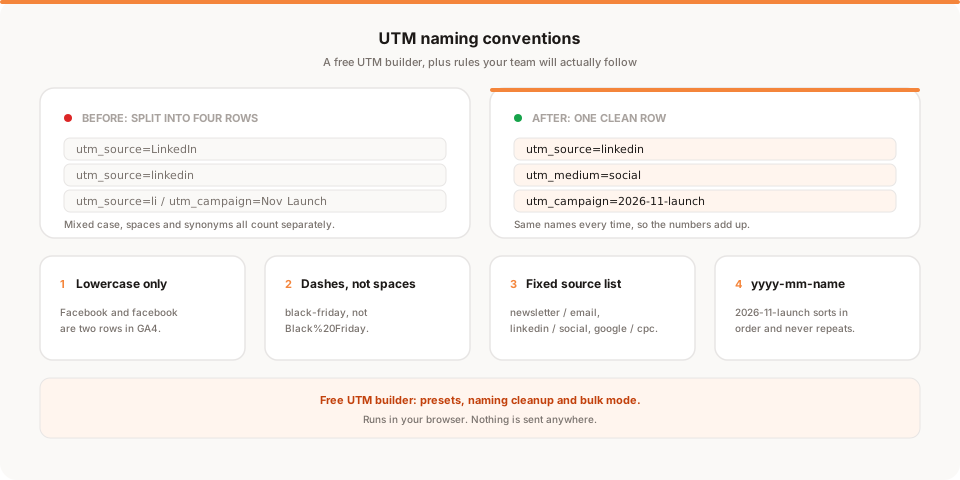
Short answer: a UTM naming convention is a short set of rules everyone on the team follows when tagging links: lowercase only, dashes instead of spaces, a fixed list of sources and mediums, and one campaign format such as
2026-11-launch. It matters because most analytics tools treat
Most UTM problems aren't technical. The links work. The trouble shows up three weeks later, when your campaign report has LinkedIn, linkedin, li and linkedin.com as four separate rows and nobody can say which one is right.
I wrote about the other side of this in UTM links are a mess, here's a simpler way to track the links you share, which is about when to skip UTMs and use a short link instead. This post is for when you do want UTMs, and want them to stay clean once more than one person is tagging links.
One disclosure: I'm Sanjeeva, and I build Muro, which includes a UTM builder in its paid product and a free one on our site. Weigh that as you read. The naming rules below work the same in any analytics tool.
What each UTM parameter is for
UTM parameters are labels you add to the end of a URL. Your analytics tool reads them when someone lands on the page and files the visit under those labels. There are five you'll use regularly.
| Parameter | What it answers | Example values |
|---|---|---|
utm_source | Where exactly did the click come from? | newsletter, linkedin, google, product-hunt |
utm_medium | What kind of channel is it? | email, social, cpc, referral |
utm_campaign | Which push or promotion is this part of? | 2026-11-black-friday, 2026-q4-webinar |
utm_content | Which variant or placement was clicked? | hero-button, footer-link, video-a |
utm_term | Which paid keyword? (mostly for search ads) | privacy-analytics |
A full tagged link looks like this:
https://example.com/pricing?utm_source=newsletter&utm_medium=email&utm_campaign=2026-11-black-friday&utm_content=hero-button
Source and medium are the two people mix up most. Source is the specific place (linkedin). Medium is the category it belongs to (social). If you only remember one thing: source is "where", medium is "what kind".
GA4 also reads a few newer parameters, according to Google's help page on URL builders: utm_id (a campaign ID, useful if you import cost data), utm_source_platform, utm_creative_format and utm_marketing_tactic. Google notes the last two aren't currently reported in GA4. For most small teams, the five above are plenty.
How GA4 uses your medium values
This is where naming stops being cosmetic. GA4 sorts every visit into a default channel group (Email, Organic Social, Paid Search, Referral and so on), and for tagged links it decides mostly from your source and medium. A few rules from Google's default channel group page, simplified:
- Email: source or medium is
email(ore-mail,e_mail,e mail). - Organic Social: the source is a known social site, or the medium is
social,social-network,social-media,sm,social networkorsocial media. - Paid Search: the source is a known search site and the medium contains
cp(socpcworks), isppcorretargeting, or starts withpaid. - Paid Social: a known social source with one of those same paid mediums.
- Referral: medium is
referral,apporlink. - Display: medium is
display,banner,expandable,interstitialorcpm. - Affiliates: medium is
affiliate.
Google says channel definitions themselves aren't case sensitive. But the raw source and medium values in your reports are, so Email and email still show as separate rows.
The practical point: if someone tags a newsletter link with utm_medium=newsletter-blast, GA4 has no rule for that and the visit can land in Unassigned. Stick to the standard medium words and GA4 does the grouping for you.
Why naming breaks
Every team I've seen hit the same four problems.
Case. Google's GA4 help says it plainly: parameter values are case sensitive, so utm_source=google is different from utm_source=Google. Most other analytics tools behave the same way. One person capitalizes, and your Facebook traffic is now split across two rows.
Spaces. A space in a URL gets encoded as %20 or +. So utm_campaign=Black Friday might show up as Black%20Friday in one tool and Black+Friday in another, and some link tools or chat apps break the URL at the space.
Synonyms. fb, facebook, facebook.com, meta. x, twitter, tw. newsletter, email, mailchimp. All correct, all different rows.
Free-text campaigns. If the campaign field is a blank box, you get launch, Launch2, nov launch, product-launch-final. Nobody can filter that six months later.
None of these are anyone's fault. They're what happens when five people type labels by hand with no shared list.
A naming system that holds up
Here are the rules. They fit on a sticky note, which is the point.
- Lowercase only. Every value, every parameter. No exceptions.
- Dashes, not spaces or underscores.
black-friday, notBlack Fridayorblack_friday. Pick one separator and dashes are the most readable. - A fixed list of sources and mediums. Nobody invents a new one without adding it to the shared list first.
- One campaign format:
yyyy-mm-name, like2026-11-black-fridayor2026-12-webinar-onboarding. The date prefix sorts campaigns in order and stopslaunchfrom meaning three different launches. - utm_content for the variant only. Use it to tell apart two buttons in the same email or two versions of an ad:
hero-button,ps-link,video-a. Leave it empty when there's only one link. - utm_term only for paid search keywords. If you're not running search ads, you can ignore it.
Cheat sheet: recommended source and medium pairs
Copy this into your team wiki or a pinned doc. The GA4 column shows where the visit should land in GA4's default channels based on Google's rules above.
| Where you share | utm_source | utm_medium | Expected GA4 channel |
|---|---|---|---|
| Your newsletter | newsletter | email | |
| Transactional or onboarding emails | onboarding-email | email | |
| LinkedIn post | linkedin | social | Organic Social |
| X post | x | social | Organic Social |
| Instagram bio or story | instagram | social | Organic Social |
| Facebook post | facebook | social | Organic Social |
| YouTube description | youtube | social | Organic Social (may vary, see note) |
| Reddit post or comment | reddit | social | Organic Social |
| Google search ads | google | cpc | Paid Search |
| LinkedIn ads | linkedin | cpc | Paid Social |
| Meta ads | facebook or instagram | cpc | Paid Social |
| Product Hunt launch | product-hunt | referral | Referral |
| Guest post or partner site | partner-name | referral | Referral |
| Affiliate links | affiliate-name | affiliate | Affiliates |
| Display banners | site-name | display | Display |
A few honest notes on that table:
- Reddit: some teams tag Reddit as
referralbecause it behaves like one. That's fine, but GA4 also matches known social sites by source, so check where Reddit lands in your own reports before relying on it. Pickingsocialkeeps it predictable. - YouTube: GA4 has an Organic Video channel that matches known video sites, so YouTube traffic may be grouped there instead. Either way,
youtubeas the source keeps it identifiable. - X: use one name and stick to it. I'd pick
x, buttwitteris fine if that's what your history already uses. Switching mid-year splits your data. - Only GA4 uses these channel groups. Other tools, including Muro, show your raw source, medium and campaign values. Clean names help everywhere, but the channel column is GA4-specific.
Where not to use UTMs
Internal links on your own site. Don't tag a banner on your homepage that links to your pricing page, or a link from your blog to your signup page. That visitor already came from somewhere, and the internal tag records your own site as a campaign on top of it.
How much damage that does depends on the tool. Google's GA4 vs Universal Analytics comparison says Universal Analytics started a new session whenever it saw new campaign parameters, so an internal tag split one visit in two and replaced the real source. GA4 no longer restarts the session, but the internal label still gets recorded as campaign data and can muddy your reports. Other tools handle it their own way. The safe rule for every tool: tags are for links that bring people to your site, never for links within it.
A few other places to skip them:
- Links you want search engines to index. Link to the clean URL.
- Paid ad platforms with auto-tagging. Google Ads auto-tagging already passes click data to GA4. Adding manual tags as well is a choice to make on purpose, not by habit.
- Links where nobody will read the breakdown. If you won't look at it, don't build it.
The free UTM builder
To make the rules above easy to follow, we built a free UTM builder. It runs entirely in your browser, needs no account, and sends nothing anywhere.
What it does:
- Fields for every parameter: URL, source, medium, campaign, content and term.
- One-click presets for common sources. Pick one and it fills in the source and medium for you, so nobody has to remember whether LinkedIn is
socialorreferral. - Naming cleanup. It lowercases values and swaps spaces for dashes, and warns you if a value has mixed case, so
Black Fridaybecomesblack-fridaybefore it ever reaches a report. - Bulk mode. Paste one base URL, pick several sources at once, and get a list of tagged links ready to copy. Handy on launch day when the same page goes to your newsletter, LinkedIn, X and Product Hunt.
- Recent links, kept only in your own browser's storage, so you can grab yesterday's link again. Clear your browser data and they're gone. Nothing is stored on our side.
How Muro fits
The free tool is useful on its own, whatever analytics you use. If you use Muro, two parts of the product connect to this.
Muro Links. Muro Links gives you short links on muro.ink, and its UTM builder has a live preview and saved UTM templates. Save "newsletter / email" or "linkedin / social" once, and the whole team picks from the same names instead of typing them. That's the "fixed list" rule enforced by the tool rather than by memory.
The UTM breakdown in the dashboard. Muro's dashboard has a UTM breakdown by source, medium and campaign. Once you've set up a goal, such as visiting your thank-you page, it shows conversions per campaign, so you can compare 2026-11-black-friday against 2026-11-webinar on signups, not just visits. If you want to go further with that comparison, I wrote about which traffic source converts best.
To be clear about the limits: UTM data lives in the dashboard. The morning brief covers visitors, pageviews, bounce rate, average session, top sources and top pages. It doesn't include campaign or conversion numbers.
Bottom line
UTMs only pay off when the names are consistent. Lowercase everything, use dashes, keep a fixed list of sources and mediums, date your campaigns, and never tag internal links. Use standard mediums like email, social, cpc and referral and GA4 will sort your traffic into the right channels.
The easiest way to follow the rules is to stop typing names by hand. Use the free UTM builder for one-off links, or save templates in Muro Links so the whole team reuses the same names. If you'd like to see conversions per campaign next to your site traffic, start a free 30-day Muro trial. No credit card needed.