UTM Links Are a Mess. Here's a Simpler Way to Track the Links You Share
UTM links work, but for the links you share by hand they're long, easy to mistype, and easy to name inconsistently, which quietly splits your data. A short trackable link is cleaner to share and counts clicks for you. Tools like Muro Links go a step further and show which links led to signups, right in your morning brief. Use short links for everyday sharing, and keep UTMs for granular campaign reports if you need them.
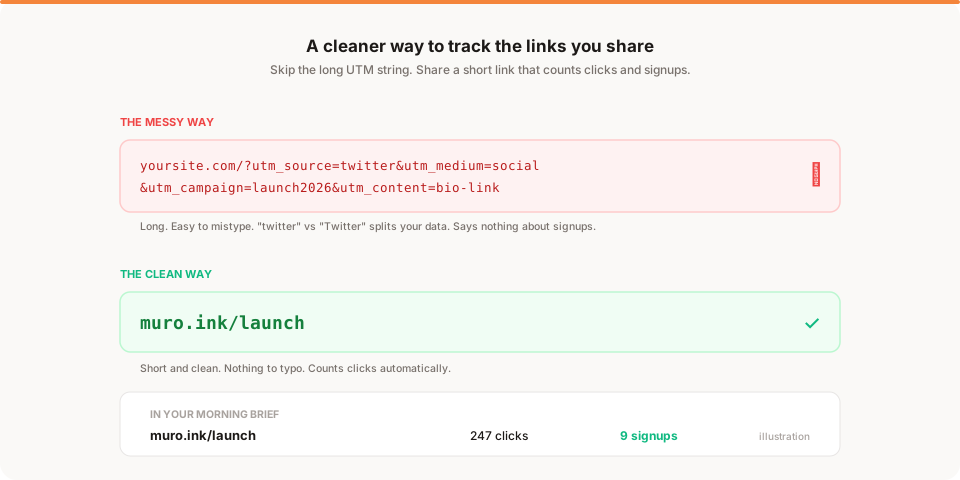
UTM links aren't broken, exactly, but for the links you share by hand they're more trouble than they're worth. They're long, easy to mistype, and easy to name inconsistently, which quietly splits your data across duplicate sources. For everyday sharing, a short trackable link is cleaner and counts clicks for you. Here's why UTMs get messy, and a simpler way to know which links actually worked.
If you've ever pasted a link into your bio that looked like yoursite.com/?utm_source=twitter&utm_medium=social&utm_campaign=launch2026, you already know the feeling. It works, but it's ugly, it's fragile, and half the time you're not even sure the data came through clean. Let's fix that.
What is a UTM link, quickly?
A UTM link is just a normal URL with extra labels added to the end. Those labels are the "UTM parameters," and the common ones are:
- utm_source (where it came from, like
twitterornewsletter) - utm_medium (the channel type, like
socialoremail) - utm_campaign (the campaign name, like
launch2026)
When someone clicks a link with those tags, your analytics tool reads them and files the visit under that source, medium, and campaign. It's a genuinely useful standard, and it's been around forever. If you run a lot of paid campaigns and live inside Google Analytics, UTMs are still worth knowing.
The problem isn't the idea. It's what happens when a busy founder uses UTMs for the dozens of links they share by hand.
Why UTM links get messy
Here's where it falls apart in real life.
They're long and ugly. A tagged URL can be two or three times longer than the page it points to. Try pasting that into an Instagram bio, a podcast show note, or a DM. It looks spammy, and on some platforms it just gets cut off.
They're easy to mistype. Every UTM link is hand-assembled, which means every one is a chance to fat-finger a parameter. One wrong character and the tag either breaks or files the visit under the wrong bucket. You usually don't notice until the data looks weird weeks later.
Inconsistent naming splits your data. This is the quiet killer. Is it twitter or Twitter or x or tw? Is it newsletter or email or mailchimp? UTM values are case-sensitive and free-text, so the same source ends up scattered across three or four labels in your reports. Now no single line in your analytics tells the truth, and you're mentally adding them back together.
They get stripped or lost. Some apps and link previews rewrite or drop query parameters when a link is shared or forwarded. When that happens, your carefully tagged link shows up as direct or unattributed traffic anyway.
They don't tell you what converted. This is the big one. A UTM tells you a visit came from a source. It does not, on its own, tell you whether that visit became a signup or a customer. To get that, you need extra setup, goal configuration, and time inside a tool like GA4. For a founder who just wants to know "did the newsletter actually drive signups," that's a lot of plumbing.
None of these mean UTMs are bad. They mean UTMs are fragile in exactly the situation founders use them most: sharing individual links, fast, across a bunch of places.
The simpler way: short trackable links
Here's the alternative, and it's refreshingly boring.
Instead of tagging a long URL, you create a short link that redirects to your page and counts every click. You share the short link. The tool records the clicks for you. That's it.
A short link like muro.ink/launch is clean enough to drop into a bio, a tweet, a slide, or a DM without looking like a tracking URL. There's nothing to hand-assemble, so there's nothing to mistype. You make one short link per place you're sharing, give it a simple name, and the click counting happens automatically.
The best part is what a good link tool does with those clicks. With Muro Links, the clicks don't just sit in a separate link dashboard. They show up in the same morning email brief as your site analytics, and Muro connects them to signups, so you can see not just how many people clicked muro.ink/launch, but how many of those clicks turned into signups. That's the question UTMs make you work for, answered by default.
So the everyday flow becomes: make a short link, share it, and read your morning brief to see which links actually worked. No parameter strings, no naming debates, no goal configuration.
To be fair: UTMs still have their place
I don't want to oversell this. UTMs aren't going away, and they shouldn't.
If you run many paid campaigns and need granular, standardized reporting inside Google Analytics or an ad platform, UTMs are the right tool. They're the shared language those systems speak, and short links don't replace that. You can even combine the two: point a short link at a URL that already has UTM parameters, so the link is clean to share and still carries the tags your analytics expects. That gives you the tidy link and the campaign reporting at once.
The point isn't "never use UTMs." It's that for the everyday case, the links a founder shares by hand, a short trackable link is simpler, cleaner, and less likely to quietly corrupt your data.
UTM link vs short trackable link
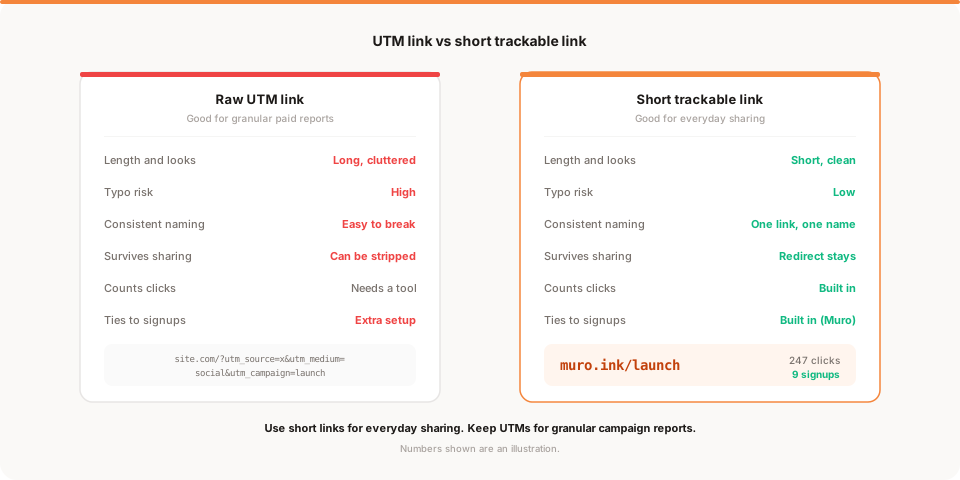
Here's the honest comparison for everyday sharing.
| Raw UTM link | Short trackable link | |
|---|---|---|
| Length and looks | Long, cluttered | Short, clean |
| Typo risk | High, hand-assembled | Low, generated for you |
| Consistent naming | Easy to get wrong | One link, one name |
| Survives sharing | Parameters can be stripped | Redirect stays intact |
| Counts clicks | Needs an analytics tool | Built in |
| Ties clicks to signups | Extra setup required | Built in with Muro Links |
| Best for | Granular paid campaign reports | Everyday links you share |
How Muro Links fits (honestly)
Since this is my product, let me be clear about exactly what it does and doesn't do.
Muro Links lets you turn any URL into a short link on the muro.ink domain. You share that link anywhere, and Muro counts the clicks. Because Muro also runs your site analytics, it can show which links led to signups, and it puts all of that in the same plain-English brief that lands in your inbox every morning at 8 AM. It's included on every Muro plan, so you're not paying extra for it.
What it doesn't do: it doesn't detect anything for you, it doesn't tell you why a link did well or badly, and it isn't a full campaign-management suite. It counts clicks, ties them to signups, and shows you the numbers clearly. The judgment about what to do next is yours. That's deliberate. The whole idea of Muro is to hand you the facts in plain language and get out of your way.
If you want to go deeper on using this data well, I wrote about which traffic source converts best, which is exactly the question link tracking helps you answer.
Practical tips for tracking links without the mess
A few habits that make this painless:
- One short link per place you share. A different link for your bio, your newsletter, and a specific launch post. That way each link's clicks tell you about that specific channel.
- Keep names simple and consistent.
muro.ink/launch,muro.ink/newsletter,muro.ink/bio. Readable names beat clever ones, and you'll thank yourself later. - Don't tag what you don't need. If you're not going to look at a breakdown, don't build one. A single clean link you'll actually read beats five tagged ones you won't.
- Read the brief, not a dashboard. Check which links drove clicks and signups in your morning summary. That's the whole feedback loop: share, wait a day, read, adjust.
- Combine with UTMs only when it earns its keep. For a big paid campaign where you need standardized reporting, put UTMs behind the short link. For everything else, keep it simple.
If you're about to launch, the same thinking applies to your first week of data. I put together a focused list in what to track in your first week after launch and a broader take in how to measure launch success.
A quick example: tracking a launch across five channels
Say you're launching something and sharing it in five places: an X post, a LinkedIn post, your newsletter, your Product Hunt page, and a banner on your own site. With UTMs, that's five hand-built strings, each a chance to typo and each needing consistent naming to stay comparable later.
With short links, you make five clean ones instead: muro.ink/launch-x, muro.ink/launch-li, muro.ink/launch-news, muro.ink/launch-ph, and muro.ink/launch-banner. You paste each where it belongs. The next morning, your brief shows how many clicks each one drove and how many became signups. Now you can see, in plain numbers, that the newsletter pulled twice the signups of the X post even though the X post got more clicks. That's the kind of comparison that changes what you do next time, and you got it without touching a settings screen or building a report.
What about Bitly, dub.co, and link-in-bio tools?
Short links aren't new, and there are good dedicated tools for them. Bitly and dub.co are popular link shorteners with their own analytics, and link-in-bio tools bundle a set of links behind a single page. They're all reasonable options, and if you already use one you like, keep it.
The difference with Muro Links is where the data lands. With a standalone shortener, your click data lives in that tool's dashboard, separate from your site analytics, so you're checking two places and stitching the picture together in your head. With Muro, the link clicks show up in the same morning brief as your site traffic and signups, so the whole picture arrives in one email. It's less about Muro Links being a fancier shortener and more about not having your data scattered across tools you have to remember to open.
Do short links hurt SEO or look sketchy?
A fair worry: does using a short link cost you anything? For links you share on social, in a bio, or in a DM, no. Those clicks are just people going to your site, and a clean redirect passes them straight through. Short links can actually look more trustworthy than a URL bristling with tracking parameters, which is exactly the kind of thing that makes people hesitate before clicking. The one place to be thoughtful is your own internal site links and anything you want search engines to index directly. For those, link to the real page, not a short link. Short links are for the places you share by hand, not for your site's navigation.
The bottom line
UTM links aren't evil. They're just fragile for the way founders actually share links: fast, by hand, across a lot of places. Long strings get mistyped, inconsistent names split your data, and even when they work, they don't tell you what converted without extra setup.
A short trackable link fixes most of that. It's clean to share, it counts clicks for you, and with the right tool it connects those clicks to signups so you can see what actually worked. Keep UTMs for the granular campaign reporting they're good at, and use short links for everything else.
If you'd like your link clicks and signups to show up in the same two-minute email as your site traffic, try Muro free for 30 days. Muro Links is included on every plan, setup takes about two minutes, and your first morning brief lands the next day. No cookies, no UTM strings to remember, and no separate dashboard to check.