How to Actually Switch Off Google Analytics (a Step-by-Step Playbook for 2026)
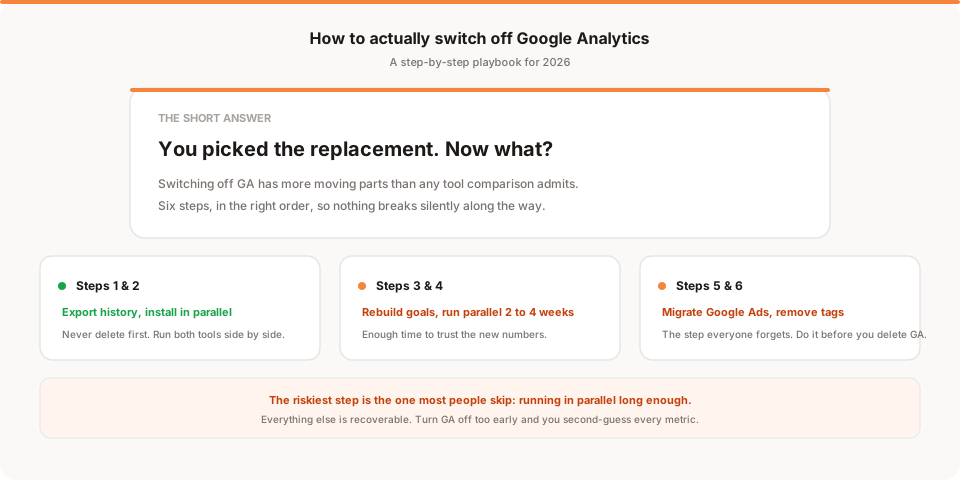
Switching off Google Analytics is a 6-step process: export your history, install the replacement alongside GA, rebuild your goals, run both in parallel for 2 to 4 weeks, update the downstream tools (Google Ads, Search Console, alerts), then remove the GA tags. The riskiest step is the one most people skip: running in parallel long enough to trust the new numbers.
If you've decided to leave Google Analytics, you've probably read a hundred articles telling you which tool to switch to. This isn't one of those. This is the article you need after you've picked the replacement, when you're staring at your GA property and wondering what actually happens next.
The reason most people put off the switch isn't that they can't find a replacement. It's that switching off GA feels like a rug-pull. Your ad campaigns are wired into it. Your Search Console is linked to it. There's a weekly report someone on your team reads. There's four years of historical data you're not sure you can lose. Every dashboard in every tool touches it somewhere.
Here's the honest version: switching off GA isn't hard, but it has more moving parts than any tool comparison post admits. This guide walks through the six steps, in the order that actually works, plus what to do about the things nobody warns you about (Google Ads breaks silently, your team notices the numbers changed, and the "just delete it" tribes give bad advice).
Before you start: what to have ready
Two things before step 1:
- You've already picked your replacement. If you haven't, that's a separate decision. Read our breakdown of the best Google Analytics alternatives or the Google Analytics vs Plausible comparison. Come back when you know what you're switching to.
- You have access to Google Ads and Search Console (if you use them). These have to be updated at specific points during the switch. If someone else on your team owns them, loop them in now.
Step 1: Export your Google Analytics history
Don't skip this even if you think you'll never look at the old data. Two years from now, someone will ask "how did our traffic in Q3 compare to last Q3" and you'll wish you had it.
What to export:
- Landing pages report, filtered to organic traffic, for the full range you care about
- Acquisition overview, all channels, monthly granularity
- Events / conversions report, if you had any custom events set up
- Audience overview, country and device breakdown
- Any custom reports you actually looked at
How to export:
- Small setups: use the export button in each GA report (CSV or Google Sheets)
- Larger setups: connect GA4 to BigQuery for a full raw-data export. This is free up to 1 million events per day and preserves everything.
- Fastest: take a screenshot of each report you care about into a folder called "GA archive 2026" and move on. Ugly but effective.
The goal isn't a perfect archive. The goal is that when you need to answer "what did our traffic look like before we switched" in six months, you can.
Step 2: Install your replacement alongside Google Analytics
Do not remove the GA tag when you install the new one. You want both running in parallel.
Every replacement tool has an install guide, so we won't rewrite them here. Whether it's a snippet in your <head>, a Shopify app, a Webflow integration, or a plugin, install it and confirm you see live traffic in the new tool within an hour.
Two things to double-check:
- The new tool sees the same pages GA sees. Load your homepage, check both. Load a pricing page, check both. The numbers won't match exactly (different tools count differently) but the pages should show up in both.
- The new tool is set to your correct timezone. Small thing, easy to miss, causes confusing off-by-a-day arguments later.
At the end of step 2, you have two analytics tools running simultaneously. That's supposed to happen. Leave it that way.
Step 3: Rebuild your goals and events in the new tool
This is where most migrations quietly fail. In GA, you probably had a few conversion goals set up (signup complete, checkout finished, form submitted). Those don't magically transfer.
Make a list of every conversion you actually cared about in GA. Not every event, not every custom dimension you set up in 2022 and forgot about. Just the 3 to 8 events that matter to your business.
For each one, set up the equivalent in your new tool:
- Signup complete: usually a
/thank-youor/dashboardpage view, or a custom event fired after signup - Purchase complete: the order confirmation page, or an e-commerce event
- Contact form submitted: the thank-you page after form submission
- Trial started: the URL of the trial dashboard, or an event
- Key feature used: a custom event fired from your app
Some replacements make this easy (you paste the same event names into their interface). Others make you rebuild from scratch. Either way, do it in this step, not later.
Test each event: go through the flow yourself and confirm the event fires in the new tool. This takes an hour and prevents a week of confused debugging later.
Step 4: Run both tools in parallel for 2 to 4 weeks
This is the step everyone rushes. Don't.
You need enough time to see:
- One full weekly cycle (weekday vs weekend patterns)
- One monthly billing/marketing cycle (if you run recurring campaigns)
- At least one campaign spike or event (so you know the tools track spikes similarly)
While they run in parallel, compare the numbers weekly. They will not match exactly, and that's fine. Different tools count sessions differently, some strip bots and some don't, some count referrals as direct traffic and some don't. What you want to see is the same shape: same weekly pattern, same top pages, same top countries, same rough conversion rate.
If the shapes match, you can trust the new tool. If they don't, figure out why before you switch. Usually it's one of:
- The new tool isn't installed on every page (check the ones GA sees that the new tool doesn't)
- Bot filtering is different (GA is aggressive, some replacements aren't, or vice versa)
- Attribution windows differ (GA counts a conversion up to 90 days after first touch, most replacements count 7 to 30 days)
Step 5: Migrate the downstream tools
This is the step that separates a clean switch from a mess.
Google Ads. Most people run their Google Ads conversion tracking through GA, and they don't realise it. When you remove GA, your Ads conversion tracking silently stops working, and you spend a month wondering why your ROAS reports are broken.
Fix: install the Google Ads conversion tag directly on your key conversion pages before you remove GA. Google's docs walk through this. It takes about an hour. Do it now, not after.
Search Console. Keep it. Search Console is a completely separate tool from Google Analytics, and it's genuinely useful (keyword-level click data straight from Google Search). Removing GA doesn't affect it.
Some analytics replacements let you connect Search Console directly for keyword-level data. Set that up if yours does.
Reporting dashboards and alerts. If you have a Slack alert that fires when traffic drops, or a Notion dashboard that pulls GA data, or a weekly report Sanjeeva reads on Monday mornings, update all of them to pull from the new tool. This is a small task if you write it down, and an infuriating one if you don't.
Consent / cookie banner. Some replacement tools don't require a cookie banner. If yours doesn't, this is a good moment to simplify (or remove) yours. See our post on whether you actually need a cookie banner.
Anything else that pulls the GA API. Data warehouses, CDPs, BI tools, monitoring dashboards. Search your project for "google-analytics" or "gtag" or "ga4" in code and config to find them.
Step 6: Remove the Google Analytics tag
Finally. This is the step everyone thinks is step 1.
- Find every place the GA tag is installed. Usually one snippet in your
<head>or a tag in Google Tag Manager. On some sites it's installed twice (once directly and once via GTM, from different eras). Find both. - Comment it out first, don't delete it. Push the change, wait 48 hours, confirm your new tool still sees traffic and nothing else broke.
- Then delete it properly. Remove the tag entirely, remove the associated cookies you no longer need, remove any consent-banner categories tied only to GA.
At this point, your site is running on the new tool only. Congratulations.
Step 7: Archive and tell your team
Two small closing tasks.
Archive the old GA property. You don't have to delete it. In GA4, you can leave it live but stop sending data. Historical data stays available for the retention period. Set a calendar reminder for 12 months from now to either export the last of it or delete the property.
Tell your team. Send one message. What tool you switched to, why, the URL, what changed in the weekly report, and what to expect (different absolute numbers because different tools count differently). If someone owns a metric that came out of GA, tell them where it comes from now.
What breaks (the honest list)
Most guides pretend the switch is seamless. It isn't. Here's what actually breaks, and why it's fine:
- Absolute numbers change. Your new tool will report a different visitor count. This isn't a bug in either tool. GA counted differently. Track your trends going forward, not the absolute comparison.
- Historical comparisons stop being possible. You can't say "traffic is up 12% vs last quarter" if last quarter was in GA and this quarter is in the new tool. You have to either compare within one tool or use approximations. Live with it for a year and it stops mattering.
- Google Ads reports look different. Because they're now pulling from your new conversion tracking, not GA. The number of conversions may look slightly higher or lower. Same reason as above.
- Some third-party tools stop working. Rare but happens. Anything you plug in that assumed "GA is installed" (some heatmap tools, some CRO tools) may need reconfiguring.
None of these are dealbreakers. They're the cost of making the switch, and after a month you'll forget they were ever an issue.
What Muro does after the switch
If you're switching to Muro specifically, the setup is one snippet, and after a week you'll get a daily email summarising your site. Traffic, top pages, where signups came from, what shifted week over week. No dashboard to open, no report to build. Meant for teams that don't have a data analyst and don't want another tab to babysit.
The switch above works for any replacement. If you want the honest positioning, see our comparison of Google Analytics vs Plausible vs Simple Analytics, or start at muroanalytics.com.
The one thing that matters more than which tool you pick: don't rush the parallel-running step. Everything else is recoverable. If you turn off GA before you trust the new numbers, you spend the next two weeks second-guessing every metric.