Can you see who viewed your Carrd site? (And how to see how many people did)
You can't see who viewed your Carrd site by name, and no privacy-respecting analytics tool will show you that. You can see how many people viewed it: Carrd's own analytics (in beta, Pro Standard or higher) counts views, and a third-party tool added through Carrd's Site Analytics setting or a hidden Embed element in the Head adds sources, countries, devices and button clicks. Both routes need Carrd Pro Standard or higher.
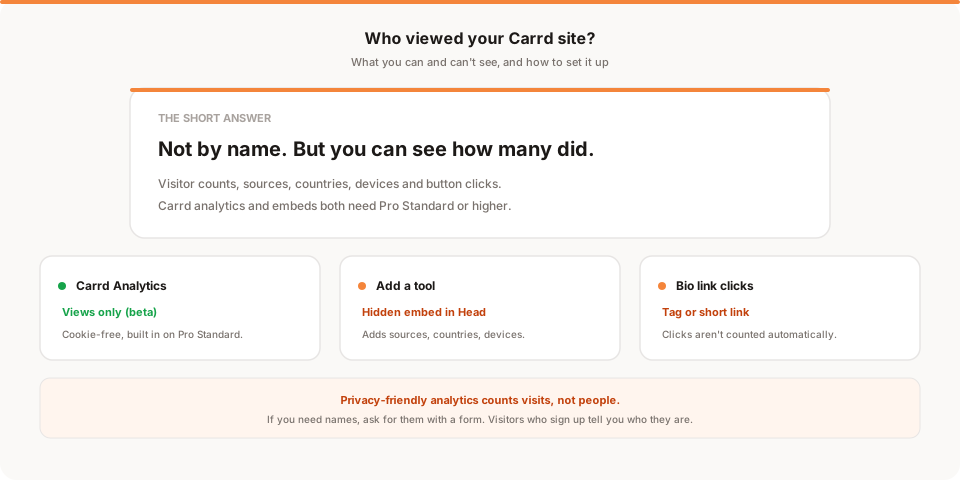
Short answer: no, you can't see who viewed your Carrd site by name, and no privacy-respecting analytics tool will show you that. You can see how many people viewed it, where they came from, and which buttons they clicked. Carrd's own analytics counts views, and a third-party tool adds the rest. Both need Carrd Pro Standard or higher.
If you put a Carrd page in your bio or launched something on it, the question comes up fast: is anyone actually looking at this?
One disclosure before we start: I'm Sanjeeva, and I build Muro, one of the tools compared below. Weigh my take on it accordingly. Everything here about Carrd comes from Carrd's own docs as of November 2026.
Can you see who viewed your Carrd site?
No. Not with Carrd, and not with any analytics tool that respects visitor privacy.
Here's why. To tell you that "Alex from Berlin" looked at your page, a tool would need to know who Alex is. A normal website visit doesn't carry that information. The visitor's browser sends a page request, maybe a referrer, a device type and a rough location from the network. There's no name or email in it unless the person typed one into a form.
Privacy-friendly tools also deliberately avoid the tricks that get closer, like cookies or browser fingerprinting. Muro, for example, stores no IP addresses, sets no cookies, and counts visitors with an anonymous ID that resets every 24 hours. It can tell you that 212 people came from Instagram yesterday. It can't tell you who any of them were.
If you really need names, the honest route is to ask for them: a signup form, an email list, or a "book a call" button. Those people tell you who they are because they chose to.
What you can see, with the right setup:
- How many people visited, by day, week or month
- Where they came from: Instagram, TikTok, X, Product Hunt, Google, a newsletter
- Which country and device they used
- Which buttons and links they clicked, once you set up click tracking
For most Carrd pages, that's the information you actually want anyway.
What Carrd offers on its own
Carrd sites don't include any tracking by default. You turn it on per site, and it needs Pro Standard or higher. Carrd lists Pro Standard at $19 a year for up to 10 sites (approximate, check carrd.com/pro, November 2026). Pro Lite, the cheapest paid tier, doesn't include analytics, embeds, forms or custom domains.
Once you're on Pro Standard, Carrd gives you two routes.
1. Carrd Analytics (native, in beta). Carrd now has its own cookie-free analytics. Per its docs, it tracks views only, where each view is one load of your site. You see a count for the last 24 hours, 7 days or 30 days, plus a trend graph. Carrd says plainly that views are a general measure of traffic, not exact unique visitors, and points you to other providers for traffic sources and conversions. If you only want to know "did anyone look at this," it does the job.
2. A third-party provider through Site Analytics. In the same settings screen you can pick a provider instead of Carrd's own. The current list is Cloudflare Web Analytics, Fathom, Google Analytics, Matomo, Plausible, PostHog, Simple Analytics and Umami. You enter the tool's ID and Carrd adds it for you.
The path, per Carrd's docs:
- Open the Dashboard and click the Sites tab.
- Find your site and click its Manage icon.
- In the sidebar, click Analytics.
- Under Site Analytics, click Select Provider, choose one, and click Enable.
If your tool isn't in that list, you add it with an Embed element instead, which is the next section.
How to add an analytics script to Carrd with an Embed
This works for any tool that gives you a script tag, including Muro. It needs Pro Standard or higher, because that's the tier that includes Embeds.
- Open your site in the Carrd editor and add an Embed element (the
</>option when you click +). - Set Type to Code.
- Set Style to Hidden. This keeps it out of your page layout. A Hidden embed doesn't render anything visible.
- Set the placement to Head. Carrd's options for a Hidden embed are Head, Body Top and Body End. Analytics scripts usually go in the Head, and that's what Plausible's and Fathom's Carrd guides use too.
- Paste your tool's script tag into the Code field. For Muro, that's the script tag from your project's setup screen.
- Click Done, then publish.
Two practical notes. The embed shows nothing inside the builder, so you have to publish and visit your live site to check it. And because a Hidden embed sits outside the normal flow, you can drag it to the bottom of the element list so it stays out of your way.
To confirm it's working, open your published site in a private window, then check your tool's dashboard for the visit. Muro's setup screen tells you when the first pageview arrives.
What you can actually see once it's installed
This depends on the tool, but here's what a typical privacy-friendly setup shows for a Carrd page.
Visitor counts. Visitors and pageviews per day, with a comparison to the previous period. In Muro, you also get a morning email at 8 AM with yesterday's visitors, pageviews, bounce rate and average session, each compared with the day before, plus your top 3 sources and top 3 pages.
Sources. Which sites sent people. For a link-in-bio page, this is the useful one: you'll see Instagram, TikTok, X, YouTube and so on as separate sources. Some apps strip the referrer, so a share of traffic will show as direct. UTM tags on the links in each profile fix most of that (for example ?utm_source=instagram).
Countries and devices. Where visitors are and whether they're on mobile. For a bio page, expect mostly mobile.
Button and link clicks. These are not automatic in Muro or most privacy-friendly tools. Pageviews are. You choose which clicks to count. More on that below.
One Carrd-specific thing to know: Carrd builds multi-section sites as one page, with sections addressed by a # in the URL. Plausible has a hash-based routing option that counts each section as its own page. Muro records the page path without the # part, so a Carrd site shows up as one page. If you need to know how many people reached a particular section, track the button that takes them there as a click instead.
How to track link-in-bio button clicks on Carrd
This is the part most Carrd guides skip. You've got three options, and the right one depends on your plan.
Option 1: Tag the button directly (Pro Plus). Muro counts a click on any element that has a data-muro-event="name" attribute, for example data-muro-event="shop-click". Adding custom attributes to Carrd elements is part of Advanced Settings, which needs Pro Plus ($49 a year, approximate, check carrd.com/pro). Select the button, open its Settings tab and add the attribute there. Carrd's docs say you can add custom HTML attributes but don't show the exact field layout, so check the result on your published page. Once a click arrives, Muro's dashboard confirms it, and you can mark the event as a goal.
Option 2: Build the button inside an Inline embed (Pro Standard). If you're on Pro Standard, add an Embed with Type Code and Style Inline, and write the button yourself, for example <a href="https://yourshop.com" data-muro-event="shop-click">Visit my shop</a>. You'll need to style it to match the rest of the page, which is a bit of extra work. A click on the link, or anything inside it, sends the event.
Option 3: Point each button at a short link. Instead of tagging the button, send it through a short link that counts its own clicks. Muro Links does this on every plan: make muro.ink/yourname-shop, set it as the button's URL, and you'll see clicks per link by country and device. This works on any Carrd tier where you can set a button URL, and it also counts clicks when you share the same link elsewhere.
Whichever you pick, remember that click tracking starts when you set it up. Muro can't count clicks from before the attribute was added. Pageviews are different: they're recorded from the moment the script is installed.
Plausible and other tools do this too, with their own method. Plausible's Carrd guide, for example, uses Carrd's default element IDs (like buttons01) plus a small script to tag clicks.
Carrd analytics options compared
Prices are approximate and change. Check each tool's site before you buy (November 2026).
| Carrd Analytics | Google Analytics 4 | Plausible | Fathom | Muro | |
|---|---|---|---|---|---|
| Price | Included with Pro Standard ($19/yr) | Free | From about $9/mo (10k pageviews) | From about $15/mo (100k pageviews) | From $12/mo (100k pageviews) |
| How it's added | Site Analytics setting | Site Analytics setting | Site Analytics setting or Embed | Site Analytics setting or Embed | Embed (Head) |
| What you see | Views only | Everything, with setup | Visitors, sources, pages, goals | Visitors, sources, pages, events | Visitors, sources, pages, goals, conversions |
| Cookies | No | Yes | No | No | No |
| Consent banner in the EU | Generally not needed | Generally needed | Generally not needed | Generally not needed | Generally not needed |
| Daily email summary | No | No | Periodic email reports | Periodic email reports | Yes, every morning at 8 AM |
| Trial | n/a | n/a | 30 days, no card | 7 days, card required | 30 days, no card |
A fair read of each:
- Carrd Analytics is the easiest. No extra account, no cookies. But views only, so you won't learn where people came from.
- Google Analytics 4 is free and very deep, and it's in Carrd's provider list. It uses cookies, so in the EU you'd normally need a consent banner, and it takes real effort to find simple answers in it. If you're unsure about banners, I covered it in do you need a cookie consent banner.
- Plausible is a clean, well-liked dashboard and has the best Carrd-specific handling I found, including hash-based sections. It's in Carrd's provider list.
- Fathom is also in Carrd's provider list, with a polished dashboard. Its trial is shorter and asks for a card.
- Muro sends a short morning email so you don't have to remember to check, has goals and conversions in the dashboard, and includes short links for bio buttons. It's not in Carrd's provider list, so you add it with an Embed, and it doesn't split Carrd sections into separate pages.
For a wider look at this category, see the best privacy-friendly analytics tools for 2026.
Tracking Carrd form signups
If your Carrd page collects emails or inquiries, you'll want to count submissions, not just views. The most reliable pattern in any tool is a thank-you page: after someone submits, they land on a page only submitters see, and you count visits to that page as conversions.
Forms need Pro Standard. I couldn't confirm from Carrd's docs exactly which post-submit options each form type offers, so check your form's settings for a redirect option before you build around it. If your form posts to a service like Mailchimp or Kit and that service redirects to a thank-you page you control, install your analytics script there too.
In Muro, you then make that page a goal. Goals are retroactive, so if the thank-you page has been getting visits since you installed Muro, you see its history straight away, broken down by source, country, device and UTM campaign.
How Muro fits with Carrd
Muro suits Carrd if you want the numbers to come to you: a hidden Head embed on Pro Standard, then a short email every morning. The dashboard holds the rest: goals, conversions by source, and clicks you've tagged. Bio button clicks aren't in the morning email; you see them in the dashboard or in Muro Links.
What it won't do: it won't tell you who visited, it won't count clicks you haven't tagged, and it won't split Carrd's # sections into separate pages. There's more detail on the Carrd setup page.
The bottom line
You can't see who viewed your Carrd site, and a tool that claims to show you names on a normal page visit should make you nervous. You can see how many people came, where from, on what device, and what they clicked.
If you only want a view count, turn on Carrd Analytics. If you want sources and clicks too, add a privacy-friendly tool through Site Analytics or a hidden Head embed. Both need Pro Standard.
If a short email every morning sounds better than another dashboard, try Muro free for 30 days. No credit card, no cookies, and about two minutes to set up. If Plausible or Fathom suits you better, use one of those. The point is knowing whether your page is working.