Analytics for Next.js Apps: What Actually Works in 2026
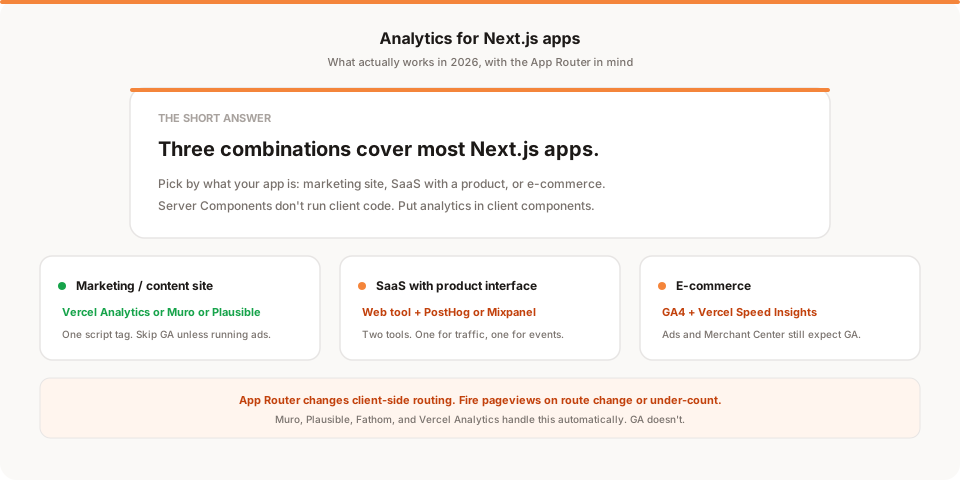
For most Next.js apps in 2026, pick one of three combinations: Vercel Analytics + Vercel Speed Insights (fastest to set up, works with everything), Plausible or Fathom or Muro for traffic + PostHog for product events (privacy-friendly, best coverage), or Google Analytics 4 if you're stuck with it for ad campaigns. The App Router doesn't break any of these, but it does mean route changes fire client-side and you have to handle them yourself for the pageviews to be right.
Every Next.js app needs analytics at some point, and every Next.js app has a slightly different setup, so most "how to add analytics" guides end up too generic to actually help. This one is trying to be more useful: what your options are in 2026, how the App Router changes things, and what to actually pick for the shape of app you're building.
If you're just looking for install instructions, we have a separate post on how to add analytics to Next.js. This one is the "which one and why" post.
What makes Next.js analytics different
Three things about Next.js that matter for analytics:
- Client-side routing. After the first page load, subsequent navigations happen in JavaScript, not full page reloads. A lot of older analytics tools (including default GA) only fire on hard page loads, so they under-count pageviews unless you hook them into the router.
- Server Components and the App Router. Since Next.js 13, some parts of your app render on the server and never ship JavaScript to the browser. Analytics that runs client-side won't fire in Server Components, which is fine, but it means you have to put your tracking in the right place.
- Streaming and Suspense. With App Router, parts of a page can render before others. If you fire an analytics pageview on component mount, you might fire before the whole page is ready. Most tools handle this fine, but it's a source of subtle bugs if you build custom event tracking.
None of these are dealbreakers. But they explain why the "just add gtag to your _app.tsx" advice from 2021 doesn't quite work anymore.
Your realistic options in 2026
Six main categories, one paragraph each on what they're for.
Vercel Analytics + Speed Insights
If you host on Vercel, this is the fastest setup possible. Two npm install commands, two component imports in your root layout, no configuration. You get pageviews, top pages, referrers, countries, and Core Web Vitals in the same dashboard as your deploys.
Downsides: it's Vercel-only (well, technically the Analytics package works anywhere, but the value is the integration). No public dashboard. Basic feature set compared to dedicated tools.
Best fit: you host on Vercel, you want the simplest thing that works, you're happy with a dashboard.
Google Analytics 4
Still the default choice for teams that need to integrate with Google Ads or that have a marketing team already trained on GA. In Next.js it's fine if you install it via next/script with the afterInteractive strategy and manually fire pageviews on route change.
Downsides: heavy (45 KB minified), requires a cookie consent banner in the EU and UK, and the interface is dense enough that most small teams only use 5% of it.
Best fit: you're running Google Ads and need the built-in conversion integration, or your organisation has standardised on GA and switching is a bigger project than it's worth.
Plausible, Fathom, Simple Analytics
Three well-loved privacy-friendly tools that all install with one script tag in your <head> (or in the App Router's root layout). Around 1 to 3 KB each. No cookies. No consent banner needed for most jurisdictions. Straightforward dashboards.
Downsides: they're for website traffic only. If you need to track feature usage inside your app (button clicks, feature adoption, signup funnels), you need a second tool.
Best fit: content site, marketing site, or a SaaS where you mostly care about traffic sources and top pages. You're on a small team and don't want a dashboard-heavy tool.
PostHog and Mixpanel
Product analytics tools. They track events (button clicks, feature adoption, signup steps, retention cohorts) rather than pageviews. Both have official Next.js SDKs.
Downsides: overkill for a marketing site. Both have steep learning curves. Both cost more once you scale.
Best fit: you're building a SaaS app and you need to understand what users do inside it (not just how they got to your marketing pages). Pair one of these with a lightweight traffic tool for a complete picture.
Muro
We build this one. It's a small tool for teams that don't want another dashboard to check. One script tag in your root layout, and after a week you get a daily email summarising your site: traffic, top pages, where signups came from, what changed vs last week. No dashboard to open, no report to build.
Downsides: not the tool if you want to slice and dice metrics ad hoc. If you love a dashboard, use one of the others.
Best fit: small team without a data analyst, you want to know what happened without going to look, and you don't need product-analytics event tracking.
Umami, Matomo, GoatCounter (self-hosted)
Open source tools you can self-host. Cheap or free once you're set up. Full data ownership.
Downsides: you have to run a database, keep it patched, and handle backups. For most small teams the time cost isn't worth the savings.
Best fit: you have DevOps capacity, you specifically want data ownership for compliance reasons, or you enjoy tinkering.
The App Router bits nobody tells you
If you're on the App Router (which you should be, at this point), a few things to know:
Put analytics in the root layout, not the page. Any script you want to run on every page should sit in app/layout.tsx (or a top-level client component imported from it). If you put it in a specific page or route group, it only fires there.
Use next/script for third-party scripts. Not a plain <script> tag. The strategy="afterInteractive" prop is the sane default. beforeInteractive blocks rendering and is almost never what you want. lazyOnload fires too late for pageview counting.
Fire client-side pageviews on route change. The pattern:
'use client'
import { usePathname, useSearchParams } from 'next/navigation'
import { useEffect } from 'react'

export function AnalyticsRouteTracker() {
  const pathname = usePathname()
  const searchParams = useSearchParams()
  useEffect(() => {
    // your analytics pageview call here
    const url = pathname + (searchParams?.toString() ? `?${searchParams}` : '')
    // gtag('config', 'GA_ID', { page_path: url })
  }, [pathname, searchParams])
  return null
}
Drop this component into your root layout. Modern tools (Plausible, Fathom, Vercel Analytics, Muro) handle this automatically. GA, Mixpanel, and PostHog don't, or handle it inconsistently, so you write this yourself.
Don't put analytics tracking in Server Components. Server Components don't run in the browser. Any gtag('event', ...) call in a Server Component just doesn't happen. Move it to a client component or use a client-side handler.
Middleware isn't the right place for pageview tracking. Edge middleware runs before the request even reaches your app, and it doesn't have access to the client. It's fine for redirects, geolocation, A/B routing. It's not fine for firing analytics events.
Practical recommendation by shape of app
Fewer opinions, more direct:
Marketing site / landing pages / content site. Vercel Analytics (if on Vercel) or Plausible / Fathom / Muro. Skip GA unless you're running Google Ads.
Docs site. Same as above, plus a search analytics layer (Algolia analytics or similar) if you care about what people are searching.
SaaS app with a mix of marketing pages and app pages. Two tools. One lightweight for the marketing site (Muro, Plausible, or Vercel Analytics). One for product events inside the app (PostHog or Mixpanel). Yes, running two tools is annoying. It's the right shape.
E-commerce on Next.js Commerce. GA4 is still the pragmatic choice because of the Google Ads and Merchant Center integration. Pair it with Vercel Speed Insights for Core Web Vitals since ecommerce SEO cares about them.
Internal tool with a small user base. Don't overthink it. Vercel Analytics or nothing. You can always add tracking later; you can never take back the wasted time of overengineering it early.
Common gotchas
Small list, sharp corners:
- Ad blockers block most analytics tools. Muro, Plausible, and Fathom get blocked less often (they use less-suspicious domains and scripts). GA and PostHog get blocked more. Whichever tool you pick, expect 10 to 40% under-counting from ad blockers. This is normal, not a bug in the tool.
useReportWebVitalsis Next.js's built-in way to grab Core Web Vitals. If you're on Vercel Analytics, Speed Insights uses this under the hood. If you're on a different tool and want vitals, this hook is where you send the data from.- Preview deployments count as traffic. If you deploy preview environments (Vercel preview URLs, Netlify deploys), they'll show up in your analytics. Filter them out at the tool level or don't fire analytics scripts on non-production URLs.
- Localhost counts as traffic if you're not careful. Same story. Every tool has a way to exclude localhost or non-prod hosts. Set it up on day one.
- App Router 404 pages need explicit tracking. The
not-found.tsxfile renders when a route doesn't match. Some tools count this as a pageview to/, which is wrong. If you have a lot of 404s and want to see them, wire it up explicitly.
Where to start if you're setting this up today
If you're a founder or engineer setting up a new Next.js app right now, here's the least-bad default:
- Add Vercel Analytics or Muro or Plausible in your root layout (one script tag).
- Don't add product analytics yet unless you've launched and have real usage.
- Wait a month, look at what questions your traffic tool actually answers.
- Add PostHog or Mixpanel only when you have questions the traffic tool can't answer (feature usage, retention, funnel drop-off).
This ordering saves 3 to 6 hours of setup time and avoids the classic mistake of over-instrumenting an app that has no users yet.
If you want to see what the "daily email summary" style looks like specifically, that's what Muro is. One script tag, and a week later you get a plain-English email summarising the site every morning. No dashboard. Meant for teams building small products who don't want another tab open.
The tool matters less than the habit of actually looking. Any of the options above will tell you what's happening on your Next.js app. Pick the one you'll actually check.