Web Analytics for Solo Founders and Small Teams: The Honest Comparison
For solo founders and small teams, the best web analytics tool is the one you'll actually check. Muro sends the summary to your inbox, no dashboard. Vercel Analytics is the fastest to install if you're on Vercel. Plausible, Fathom, and Simple Analytics are the polished dashboard tools. GoatCounter is the free open-source option. Skip PostHog, Mixpanel, and Google Analytics 4 unless you have a specific reason to run them, they're built for a different customer.
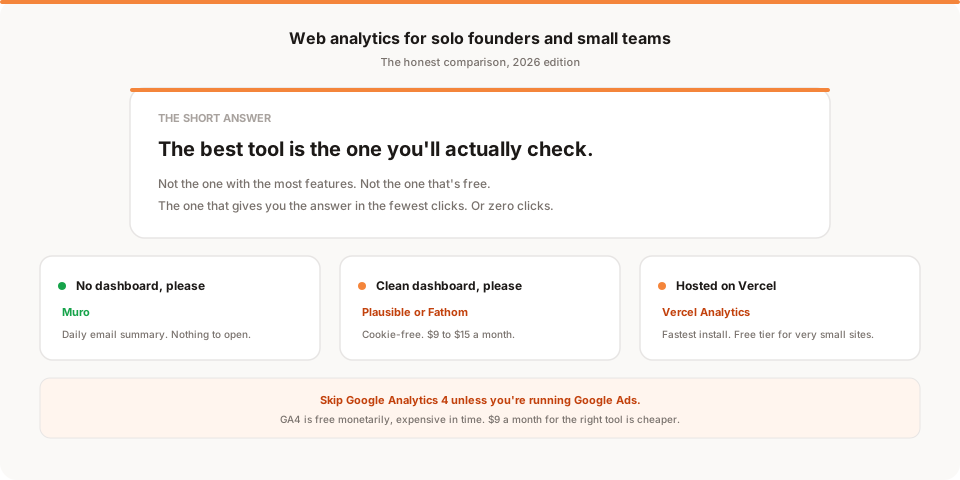
Every analytics comparison post seems to be aimed at either a big company with a data team, or a hobbyist looking for a free hit counter. There's almost nothing written for the actual middle: a solo founder or a small team with a real product, no data analyst, no time to babysit a dashboard, and no interest in learning a new tool for the sake of it.
This is that post. It compares the seven web analytics tools that actually fit a small team, ranks them honestly for that shape, and skips the ones that are built for someone else. Full disclosure: we build one of them (Muro). We'll be upfront about where it fits and where it doesn't.
First: what "small team analytics" actually means
The tools built for enterprises assume you have someone whose job includes looking at analytics. That person will slice by segment, build funnel reports, tag campaigns, connect the CRM, and produce a monthly summary for the leadership team.
Small teams don't have that person. What they usually need is:
- A basic health check. Are visitors up or down this week? Where are they coming from? Which pages are working?
- Signal that something changed. Traffic dropped after a deploy, or spiked after a launch, or is arriving from a place you didn't expect.
- Enough data to trust. Ideally not blocked by ad blockers or wrecked by a cookie banner.
- A tool they'll actually check. This is the one everyone underestimates. The best analytics tool is the one you look at.
That's it. The tools built for enterprises solve this, badly, by making you set up custom reports and remember to open them. The tools built for small teams solve it more directly.
The tools that fit
Seven options worth considering. Ranked by simplicity for small teams.
1. Muro
The tool we build. It sends a daily email summarising your site. Traffic, top pages, where signups came from, what changed vs last week. No dashboard to open, no reports to configure. One script tag on the site and after a week you get a plain-English morning summary.
Best fit: you don't have a data analyst, you don't want another tab open, and you want to know what happened without going to look.
Not the best fit: you love dashboards, you want to slice and dice metrics ad hoc, you have a full-time growth person who wants a live tool.
Cost: starts at $9/month for small sites.
2. Vercel Analytics
If you host on Vercel, this is the fastest possible setup. One npm install, one component in your layout. You get pageviews, top pages, referrers, countries, and Core Web Vitals in the same dashboard as your deploys.
Best fit: you host on Vercel, you want the least friction to get started, you're happy with a dashboard.
Not the best fit: you don't host on Vercel, you want a shareable public dashboard, you want anything beyond basic traffic reporting.
Cost: free tier up to 2,500 events/month, then $10/month for the paid tier.
3. Plausible
The polished privacy-friendly dashboard tool. Well-loved by a lot of small teams. Clean interface, cookie-free, shareable public dashboards if you want them. Open source, so you can self-host if you want.
Best fit: you want a clean dashboard, you like the idea of a public "here's how our site is doing" URL, you want to feel good about privacy.
Not the best fit: you don't want to remember to open the dashboard, you want product-analytics-level detail.
Cost: starts at $9/month for 10K monthly pageviews.
4. Fathom Analytics
Very similar to Plausible in shape. Also privacy-friendly, cookie-free, clean dashboard. The differences vs Plausible are small (some feature parity variations, slightly different pricing). Both are good.
Best fit: same as Plausible. Pick based on which dashboard you like the look of.
Cost: starts at $15/month.
5. Simple Analytics
Does what it says on the tin. The simplest of the dashboard tools. Cookie-free, GDPR-friendly, minimal interface. Almost no learning curve.
Best fit: you specifically want the least dashboard possible while still having a dashboard. You want fewer numbers, not more.
Not the best fit: you want more detail, or you want to slice by anything (device, campaign, event).
Cost: starts at $9/month.
6. GoatCounter
Free and open source. Very lightweight. No cookies. Designed for personal sites and small commercial sites.
Best fit: you're on a tight budget, your site is small (under 100K pageviews/month), and you're comfortable with a slightly-less-polished tool.
Not the best fit: you want a professional-looking tool for client work, you need advanced features like custom events or funnels.
Cost: free for personal and non-commercial use; hosted commercial plans start at $5/month.
7. Umami (self-hosted)
Open source, cookie-free, GDPR-friendly, self-hosted. Deploy it to a Vercel or Fly.io instance for a few dollars a month.
Best fit: you want data ownership specifically, or you enjoy running your own infrastructure, or you're on such a tight budget that a self-hosted tool is cheaper than any paid tool.
Not the best fit: you don't want to maintain a database, patch updates, and handle backups. Which is most people.
Cost: free (self-hosted); their cloud version starts at $20/month.
The tools worth skipping (for now)
Three tools show up in every "best analytics" list but rarely fit a small team.
Google Analytics 4. Free, powerful, and built for a completely different customer. If you're not running Google Ads campaigns, the cost-benefit of GA4 for a small team is bad: hours of learning, a cookie consent banner that hurts your data quality, and a dashboard designed for enterprise marketing teams. Small teams almost always get more value from any of the tools above.
Mixpanel. Excellent product analytics tool. Not a website analytics tool. If you have a SaaS with a product interface and you want to understand feature usage, Mixpanel is a fine choice, but pair it with a lightweight web analytics tool for the marketing site. Don't try to use Mixpanel as your only analytics.
PostHog. Similar to Mixpanel, plus feature flags and session replay. Great for a mature SaaS with a product engineering team. Overkill for a small team's first web analytics tool. Add PostHog once you have real users and real questions about behavior. Not before.
The free tier reality check
Every "free" analytics tool has a catch. Here's the honest version:
- GoatCounter is genuinely free for small personal and non-commercial sites. Actually free.
- Vercel Analytics free tier is fine for very small sites. Runs out around 2,500 events/month.
- Google Analytics 4 is free monetarily but expensive in time. Most small teams spend more in hours understanding GA than they'd pay for a purpose-built tool.
- Mixpanel and PostHog free tiers are generous (up to 1M events/month each), but they're product analytics tools. If you install them for web analytics, you're using the wrong tool for the wrong reason and it'll cost you in setup time.
- Umami, Matomo, GoatCounter are free if you self-host. Not free if you count the DevOps time.
The rough truth: for a small commercial site, $6 to $15 a month for the right tool is cheaper than the time you'd spend running or learning a free one.
When to upgrade or add a second tool
Signs you've outgrown your small-team analytics setup:
- You have a full-time growth or marketing person who wants live data
- You're running paid campaigns above $2K/month and need proper attribution
- You need to track feature usage inside your product (not just marketing pages)
- You want to build custom funnels or cohort analysis
At that point, add a second tool (usually PostHog or Mixpanel for product analytics) or upgrade the tier of your existing tool. Don't rip out the small-team tool, just layer.
What we'd actually recommend if you're starting today
Fastest, laziest recommendation for a solo founder or small team in August 2026:
- If you host on Vercel: Vercel Analytics for now, add Muro when you have real traffic and want the email summary.
- If you host anywhere else: Muro (for the daily email) or Plausible (for the dashboard). Pick based on whether you actually check dashboards.
- If your budget is genuinely zero: GoatCounter (self-hosted) or Vercel Analytics free tier.
- If you're a large team already or need product analytics: this isn't the guide for you. See our post on best Google Analytics alternatives instead.
The pattern to notice: none of these recommendations are Google Analytics. Not because GA is bad, but because it's not built for the shape of team you are. Small teams don't need GA's complexity. They need the answer to "what happened on my site this week" in the smallest number of clicks (or zero clicks, if you go with the email version).
Start at muroanalytics.com if the daily email approach fits how you actually work. Or see our full breakdown of website analytics for startups if you want a longer read on the shape of the problem.
The best analytics tool for a small team is the one that gives you the answer without becoming a job.