How to make Google Analytics GDPR compliant (2026 guide)
You can meaningfully reduce your GDPR risk with Google Analytics, but you cannot make it zero. The practical steps are: get valid consent before GA loads (a real banner plus Google Consent Mode), configure GA4 for privacy (keep IP anonymization on and minimize data retention), sign Google's Data Processing Amendment, rely on the EU-US Data Privacy Framework as your transfer basis, turn off unnecessary data sharing, and update your privacy policy. Even done perfectly, GA still uses cookies and loses data when visitors reject consent, which is why many teams find it simpler to switch to a cookieless tool. This is general information, not legal advice.
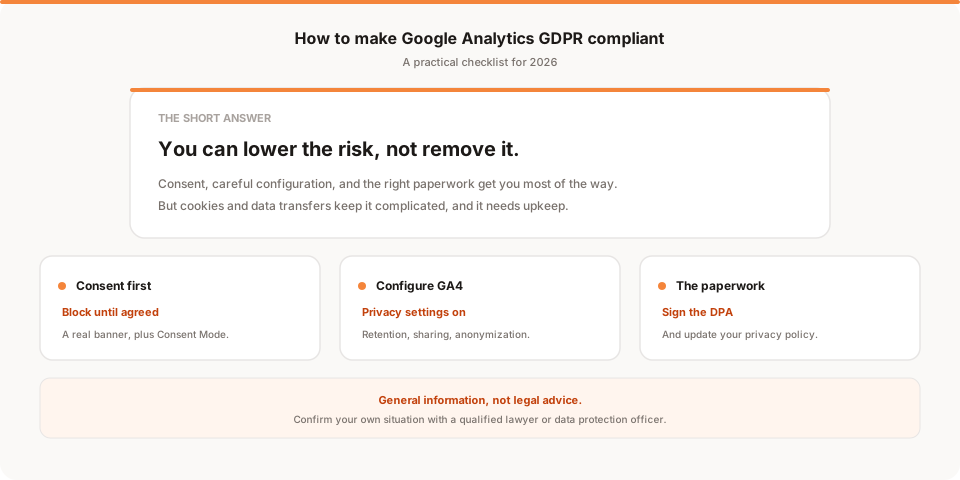
Short answer: you can make Google Analytics substantially lower risk under GDPR, but you can't make the risk zero. The practical path is getting real consent before it loads, configuring GA4 for privacy, signing the right contract with Google, relying on a valid transfer basis, trimming data sharing, and disclosing everything clearly. This guide walks through each step, then tells you honestly where the whole exercise still falls short.
One important note before we start. I'm a founder, not a lawyer. Everything here is general information to help you set things up sensibly, not legal advice. GDPR is nuanced, enforcement varies by country, and your situation may differ. For anything that carries legal weight, talk to a qualified lawyer or your data protection officer (DPO). I'll repeat that at the end.
Quick disclosure: I'm the founder of Muro, a privacy-friendly analytics tool, so I have a point of view here. I've kept this a genuine how-to for people who want to keep Google Analytics, and saved my own product for one honest mention near the end.
Can you actually make Google Analytics GDPR compliant?
Yes, in the sense that you can configure and document it responsibly enough to defend. No, in the sense that "compliant" isn't a permanent property you switch on once.
The useful way to think about it is risk reduction. Every step below lowers your exposure and gets you closer to a setup a regulator would view as reasonable. But because Google Analytics fundamentally relies on cookies and processes personal data, some risk remains no matter how carefully you configure it. If you want the fuller background on why it's this complicated in the first place, I covered it in is Google Analytics GDPR compliant? and, for the "illegal" framing specifically, in is Google Analytics illegal?.
With that framing set, here's the checklist.
Step 1: Get consent before Google Analytics loads
This is the most important step, and the one people most often get wrong.
Because Google Analytics sets cookies and processes personal data, the standard reading under GDPR and the ePrivacy rules is that you need valid, freely given consent before it runs. That means two things working together. First, a real cookie consent banner that genuinely blocks Google Analytics until the visitor clicks accept, not a banner that says "by using this site you agree" while Analytics has already loaded. Second, Google Consent Mode, which tells Google's tags to hold back or run in a limited way depending on the visitor's choice.
The common failure is a banner that's decorative: it appears, but Analytics fires regardless of what the visitor does. That's arguably worse than no banner, because it signals you knew consent was required and didn't honor it. If you keep Google Analytics, make consent real and make Analytics wait for it.
Step 2: Configure GA4 for privacy
Once consent is handled, tighten GA4 itself. The defaults are better than they used to be, but they aren't automatically the most private option.
- Keep IP anonymization in place. GA4 anonymizes IP addresses by default and doesn't store full IPs the way older versions did. Don't undo that.
- Minimize data retention. GA4 lets you choose how long it keeps user-level data. Set it to the shortest window that still meets your needs rather than leaving it at the maximum.
- Review Google signals and ads personalization. Features that enrich data using Google's cross-device and advertising data raise the privacy stakes. If you don't need them, turning them off reduces how much personal data is in play.
None of these individually makes you compliant, but together they shrink the amount of personal data you're responsible for, which is exactly the direction GDPR rewards.
Step 3: Sign Google's Data Processing Amendment
When you use Google Analytics, Google processes your visitors' data on your behalf. GDPR requires a contract that spells out how that processing happens, and Google provides one, commonly referred to as its Data Processing Amendment or data processing terms.
For most account setups this is accepted within your Google account settings, but you should confirm it's actually in place rather than assuming it is. It's a required piece of paperwork, not an optional one. It won't make you compliant on its own, but missing it is a clear gap if anyone ever asks how your processing is governed.
Step 4: Make sure your data transfers have a legal basis
This is the issue that caused Google Analytics so much trouble in the EU, and the one the paperwork above doesn't fully solve by itself.
Using Google Analytics can involve transferring EU visitor data to the US. After the 2020 Schrems II ruling, that became a serious legal problem, and several EU regulators ruled specific GA setups unlawful in 2022 largely because of it. The picture changed in 2023 when the EU adopted the EU-US Data Privacy Framework, which created a legal basis for transferring data to certified US companies, Google included. In practice, that framework is what most organizations now rely on as their transfer basis for Google Analytics.
The honest caveat: privacy advocates have signaled they may challenge that framework, just as its predecessors were struck down. It's in force now and it genuinely helps, but it's not guaranteed to last forever. If your entire comfort rests on it surviving, understand that as a live risk.
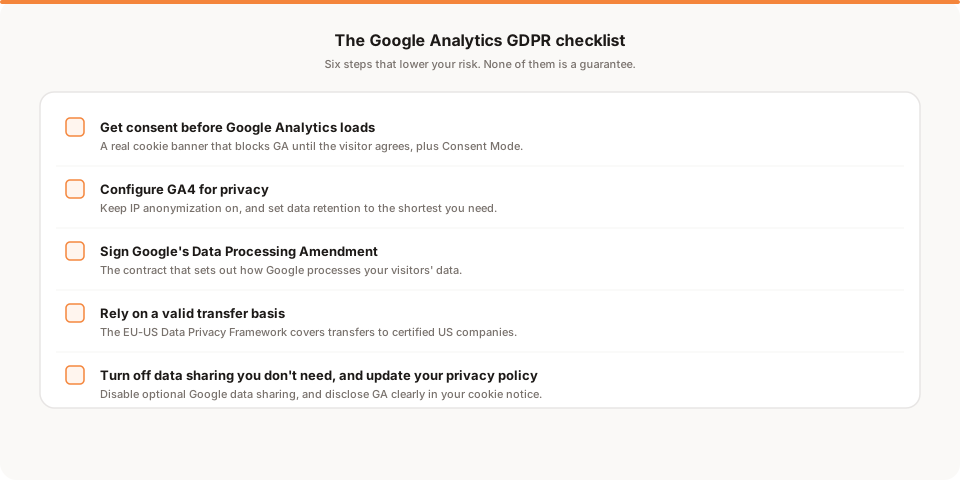
Step 5: Turn off data sharing you don't need
Google Analytics includes optional data-sharing settings that send your data to Google for various purposes, such as product improvement and benchmarking. These are often on by default.
Review them and switch off anything you don't actively rely on. Less sharing means less personal data leaving your control, which is both a genuine privacy improvement and an easier story to tell if you're ever asked to explain your setup. This takes about two minutes in your Analytics admin settings and is one of the simplest wins on this list.
Step 6: Update your privacy policy and cookie notice
Finally, disclosure. GDPR expects you to tell people clearly what you collect and why.
Your privacy policy should name Google Analytics, explain what it does, describe the data it processes, and tell visitors how to exercise their rights. Your cookie notice should reflect that Google Analytics cookies are set only after consent. This isn't just box-ticking. Clear, honest disclosure is part of the lawful basis working at all, and a vague or missing policy undercuts everything else you did in steps one through five.
Why this still might not be enough
Here's the part a lot of guides skip. Even if you do all six steps perfectly, two problems remain that you can't configure away.
First, you still lose data. Because Analytics only runs after consent, every visitor who rejects or ignores your banner is missing from your reports. Depending on your audience, that can be a large share of your traffic, which means you did all this work and still have an incomplete picture.
Second, the underlying tension never fully resolves. Google Analytics is a cookie-based tool that processes personal data and sits inside a US company's infrastructure. You can wrap that in consent, contracts, and a transfer framework, but you're managing a risk rather than eliminating it, and you're signing up for ongoing upkeep as rules and enforcement shift. For a large team with the resources to maintain that, it can be worth it. For a small team, it's a lot of recurring attention for a tool you may barely check.
Common mistakes that quietly undo your setup
Even teams that mean well tend to trip on the same few things. It's worth checking yours against this list.
- A banner that doesn't actually block. The most common mistake by far. The consent banner appears, but Google Analytics has already loaded in the background before anyone clicks. If Analytics fires before consent, the banner is decoration, and arguably makes things worse by showing you knew consent was needed.
- Skipping Consent Mode. A banner that hides or shows Analytics is not the same as Google Consent Mode, which tells Google's own tags how to behave. In the EU, running Google Analytics or Ads without it is increasingly treated as a gap.
- Never confirming the Data Processing Amendment. It's easy to assume this is handled automatically. Confirm it's in place, don't assume it.
- Forgetting every other script. GDPR doesn't only care about analytics. Chat widgets, ad pixels, embedded videos, and social buttons can all set cookies and process data. A perfectly configured Google Analytics sitting next to an unmanaged advertising pixel still leaves you exposed.
- A stale privacy policy. If your policy doesn't mention Google Analytics, or still references settings you've since changed, it undercuts the lawful basis you worked to establish.
None of these are exotic. They're the quiet, boring failures that turn a setup you thought was compliant into one that isn't, and they're worth a ten-minute audit every few months.
The simpler alternative: collect less
This is why so many teams eventually stop configuring and start switching. The entire checklist above exists because Google Analytics collects personal data and sets cookies. Remove those two facts and most of the checklist becomes unnecessary.
That's the idea behind cookieless, privacy-friendly analytics. Tools in this category don't set cookies and don't collect personal data, so in most EU contexts there's no consent banner to build, no transfer framework to lean on, and no user-level retention to minimize. You lose some of Google Analytics' depth and its Google Ads integration, which is a real trade, but you delete most of the compliance surface area in one move. I walked through the main options in the best privacy-friendly analytics tools for 2026, and if you decide to move, how to migrate from Google Analytics 4 keeps GA running as a safety net while you test the switch.
Where Muro fits
Briefly and honestly: Muro is one of those cookieless tools, built for teams who'd rather read a short summary than check a dashboard every day or manage a consent banner.
Muro uses no cookies, stores no IP addresses, counts visitors with an anonymous ID that resets every 24 hours, doesn't need a consent banner in most EU contexts, and is designed to be GDPR-friendly, because it summarizes your own aggregate data instead of tracking individuals. Each morning it emails your team a short, plain-English brief on yesterday: visitors, pageviews, bounce rate and average session compared with the day before, plus your top 3 sources and top 3 pages. A full dashboard is there when you want more. It won't replace Google Analytics for deep ad attribution, and it isn't legal cover on its own. What it does is remove most of the GDPR checklist above by not collecting the data that creates it.
The bottom line
You can make Google Analytics much safer under GDPR: get real consent before it loads, configure GA4 for privacy, sign the Data Processing Amendment, rely on the Data Privacy Framework for transfers, trim data sharing, and disclose clearly. Do those six things and you've done the responsible version of running Google Analytics in the EU.
But be clear-eyed that it's risk reduction with ongoing upkeep, not a permanent stamp of compliance, and that you'll still lose the data of everyone who declines your banner. If that trade sounds heavy for what you get, the alternative is to collect less and delete most of the checklist entirely.
And to say it plainly once more: this article is general information, not legal advice. GDPR is nuanced, it changes, and your right answer depends on details I can't see from here. Before you make a decision that carries legal weight, talk to a qualified lawyer or your data protection officer.
If you'd rather skip the consent banner and the configuration altogether, start a free 30-day Muro trial. No credit card, no cookies, about a two-minute setup. And if you're keeping Google Analytics, use the checklist above and keep it honest.