How to migrate from Google Analytics 4 to a privacy-friendly alternative in 30 minutes
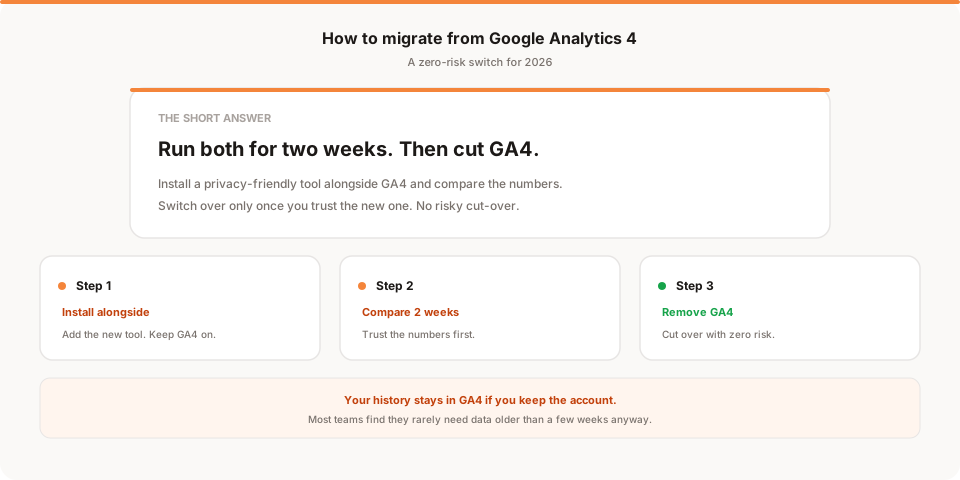
Migrating from GA4 to a privacy friendly analytics tool takes 30 minutes of active work spread across two to three weeks. You install the new tool alongside GA4, run both in parallel, confirm the new one shows you what you need, then remove the GA4 tag. Zero downtime, zero risk. The hardest part is deciding to actually do it.
Most founders I talk to want to leave Google Analytics. Some of them have wanted to for over a year. Almost none of them have done it. The reason is usually the same: it feels like a project. It isn't. Here's the actual step by step.
The migration from GA4 to a privacy friendly analytics tool is the least painful product switch you will ever make.
Total active work is around 30 minutes. You run both tools side by side for two to three weeks to confirm the new one shows you what you need. Then you remove the GA4 tag. Zero downtime. Zero risk.
This guide is the exact step-by-step. By the end you will have a clean analytics setup, no cookie banner, and a clear sense of why the whole thing took less time than reading the GA4 documentation.
What 30 minutes actually means
To set expectations cleanly:
| Step | Active time |
|---|---|
| Identify what you actually use GA4 for | 5 min |
| Pick a replacement | 10 min |
| Install the new tool alongside GA4 | 5 min |
| Wait 2 to 3 weeks while both run in parallel | 0 min (just wait) |
| Remove the GA4 tag | 5 min |
| Confirm everything still works | 5 min |
Total active work: 30 minutes. Total calendar time: 2 to 3 weeks. The waiting part is not optional, because you need to see the new tool's numbers next to GA4's for at least a full reporting cycle before you commit.
Before you start: the one decision to make
You need to decide whether you actually want a Google Analytics replacement, or whether you have been told you do.
Most founders use about 5% of GA4. The 5% is almost always: how many visitors came yesterday, where did they come from, which pages they landed on, how many converted. Five numbers. Maybe ten.
If that's you, any privacy friendly analytics tool will give you those five numbers in a cleaner interface. The pain of GA4 was never the data. It was the interface around the data.
If you actually use the deeper GA4 features (custom dimensions, audience builder, BigQuery export for SQL queries, Google Ads attribution integration), you may want a more capable tool like PostHog or Mixpanel rather than a pure web analytics replacement. That's a different post.
For everyone else: read on.
Step 1: Identify what you actually use GA4 for (5 minutes)
Open GA4. Write down which reports you actually look at in a normal week. Be honest. If you only ever look at Reports → Realtime and the top of Reports → Acquisition, write down "realtime and acquisition" and stop there.
Most founders end up with a list like:
- Yesterday's pageviews
- Top referrers
- Top pages
- Conversion or signup count
- Maybe: a basic funnel from /pricing to /signup
That's the 5%. Everything else is configurable in any decent alternative.
If your list has more than seven items, you are either an analyst (in which case you probably know what you're doing) or you're spending too much time in GA4. Cut the list down to what you actually act on.
Step 2: Pick a replacement (10 minutes)
The privacy friendly options that match GA4's web analytics use case:
Muro ($12/month, 100k pageviews). Different angle from the rest of this list. Instead of asking you to open another dashboard, Muro emails you a 2-minute summary every morning of your visitors, signups, and top sources. Built for founders who'd rather get the answer than dig through charts. 30-day free trial. Disclosure: I built this one. More on it at the end.
Plausible ($9/month, 10K pageviews). Cleanest dashboard among the dashboard options. EU-based, popular with developers. Hosted version requires no cookies and no consent banner. Open source.
Fathom ($15/month, 100K pageviews). Great if you have multiple sites. Includes goal tracking and email reports. Founder-friendly pricing model that doesn't punish you for traffic spikes.
Simple Analytics ($15/month, 100K pageviews). Strongest privacy story. Dashboard is publicly shareable. Popular with content creators and indie hackers.
Pirsch ($6/month, 10K pageviews). Server-side option available, which is useful if you want to track without any client-side JavaScript. Built for developers.
Umami (Free, self-hosted). If you want to host it yourself, Umami deploys to Vercel in 10 minutes. Best free option if you don't mind running infrastructure.
All six are GDPR compliant without a cookie banner, unlike Google Analytics, which never fully sheds that friction. All six load under 5KB. All six install via a single script tag.
The decision usually comes down to: do you want to skip the dashboard entirely (Muro), or do you want a cleaner dashboard than GA4 (the others)?
Step 3: Install the new tool alongside GA4 (5 minutes)
Critical: don't remove GA4 yet. You're going to run both tools for 2 to 3 weeks to make sure the new one covers everything you actually need.
Sign up for the alternative. Grab their tracking script. It will look something like this for most tools:
<script defer src="https://yourtool.com/script.js" data-site="YOUR_SITE_ID"></script>
Where to paste this depends on your stack:
- Webflow: Site settings → Custom code → Head section
- Squarespace: Settings → Advanced → Code injection → Header
- Wix: Settings → Custom code → Add custom code (head)
- WordPress: Use a plugin like Insert Headers and Footers, or paste directly into your theme's
header.php - Next.js / React: Add to your root layout component's
<head> - Astro: Add to your base layout component's
<head> - Static HTML: Paste before the closing
</head>tag - Ghost: Code injection → Site header
That's the entire install. Both GA4 and your new tool now run in parallel. Visitors don't notice. Performance impact is negligible because privacy friendly tools are all under 5KB compared to GA4's 130KB plus.
Open your site in a private window and check the new tool's realtime view. You should see yourself appear within 60 seconds. If you do, you're done with this step.
Step 4: Wait 2 to 3 weeks (0 minutes of work)
This is the hardest step because it's the most tempting to skip. Don't skip it.
Over the next 14 to 21 days, both tools will collect data on the same visitors. Compare the numbers weekly:
- Are pageviews within 5 to 10% between GA4 and the new tool? Good. The small variance is normal. GA4 over-deduplicates and privacy tools don't fingerprint, so a 5 to 10% gap is expected.
- Are top referrers the same? Good.
- Are conversion counts close? Good.
- Is the new tool showing you the answer to "did anything important change yesterday" without you having to dig? Great.
If you notice the new tool is missing something you genuinely need, you have time to either configure it or pick a different alternative before you cut GA4.
The other thing this period does: it tests whether you actually use the new tool. If you find yourself going back to GA4 out of habit, that's useful information. Either the new tool's interface is worse for your workflow, or you're addicted to a dashboard you don't actually need.
Step 5: Remove the GA4 tag (5 minutes)
Once you've confirmed the new tool covers your real needs, go back to wherever you pasted the GA4 snippet and delete it.
In Google Tag Manager: pause or delete the GA4 configuration tag. Don't delete the GA4 property itself yet if you want to keep your historical data accessible. Google keeps GA4 properties free for a while after you stop sending data, then may start charging for archived access.
Refresh your site. Open browser DevTools, go to the Network tab, and filter for "google". Confirm no requests to google-analytics.com or googletagmanager.com are firing. Done.
Your site now uses only the privacy friendly alternative. No cookies, no consent banner, no GA4 dashboard to feel guilty about not opening.
What about historical data?
You can't import GA4 history into any of the privacy friendly tools. That's a real limitation, but a smaller one than it sounds.
Most teams never look at data older than 30 days anyway. The questions you ask of your analytics are "what happened yesterday" and "what happened last week", not "what happened last March". If you do need to look at historical GA4 numbers occasionally, you still can: Google keeps your GA4 property accessible after you stop sending data to it.
If you want a record of pre-migration numbers for reference, take a screenshot of the GA4 Acquisition and Engagement reports for the past 90 days before you cut the tag. Stash it in Notion or a folder. You'll almost never refer to it, but the option is there.
What you actually lose
In honest order of impact:
1. Google Ads attribution. If you run paid Google Ads at scale, GA4's integration matters. Most privacy friendly tools can still tell you traffic came from Google Ads via UTM parameters, but the deeper attribution model is GA4-only. If your monthly Google Ads spend is under a few thousand dollars, this rarely matters. If you're spending $50K a month on Google Ads, this is a real consideration.
2. Deep custom reporting. If you've built complex GA4 explorations or BigQuery pipelines, those don't translate. For 95% of founders, this doesn't apply because nobody built those.
3. Google ecosystem integrations. GA4 plays with Search Console, Looker, and BigQuery. None of these matter much for early-stage products.
For 90% of small teams, you lose nothing you actually used.
Three common mistakes
Mistake 1: Skipping the parallel period. Founders get excited, install the alternative, delete GA4 the same day. Then they realize on day 5 that the new tool doesn't track something they actually needed. Now they're scrambling. Always run both for 2 to 3 weeks.
Mistake 2: Picking based on the dashboard's first screen. Every privacy friendly tool looks similar on the home dashboard. The differences show up in the third or fourth view, when you want to filter by source or look at a specific page's traffic. Spend 5 minutes clicking around the actual product before you commit. Most of these tools have a free trial or a public demo.
Mistake 3: Not removing the GA4 tag at the end. Founders sometimes leave GA4 installed "just in case" forever. This defeats the whole purpose. Removing GA4 is what gets rid of the cookie banner requirement and the bloat. If you're going to keep GA4 running, you didn't migrate.
If you want to skip the dashboard entirely
Most of this guide assumes you're moving from one dashboard tool to another. There's a different option worth knowing about.
I'm Sanjeeva, founder of Muro. I built it because I kept opening GA4 and closing it without learning much. Muro emails you a two-minute morning summary of your visitors, signups, and top sources, and how those numbers moved compared to before. There's a full dashboard too, but most days the email is all you open.
If you find yourself opening any analytics dashboard out of habit but rarely learning anything from it, this might be the angle that fits how you actually work. Muro starts at $12 a month with a 30-day free trial. Setup is the same single script tag as everything else in this guide.
If a more traditional dashboard fits how you work, pick Plausible or Fathom. Either is a great choice and I use them on sites where dashboards make sense.
The whole thing in one sentence
Add the new tool tonight, wait 2 to 3 weeks, remove GA4. The migration is the easiest part. The harder part is deciding you actually want to do it.