How to analyze your website data (a simple step-by-step guide)
Website analysis is not about reading every number. It is about following the same five-step sequence every week and leaving each session with one specific thing to fix.
You installed analytics six weeks ago. The snippet is working. Data is coming in. And every time you open the dashboard, you scan a grid of numbers for a few minutes, feel vaguely uncertain about what you are looking at, and close the tab.
Nothing changes. Not because the data is wrong. Because you have no system for reading it.
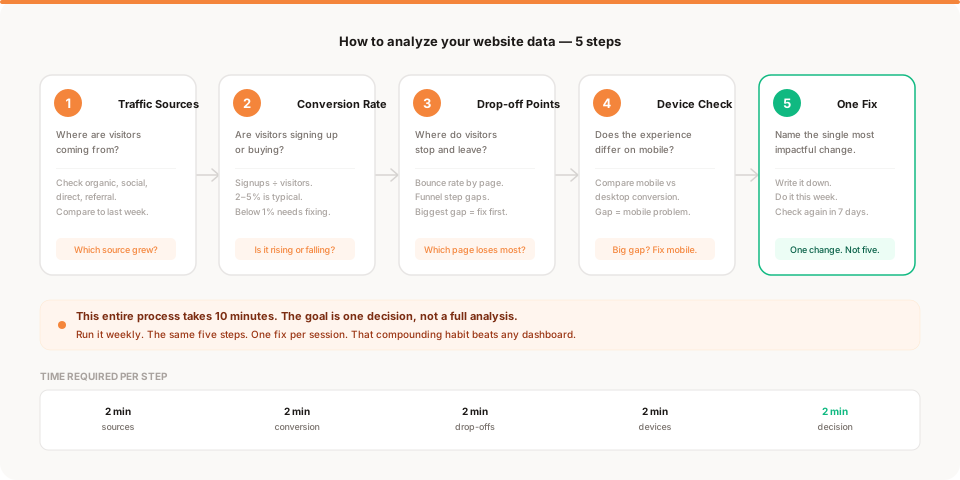
This guide gives you that system. Five steps. Ten minutes per session. One decision at the end. The same process, every week.
Why reading analytics feels hard
The dashboard is not designed to answer your question. It is designed to display data.
Most analytics tools show you totals, charts, and time series. They surface the highest-level numbers prominently and bury the useful ones inside filters and reports. So when you open the tool without a specific question, you see a lot of information and have no framework for what matters or what to do about it.
The problem is not that you lack data literacy. The problem is that the format you are given is not designed for the analysis you need. Numbers in isolation do not tell you anything. Context, comparison, and sequence do.
The fix is a checklist: the same five questions, in the same order, every time. Each question has a specific answer. The answers add up to one decision.
Before we get into the steps, one clarification: this guide is about how to analyze the data. If you want to know which numbers are worth analyzing at all, start with vanity metrics vs real metrics first. The short version: most of the numbers that look impressive in your dashboard will not tell you anything useful. The ones that matter are rates and ratios, not raw counts.
The five-step process
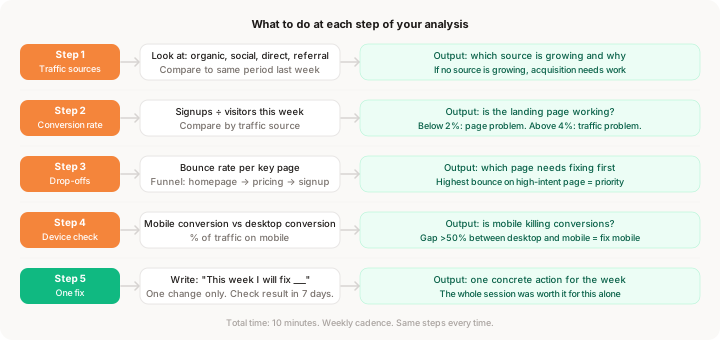
Here is the sequence. Each step takes about two minutes. The whole session is ten minutes.
Step 1: Check your traffic sources
Open your analytics. Find the section that shows where your visitors came from. This is usually labeled "Sources," "Referrers," or "Acquisition."
You are looking for four categories:
- Organic search: people who found you through Google
- Social: traffic from X, Reddit, LinkedIn, or wherever you post
- Direct: people who typed your URL or used a bookmark
- Referral: other websites linking to you
Do not look at total traffic first. Look at traffic by source and then compare it to the same period last week.
What you are asking: Did any source grow or shrink? Is there a new source sending traffic you did not expect?
What the answer tells you:
If organic search is growing week over week, your content or SEO is starting to compound. Keep doing whatever produced that.
If all your traffic came from one social post, you had a spike, not growth. The number looks good but it is not repeatable yet.
If direct traffic is growing, people are coming back on purpose. That is a healthy signal for an early product.
If referral traffic appeared from somewhere unexpected, find out where. Someone may be recommending you in a community or publication you did not know about.
What to record: Which source sent the most traffic this week? Is that up or down from last week?
Step 2: Check your conversion rate
Conversion rate is the percentage of visitors who took the action you care about most. For most early products, that means signing up for an account, joining a waitlist, or starting a free trial.
The formula is simple: signups divided by total visitors. If 400 people visited and 12 signed up, your conversion rate is 3%.
What good looks like:
- Below 1%: the landing page is not working, the positioning is unclear, or the traffic quality is very low
- 1% to 3%: below average, but fixable with targeted changes
- 3% to 5%: healthy for most early products
- Above 5%: strong, which means your constraint is traffic volume, not conversion
What you are asking: Is conversion going up, down, or flat compared to last week? And does the rate differ by traffic source?
That second question matters a lot. Traffic volume and traffic quality are different things. A source that sends 2,000 visitors at 0.2% conversion is less valuable than one that sends 200 visitors at 4.5%. If you can see conversion broken down by source, that is where the most useful insight lives.
What to record: Your conversion rate this week and whether it went up or down. Which source had the highest conversion rate?
Step 3: Find your biggest drop-off point
This step is about finding the specific page where visitors stop progressing.
Every website has a flow. For most products it looks something like: homepage, then a features or pricing page, then the signup page, then account creation. At each transition, some visitors leave. Your job is to find the step where the most people are leaving and ask why.
The simplest approach: look at pageview counts for your three or four most important pages, in sequence.
If 800 visitors hit your homepage but only 120 view your pricing page, 680 people left without reaching pricing. That is an 85% drop. Something on the homepage is not compelling enough to make them want to see pricing.
If 120 hit pricing but only 30 reach the signup page, pricing is the bottleneck. The page is either confusing, too expensive, or missing a clear call to action.
If 30 reach the signup page but only 8 complete it, the form itself is the problem.
What to look for: Page-level bounce rate is useful here. A high bounce rate on a page that should be moving visitors forward (pricing, features, signup) means people are reading the page and choosing not to continue. That is a specific, fixable problem.
What you are asking: Which step in the journey has the largest absolute gap? That is the step to focus on.
For a more detailed guide to this kind of funnel analysis, where users drop off on your website walks through the full approach with real examples.
What to record: The page with the highest bounce rate or the funnel step with the biggest drop. That is your candidate for this week's fix.
Step 4: Check device differences
This step takes 90 seconds and catches a problem that is surprisingly common.
Find where your analytics shows the split between mobile and desktop visitors. Then look at whether the conversion rate is significantly different between the two.
For most websites, 40% to 60% of traffic comes from mobile. If your product converts at 4.2% on desktop but 0.6% on mobile, you have a mobile experience problem. The same visitors, the same landing page, but the mobile version is broken, cramped, or hard to use.
What to look for:
If mobile traffic is high (above 30%) and mobile conversion is less than half of desktop conversion, your mobile experience needs work. Open your site on your phone right now. Try to sign up. How long does it take? Is the form usable? Does anything overflow or feel broken?
If mobile and desktop conversion are similar, you can move on quickly.
Why this matters: Most founders build and test on desktop. They do not catch mobile problems because they are not on mobile when they work. Meanwhile, a large portion of real visitors are trying to use the site on a small screen and quietly leaving.
What to record: Mobile conversion rate vs desktop conversion rate. If the gap is large, mobile is a fix candidate.
Step 5: Pick exactly one problem to fix
This is the most important step, and it is the one most founders skip.
You now have four potential observations:
- One source is growing (or declining)
- Conversion rate moved in some direction
- One page has a significant drop-off
- Mobile may have a conversion gap
You are not going to fix all of them this week. Pick one.
The rule for choosing: fix the step closest to conversion that has a significant gap. A problem on the pricing page (step three in the funnel) has more immediate impact than a problem with social traffic volume (step one). But if mobile is completely broken and represents 50% of your traffic, that takes priority regardless.
Write down the one thing you are going to change this week. Not a vague intention: "improve the pricing page." A specific action: "remove the second pricing tier and simplify the plan comparison table."
Then do it. Then check the same numbers in seven days. Did the metric at that step improve?
This is the entire loop. The three-question framework from how to act on your website data maps directly onto this output: what happened (your observation from steps 1 to 4), why it happened (your interpretation), and what to do (your one fix from step 5).
Common mistakes when analyzing website data
Analyzing without a baseline. Numbers are meaningless without comparison. "My bounce rate is 58%" tells you nothing. "My bounce rate on the pricing page went from 38% to 62% this week" tells you something happened. Always compare to last week or last month.
Changing multiple things at once. If you fix the pricing page, shorten the signup form, and rewrite the hero headline in the same week, you cannot tell which change moved the needle. One change per week is a real constraint, not a suggestion.
Checking too often. Opening analytics every morning to see if yesterday's traffic was good is almost never useful. Day-to-day variation is mostly noise. Weekly comparison smooths out that noise and shows you real trends.
Treating a traffic spike as meaningful. A viral post can inflate your traffic numbers for a week. Before you celebrate or make decisions based on it, check whether conversion was proportional. In most cases, viral traffic converts at a fraction of your normal rate. This pattern is worth understanding in detail because it changes what the spike actually means.
Skipping the session when nothing looks interesting. The weeks where nothing obvious changed are often the most important ones to document. You are building a baseline. Knowing what "normal" looks like is what makes unusual numbers recognizable.
How to turn findings into action
The output of every analysis session is one sentence:
"This week I will [specific change] because [observation from steps 1-4]."
That sentence is your action. Everything else is context.
If you run this session every week for three months, you will have made 12 targeted improvements to your site. Not all of them will work. Some will move the needle noticeably. Others will have small effects. A few will make things worse, which is also useful information.
The founder who makes 12 small, evidence-based changes over three months will almost always out-improve the one who makes one big redesign every quarter and wonders why results are inconsistent.
Analysis without action is just a chart-watching habit. The session is only worth running if it ends with a change.
How to read website analytics when you have very little traffic
If you are getting fewer than 200 visitors per week, individual sessions and events can skew your numbers significantly. One bot crawl, one person refreshing the page, one unusual referral can move your percentages by 10 points.
At this volume, use the five steps but hold the numbers loosely. Focus more on qualitative signals: are people signing up at all? Are there any patterns in where they come from? Is there one page that everyone seems to skip?
The framework still applies. You just need to treat the numbers as directional rather than precise.
Once you reach 300 to 500 weekly visitors consistently, the numbers stabilize and the analysis becomes much more reliable. Until then, the most valuable thing you can do alongside analytics is talk to the people who do sign up and ask them how they found you and what made them try it.
Keep reading
- Website analytics for startups: what to track and what to ignore at the early stage
- Vanity metrics vs real metrics: which numbers are worth bringing to this analysis in the first place
- How to act on your website data: the decision framework that follows from what you find here
- Muro for founders: analytics that runs this process for you and delivers the output as a daily summary