Add a goal today, see last month's conversions: retroactive goals explained
GA4 does not apply a new key event to past data: Google's help docs say marking an event as a key event 'affects reports from time of creation' and 'doesn't change historic data.' Tools that store raw events and work out goals when you ask can apply a new goal to everything already collected, which is what retroactive goals means. The limit is always the same: a goal can only count what the tool actually recorded, so nothing from before the script was installed, and no clicks from before you started tracking them.
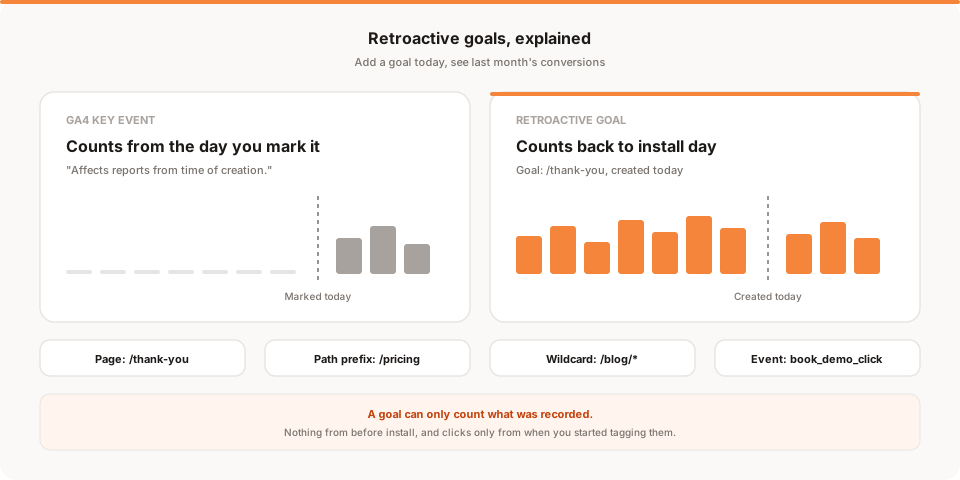
Short answer: in GA4, marking an event as a key event only counts it from that moment on. Google's own help docs say it "affects reports from time of creation" and "doesn't change historic data." Retroactive goals work the other way round: you create a goal today and immediately see how many visits matched it last week and last month, back to the day your tracking was installed.
I build Muro, so weigh that when I get to the Muro part. The GA4 behavior and the comparisons with other tools are sourced from their own docs, and I've linked those so you can check.
The problem: you set up the conversion, and the history is empty
It goes like this. Someone asks "how many demo requests did last month's newsletter bring in?" You open GA4, realize nobody ever marked generate_lead as a key event, and mark it. You go back to the report. Zero for last month. Zero for last week. Maybe something tomorrow.
That's not a bug. It's documented. Google's help article Mark events as key events says, in so many words:
- "Marking an event as a key event affects reports from time of creation."
- "It doesn't change historic data."
- "Allow for up to 24 hours for it to show up in standard reports."
The same goes for events you build inside GA4. The help page on creating and modifying events says: "Modified and new events do not apply to historical data."
There is a partial escape hatch. If the event itself was firing all along, you can usually still count it in an Exploration for the dates before you marked it. But that only reaches as far back as your data retention setting, which is 2 or 14 months on a standard property and applies to Explorations and funnel reports. And it's the raw event count, not the key event metrics in your standard reports or your attribution.
So the practical rule in GA4 is: decide your conversions before you need them. Most small teams don't, which is fair. You rarely know what matters until someone asks.
Why it happens: tagging on arrival vs. asking later
There are two broad ways an analytics tool can handle a goal.
Tag it on arrival. When a hit comes in, the tool checks it against your current settings and stamps it: this one is a key event, this one isn't. Reports are then built from those stamps, often pre-added up into daily totals so they load fast. If you change the settings later, the old stamps don't change. That's the GA4 model for key events, and it's the reason the history stays empty.
Ask later. The tool keeps the raw pageviews and events as they arrived. A goal is just a saved question: "how many visitors viewed /thank-you?" Every time you open the report, the tool asks that question of the stored data. Change the question, and the answer covers everything already stored.
Neither model is wrong. Tagging on arrival is cheaper to run at Google's scale. Asking later costs more compute but means a goal you invent today has a history. That second behavior is what people mean by retroactive goals.
One limit applies to every tool, whichever model it uses: you can only ask questions of data you actually recorded. No tool can count visits from before its script was on the page, and no tool can count clicks it wasn't recording.
How other tools handle it
I checked each tool's current docs in November 2026. Here's what I could confirm, and where I couldn't.
| Tool | New goal counts past data? | What the docs say |
|---|---|---|
| GA4 | No, for key events | "Affects reports from time of creation." Raw events may still be visible in Explorations within your retention window. |
| Plausible | No, for custom event goals | "Past events are not backfilled." Pageview goals: not stated either way. |
| Fathom | Not stated | Events are fired from your code with fathom.trackEvent(). I couldn't find a statement on backfilling. |
| Mixpanel | Reports over events you already send | Funnels have worked over past events for years. Autocapture records clicks from when you turn it on. |
| Muro | Yes | Goals are worked out from stored events, back to when the script was installed. |
A few notes so the table isn't unfair to anyone.
Plausible is clear about custom event goals. Their custom event goals page says "Past events are not backfilled" and that if you set up the goal after events were already being sent, "the counter starts from zero." Their pageview goals page supports wildcards like /blog* and says edits apply immediately, but doesn't say whether a new pageview goal shows past visits. If that's the deciding factor, ask them.
Fathom treats events as things your code sends, with fathom.trackEvent('name'), including for page-load conversions (you fire an event when an important page loads). Their events overview doesn't say whether a new event can be applied to history, and since the event only exists once your code sends it, there's nothing earlier to count anyway. You can still filter Fathom's dashboard to a page for any date range and see its past visitors, which covers a lot of simple cases.
Mixpanel is built around raw events, and its funnels have been computed over past data for a long time. If you were already sending a signup event, a new funnel or report on it covers your history. The catch is the same as everywhere: Mixpanel's Autocapture starts collecting clicks "when you enable Autocapture," so clicks from before that aren't there.
How Muro's retroactive goals work
In Muro, goals are evaluated against the events already stored, so a new goal shows its conversions straight away, for any date range back to when you installed the script. Muro doesn't delete your old events, so that history keeps growing.
Four goal types:
- Page: exactly one path, like
/thank-you. A trailing slash and query strings are ignored, so/thank-you?plan=prostill matches. - Path prefix: a path and every page under it.
/docsmatches/docs/installbut not/docsearch. - Wildcard: pages below a path.
/blog/*matches direct children like/blog/launch-week./blog/**matches every depth. - Custom event: a custom event with an exact name, like
demo_request_click. Names are case-sensitive.
You can have up to 10 active goals per project, on every plan. Paused goals don't use a slot.
Three ways to create one:
- Mark as goal. Hover any page in the Pages panel, or any event in the Custom Events panel, and click Mark as goal. The dialog fills in the path or event name. When you save, it shows the goal's conversions and conversion rate for the range you're viewing, counted from traffic you already have.
- Suggested goals. When a project has no goals yet, the Goals panel suggests up to 5 pages from your last 30 days of traffic that look like a finish line: thank-you, welcome, confirm or success pages, or pages where a lot of visits end. Nothing is created until you click Add goal.
- From scratch in the Goals panel, with any of the four types.
Once a goal exists, the Goals panel shows its conversions, conversion rate and trend. You can break conversions down by source, page, country, device and UTM campaign, so "which campaign brought the demo requests?" becomes a click. Muro uses first-touch attribution, meaning a conversion is credited to the source of the visit where the visitor first arrived. Conversions live in the dashboard. The morning brief Muro emails each day sticks to traffic (visitors, pageviews, bounce rate, average session, top sources, top pages), so don't expect goals there.
The limits, plainly:
- Nothing before install. If Muro went on your site in March, a goal created in November counts back to March, not to January.
- Clicks only from when you tagged them. Pageviews are recorded automatically, so page goals reach all the way back. Clicks are not automatic: you add
data-muro-event="name"to an element. A goal on that click event can only count clicks from the day the attribute went live. - Muro can't see who converted. No names, no emails. You see counts and breakdowns, not people.
Four practical examples
1. A thank-you page goal
Your contact form redirects to /thank-you. You've had Muro installed since spring but never set a goal.
Create a Page goal for /thank-you, or just hover it in the Pages panel and click Mark as goal. Set the date range to the last 90 days. You'll see every form completion since then, and you can split them by source to answer the newsletter question from the top of this post. If you want more on reading that split, I wrote about which traffic source converts best.
2. Any blog post, with a wildcard
You want to know how many visitors read a blog post and whether blog readers convert. Create a Wildcard goal for /blog/*. It matches /blog/launch-week and every other post one level down. If your posts are nested by year, use /blog/** instead. The history fills in immediately, so you can compare this quarter to last without waiting.
3. The pricing section, with a path prefix
Your pricing lives at /pricing, /pricing/teams and /pricing/enterprise. A Path prefix goal for /pricing counts a visitor who reached any of them. It's a useful "showed buying interest" goal, and it's the kind of thing teams usually think of the day after a launch, which is exactly when retroactive counting helps.
4. A custom event for a button
You want to count clicks on "Book a demo." Add the attribute to the button:
<a href="/demo" data-muro-event="book_demo_click">Book a demo</a>
Then make it a Custom event goal named book_demo_click. The dashboard's first-hit watcher confirms when the first click arrives. This goal can't reach back before the attribute existed, so it starts on the day you published it. If the demo flow ends on a confirmation page, pair it with a page goal for that page, which does have history.
One caution on clicks: a click on "Book a demo" isn't a booked demo. Some people click and leave. For completed actions, a thank-you page goal or a muro.track("demo_booked") call from your code after the booking succeeds is more honest.
Retroactive goals vs. GA4 key events at a glance
| GA4 key events | Muro goals | |
|---|---|---|
| Applies to data before you created it | No, "from time of creation" | Yes, back to install |
| Time to see a new one in reports | Up to 24 hours in standard reports | Immediately |
| Goal types | Any event you mark (pageviews need a created event) | Page, path prefix, wildcard, custom event |
| Limit | 30 key events (standard property) | 10 active goals per project |
| Click tracking | Usually set up in Google Tag Manager | data-muro-event attribute |
| Historical reach | Explorations limited by 2 or 14 month retention | All data since install, kept |
GA4 does far more than Muro in other ways: Google Ads integration, deep custom reporting, audiences. If you depend on those, keep it. A lot of teams run both. If you're thinking about moving off it, my GA4 migration guide covers what to set up first, and there's a side-by-side comparison too.
The bottom line
GA4 key events count forward from the day you mark them, and Google says so. That's fine if you planned every conversion in advance. Most teams don't, and end up with an empty report exactly when someone asks a question.
Retroactive goals turn that around: install the script early, ask the question whenever it comes up, and get the history. The honest limit is that no tool can count what it never recorded, so get the script on the page early and tag the buttons you care about sooner rather than later.
If you want to try it on your own site, Muro has a free 30-day trial, no credit card. Install it today, and the first goal you create next month will already have a month of history.